FS7: Compression Artifacts in Gradients

Guys - no scopes needed. This is exactly what I'm getting, too - but somehow when I posted my findings, everyone denied anything abnormal :/...

And I don't buy the explanation that the codec is "optimized for fine details, and gets lost in large, flat, semi-monochromatic areas" - just like the OP, I'm getting severe macroblocking in the sky - true - but not clear sky... Some objects must be present to initiate this artefacting; usually clouds, sometimes a tree's contrasty silhouette against the sky.

I'm not bashing the FS7 - great camera - but we really need XAVC-480 !!! Please, Sony :)
 
Guys - no scopes needed. This is exactly what I'm getting, too - but somehow when I posted my findings, everyone denied anything abnormal :/...

And I don't buy the explanation that the codec is "optimized for fine details, and gets lost in large, flat, semi-monochromatic areas" - just like the OP, I'm getting severe macroblocking in the sky - true - but not clear sky... Some objects must be present to initiate this artefacting; usually clouds, sometimes a tree's contrasty silhouette against the sky.

I'm not bashing the FS7 - great camera - but we really need XAVC-480 !!! Please, Sony :)
There's a reason why no one listens to you.

I was about to suggest several things but since you're such an expert moldy how about you assist the OP?
 
Last edited:
Downloaded the DPX and played around with it. I think this looks just like normal banding. 10 bit is stretched in Slog3 and the compression probably makes it look a bit worse. The noise is probably due to the saturation and how hard you grade the footage. With my LUTs/curves there was no noise. You can try to use more gentle LUTs and add saturation more isolated to skintones, green, blue etc.

These kinds of surfaces are exactly where Slog3 and 10bit can show problems. It does not look that bad though, with some grain it would not make it on the web IMO. (but would probably come anyways anew in online compresison)
 
Just did the same thing... downloaded your dpx file and opened in Resolve... I think if you were rating at 1000EI (assume it's typo in your earlier post) - you were underexposed by about 1 or 1.5 stops. Your grade in OP seems to really be pushing saturation - and that along with pushing mid grey and image up in post - is causing the noise and some of the banding.
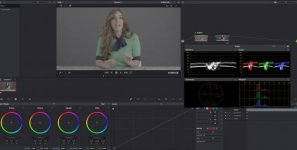
Here are my screenshots of a very quick s curve applied in resolve - before and after:
Original.jpgS_curve.jpg
 
I like the image so I graded it to my personal taste at the download link below, using Resolve Studio.
Basically, my observation is this; It's perfectly exposed, there is nothing you could have improved on with the camera work. The gray backdrop is simply a torture test for *bit depth.* What you see is quantization artifact, from bit depth due to the subtle gradients caused by the paper not perfectly flat. The exposure is very clean. Compression is not the issue at all when so much of the image is static as in this case. Bit depth is. From here you're stuck with either 12 bit raw acquisition (for FS7) or trying to clean it up in post. As to the latter, I applied a very mild spatial NR in Resolve. What has to be understood is to be careful that NR can actually make the subtle gradients worse and devolve into banding when the swaths containing discrete blocks are equalized into a flat gradient that now has to fit into a gradient band adjacent to other bands of a slightly different shade.

With SLog3 I find I need to be careful with fine grain noise and the potential for subtle banding too, situationally. SLog2 can also be affected by this but is slightly better since it writes to the full range 0-1023 whereas SLog3 doesn't write above about 940, thus giving up a few shades. But also consider it's possible in cases where the DR is of the image is not full to use STD gamma and avail yourself to more shades in the middle range where your subjects reside. In this case, you had controlled lighting with fill ratios that were going to give you an easy good result no matter what gamma curve you chose, SLog or STD, but sometimes STD gamma which packs more shades into the low and middle can be cleaner, certainly not a criticism in this case.

https://drive.google.com/open?id=0B7wNrNfr-UB4b29NeWJmM2hHLVk
 
Thanks for those who gave advice and took a look at the DPX file. I appreciate the confirmation that it was shot properly. It seems that this is a situation that is difficult for Slog3, perhaps next time I will try shooting with a profile of slog2, shooting at 500 EI, or alternativly RAW if I ever decide to upgrade.

For now, I'll just do my best to mend the image in post. Add a little noise, play around with NR, back off on the saturation, etc.
 
I'm frankly a little dumb about Slog exposure, but after looking in Resolve it looks to me like your exposure is more like EI 2000.

For normal Slog3 exposure ( I assume 2000) Alister Chapman says 18% grey ought to be at around 420 on the waveform and your grey background tops off around there with most of it under. That would imply you exposed at 2000 ISO to me or even less. That's assuming your grey is meant to lie at neutral grey though if anything it looks a bit hotter on the grade to my eye -(which would imply more underexposure).

Did you expose at 1000 using a light meter, or rate the camera at EI 1000 and then set the exposure using the waveform? Even if using the waveform, how did you set it - using a LUT or directly from the Slog?

I would be very wary of setting it just using a meter because then you are trusting the idea that Sony rated the camera correctly and a number of people have said its actually slower. The waveform is the only trustworthy method.

By the way I'm very troubled by your test and am not being critical of you, I want to know what's going on myself before I get screwed on something similar. I think the obvious thing to do here is to shoot a grey background with a gradient at 2000, 1000, 500 etc and see what happens. I don't have time for that myself right now , but I'd be pleased as punch if some gracious DVX'er would knock that out for us. That would settle a very serious question and be more useful than pages of posts .

Does my thinking make any sense here?
 
Last edited:
^ That is what I based my comments above on ... Slog 3 18% grey supposed to be 420 or 41 IRE. If you are rating at EI 1K - which I would recommend - then you want to open up an additional stop. You'll pull that back down in post - which will help eliminate that noise you are seeing.
Pushing exposure in post and / or using certain Luts are usually the culprit when I have found banding in my own footage... and those soft gradients are where banding first appears.
 
Last edited:
I'm frankly a little dumb about Slog exposure, but after looking in Resolve it looks to me like your exposure is more like EI 2000.

For normal Slog3 exposure ( I assume 2000) Alister Chapman says 18% grey ought to be at around 420 on the waveform and your grey background tops off around there with most of it under.

Does my thinking make any sense here?


This assumes my backdrop is 18% gray (which would be convenient), however, it's "Thunder Gray" by Savage, which is a much darker gray.
 
Thanks - that's relevant but to understand what's going I would still want more info on how it was exposed. Saying you shot at Cine EI 1000 doesn't meant all that much.

Did the background get the same exposure as the face and how did you determine the exposure - waveform or meter? It does seem clear that the artifacting is on the darker end of the grey.

On the other hand it does seem to me like the problem is real. Say you exposed a stop and half higher but happened to want a darker background then maybe you would still have artifacting just in a deeper shadow area. I'd still like to see a good test of a long gradient at a range of exposures.
 
I'm frankly a little dumb about Slog exposure, but after looking in Resolve it looks to me like your exposure is more like EI 2000.

For normal Slog3 exposure...Alister Chapman says 18% grey ought to be at around 420 on the waveform and your grey background tops off around there with most of it under.

Yes, the ungraded SLog3 DPX file puts the gray background at 420 as you say.
 
Thanks - that's relevant but to understand what's going I would still want more info on how it was exposed. Saying you shot at Cine EI 1000 doesn't meant all that much.

Did the background get the same exposure as the face and how did you determine the exposure - waveform or meter? It does seem clear that the artifacting is on the darker end of the grey.

On the other hand it does seem to me like the problem is real. Say you exposed a stop and half higher but happened to want a darker background then maybe you would still have artifacting just in a deeper shadow area. I'd still like to see a good test of a long gradient at a range of exposures.

Your going to hate me for this answer but I throw up color bars and do a rough brightness calibration of the monitor under current lighting conditions. I then pretty much judge exposure by eye. I'm almost always within 1/4 stop of my expsoure using this method. In this case, All I had to do was throw on the sony Slog3 lut and my exposure was good right off that bat (all I did was make adjustments to saturation, a little contrast and crushing the blacks a little.)
 
If you want the cleanest, shoot it again or at least the background with STD gamma. SLog2/3 are for higher dynamic range scenes, they are not the cleanest. That's the answer people will hate you for.
 
Thanks - that's relevant but to understand what's going I would still want more info on how it was exposed. Saying you shot at Cine EI 1000 doesn't meant all that much.
.
I more or less agree with Tom's assessment in post #25 of this thread - other than I think the EI exposure was rated at 2k instead of one. For me, the "clue" was simply opening that dpx file and not having to apply any offset. Would overexposing have helped in this case? With noise a bit, but not sure about the banding...
While I know the pixel peepers want a quantifiable answer... I think in the end, if folks watching the video are looking at that background as opposed to the talent on camera, then the content of the video has already failed.
 
I more or less agree with Tom's assessment in post #25 of this thread - other than I think the EI exposure was rated at 2k instead of one. For me, the "clue" was simply opening that dpx file and not having to apply any offset. Would overexposing have helped in this case? With noise a bit, but not sure about the banding...
While I know the pixel peepers want a quantifiable answer... I think in the end, if folks watching the video are looking at that background as opposed to the talent on camera, then the content of the video has already failed.

I agree but of course the counterpoint to this is that you don't want a distracting background which is the whole point of something solid.
 
other than I think the EI exposure was rated at 2k instead of one. For me, the "clue" was simply opening that dpx file and not having to apply any offset.

Is the LUT rated at 2K? I know the camera was rated at 1K when I was shooting and the monitor looked calibrated so I'm not sure how I would have been off by a whole stop.
 
I would like to know how the DPX was made. It's from Adobe Premiere? I have a feeling the false contouring might have been baked in at that stage.
As a VFX artist I've often had to fix things like this. The BG is very blur-able. Adding some grain will dither it to the display better on 8 bit displays.
If you're in trouble with your clients over this let me know and I can try to help you out. I hope it's not hours of footage...
 
Back
Top