Comprehensive guide to HDR

Thanks for your article on this. It's great to see a single write up covering all the aspects of HDR production in one place. Trying to piece together how all this works over the last 2 years with my FX6 has been a frustrating nightmare but I'm now in a good place with my workflow to create both HDR and SDR footage.

FWIW, I'd add:

SGamut3 vs SGamut3.cine: There are only upsides to using SGamut3. It is a wider Gamut than 2020, and according to Sony is close to the raw capabilities of the sensor. It works well in Resolve to create today's recommended DCI-P3 constrained gamut and will be the perfect archival format for going back and re-rendering out to full 2020 when/if displays can get closer to 100% 2020 coverage. On the other hand, SGamu3t.cine is aimed at reducing the native sensor Gamut down to (just wider) than DCI-P3 in camera and while it was made to make grading "easier" or more "familiar" to traditional formats it now offers no advantage in Resolve's HDR Colour Managed Workflow.

Technical LUTS for Colour Space Conversions are Dead: Resolves Colour Managed Workflow is revolutionary in automatically bringing together all the various (supported) footage we have into one colour space for grading, and then rendering out the format you want. LUTS are no longer needed (or desired) for either end of this process.

Also, both SGamut3 & SGamut3.cine / SLOG3 are automatically recognised, and correctly mapped in Resolve into the intermediate wide managed colour space for grading. I've never had to manually assign what the clips are in Resolve.

Some things that are worth considering over the near future is:
- Less and Less need to make an SDR Grade: While not there yet, more and more consumer devices (from TV, Phones etc) will take and tone map HDR Footage regardless of what their screen can display. This is great news.
- AV1 is finally coming of age. The latest generation of GPUs can now encode AV1 at better than realtime. The efficiency is better than H264/265. The final hurdle is Apple joining the rest of the world by enabling decoding support in their Eco System (and it looks like it should happen shortly). At this point AV1 for streaming support across all major devices will be a viable alternative to H264 (H265 never achieved this).
 
Last edited:
Thanks for your article on this. It's great to see a single write up covering all the aspects of HDR production in one place. Trying to piece together how all this works over the last 2 years with my FX6 has been a frustrating nightmare but I'm now in a good place with my workflow to create both HDR and SDR footage.

FWIW, I'd add:

SGamut vs SGamut.cine: There are only upsides to using SGamut. It is a wider Gamut than 2020, and according to Sony is close to the raw capabilities of the sensor. It works well in Resolve to create today's recommended DCI-P3 constrained gamut and will be the perfect archival format for going back and re-rendering out to full 2020 when/if displays can get closer to 100% 2020 coverage. On the other hand, SGamut.cine is aimed at reducing the native sensor Gamut down to (just wider) than DCI-P3 in camera and while it was made to make grading "easier" or more "familiar" to traditional formats it now offers no advantage in Resolve's HDR Colour Managed Workflow.

Technical LUTS for Colour Space Conversions are Dead: Resolves Colour Managed Workflow is revolutionary in automatically bringing together all the various (supported) footage we have into one colour space for grading, and then rendering out the format you want. LUTS are no longer needed (or desired) for either end of this process.

Also, both SGamut & SGamut.cine / SLOG3 are automatically recognised, and correctly mapped in Resolve into the intermediate wide managed colour space for grading. I've never had to manually assign what the clips are in Resolve.

Some things that are worth considering over the near future is:
- Less and Less need to make an SDR Grade: While not there yet, more and more consumer devices (from TV, Phones etc) will take and tone map HDR Footage regardless of what their screen can display. This is great news.
- AV1 is finally coming of age. The latest generation of GPUs can now encode AV1 at better than realtime. The efficiency is better than H264/265. The final hurdle is Apple joining the rest of the world by enabling decoding support in their Eco System (and it looks like it should happen shortly). At this point AV1 for streaming support across all major devices will be a viable alternative to H264 (H265 never achieved this).

Thanks so much for the feedback, jmone. I'm always eager to learn, and it's comments and suggestions from perceptive filmmakers like yourself that help to increase my knowledge in order to make the guide even more useful.

1. Re: S-Gamut. I believe you’re referring to S-Gamut3, not S-Gamut. You're welcome to use whichever you like, there's no right or wrong.

The Camera Production Guides that spell out the settings and best-practices for capture with Sony cameras on Netflix 4K Originals from the Venice on down, whether XAVC or RAW, recommend either S-Gamut3/S-Log3 or S-Gamut3.cine/S-Log3, adding that S-Gamut3.cine/S-Log3 is the most common color space used on FX9, F55, FS7, F5 and FX6 productions.

The key mastering engineers at Sony Pictures in Culver City also recommend selecting S-Gamut3.cine/S-Log 3.

Virtually every custom LUT ever developed for Sony S-Log3 is for S-Gamut3.Cine, including the outstanding ones created by Technicolor and Picture Shop in collaboration with Sony for their flagship cinema cameras, the Venice and Venice 2, so that might be something to consider when deciding which gamut to shoot. I even use them to grade RED footage from time to time.

Most find S-Gamut3.Cine easier to grade, myself included. Whether the sensor in the a7s III can even see the full color range that S-Gamut3 is capable of recording is another story altogether. But again, everyone is encouraged to try both and see what works best for them.

2. RCM may be revolutionary, but it’s broken with REDCODE RAW, which is why I recommend a node-based color managed workflow for R3D. The engineers at Blackmagic are looking into it. The color space transform in Resolve OFX does not apply the correct tone map curve and highlight rolloff to my R3Ds, which is why I prefer and recommend using a LUT created in REDCINE-X Pro. Everyone is free to decide for themselves what they like, and I always recommend that people do their own testing.

3. You are very fortunate not to have ever had to change the input color space of your clips! Contrary to your experience, footage from my a7s III is not recognized in Resolve and I've seen other instances where colorists have had to assign the correct input color space in Resolve. When importing ProRes that has been transcoded from ProRes RAW into Resolve, the input color space says Rec.2100 ST2084, but changing it to 'same as timeline' (Rec.2020 ST2084 1,000 nits} yields improved color.

Again, thank you so much for the feedback, I really appreciate hearing from people with more experience than myself!
 
Last edited:
Hi jonpais, My observations was specifically around SLOG3 footage from the FX6 (which for me just works). The same can't be said for clips from other sources such as my DJI Air2s or those pre-processed (these I have to manually assign). I'm surprised the a7s III does not include the meta data to be correctly assigned :( .

I'm certainty no expert on this and have just ended up where I am from trying to understand the concepts from people such as yourself (and Daria Fissoun) then applying them. I was excited to see that Daria had authored and just released "The Colorist Guide to DaVinci Resolve 18" but unfortunately there is no end to end HDR segment as you have created. I think you are the only one to have done this!

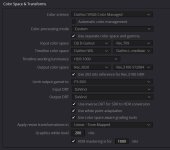
FWIW, the attached is where I have currently landed for my Colour Management Settings and I'm all ears to see if you think there are changes I should make (I've made many mistakes getting this far but it is easy enough to correct and re-render). You will note that I've set the input transform for the DJI Air2 as the default, and with the FX6 footage correctly identified I don't have to manually assign colour space or gamut for either of my main two sources. I just drag in the FX6 and Air2s footage and get to editing.

I did read in your writeup the recommendations from Sony Pictures. I used to shoot in S-Gamut3.cine as this is what everyone said to do, but it always nagged me why you would want to throw away that extra data in camera. If you need to do that, then doing it in post would make sense. I did my own comparison between S-Gamut3 S-Gamut3.cine taken of the same scene but could not pick the difference with the end renders of the two (though I am getting older every day!) and find them the same to grade (but I'm no colourist). I've now changed to S-Gamut3.

Thanks
Nathan

PS - in my original response I kept writing SGamut and SGamut.cine where they should have been SGamut3 and SGamut3.cine (now fixed).
 

Attachments

  • CMWS.jpg
    CMWS.jpg
    79 KB · Views: 0
Hi jonpais, My observations was specifically around SLOG3 footage from the FX6 (which for me just works). The same can't be said for clips from other sources such as my DJI Air2s or those pre-processed (these I have to manually assign). I'm surprised the a7s III does not include the meta data to be correctly assigned :( .

I'm certainty no expert on this and have just ended up where I am from trying to understand the concepts from people such as yourself (and Daria Fissoun) then applying them. I was excited to see that Daria had authored and just released "The Colorist Guide to DaVinci Resolve 18" but unfortunately there is no end to end HDR segment as you have created. I think you are the only one to have done this!

FWIW, the attached is where I have currently landed for my Colour Management Settings and I'm all ears to see if you think there are changes I should make (I've made many mistakes getting this far but it is easy enough to correct and re-render). You will note that I've set the input transform for the DJI Air2 as the default, and with the FX6 footage correctly identified I don't have to manually assign colour space or gamut for either of my main two sources. I just drag in the FX6 and Air2s footage and get to editing.

I did read in your writeup the recommendations from Sony Pictures. I used to shoot in S-Gamut3.cine as this is what everyone said to do, but it always nagged me why you would want to throw away that extra data in camera. If you need to do that, then doing it in post would make sense. I did my own comparison between S-Gamut3 S-Gamut3.cine taken of the same scene but could not pick the difference with the end renders of the two (though I am getting older every day!) and find them the same to grade (but I'm no colourist). I've now changed to S-Gamut3.

Thanks
Nathan

PS - in my original response I kept writing SGamut and SGamut.cine where they should have been SGamut3 and SGamut3.cine (now fixed).

I’ve never mixed rec.709 and HDR footage together on the same timeline before, so I’m afraid I can’t really give any advice on the settings. As far as the timeline color space goes though, I do have a preference. In a multicamera shoot, there’s often a hero (or dominant) camera, and I would use that as the hero working color space as well. This is how Walter Volpatto works and it is also the recommendation of Netflix in situations where ACES (their preferred color management system) is not used.
 
Last edited:
Does this cover what HDR is and that you cant enjoy it on a normal monitor?

I think the issue of that washed out look of HDR on SDR displays is rapidly changing:
1) Most modern TV, PJ & Phones are HDR capable. There are even more and more HDR capable PC monitors (i have 2 of them for years). Even my Laptop screen is HDR. If your only rendering out SDR your missing out on HDR devices sets.

2) If you want 100% compatibility across all screen types then you can still use the method that jonpais has documented but render it out as HLG. Works well on both SDR and HDR devices.

At home I've even gone 100% HDR on the PCs. I've set Windows11 to be permanently in HDR Mode and it tone maps / converts SDR to HDR on the fly as required. Looks good, but true HDR looks great.
 
I’ve never mixed rec.709 and HDR footage together on the same timeline before, so I’m afraid I can’t really give any advice on the settings. As far as DWG goes though, I do have a preference. In a multicamera shoot, there’s often a hero (or dominant) camera, and I would use that as the hero working color space as well. This is how Walter Volpatto works and it is also the recommendation of Netflix in situations where ACES (their preferred color management system) is not used.

I'd not argue against the logic of that for what you describe (for either ACES or DWG). I found this discussion with Daria outlining Resolves approach to Mgd Colour Mgt fascinating in that the concept she was pushing is to be able to take footage from all sources and normalising them into a single ultra wide colour space for editing/grading and then rendering it out as desired. I certainty can tell the difference between the drone and FX6 footage in the final render but it works surprisingly well with such different sources.
 
If you use Media Player Classic in combination with the MadVR directshow filter to watch your video files, the player will automatically switch between HDR and SDR on the fly. You can leave Windows permanently in SDR mode for better normal viewing, and not have to change it in the settings for HDR.
 
Hi Tom, I do the opposite these days on all my high NIT screens. Leave them in HDR and let windows do the SDR to HDR conversion. On my PJ (low nits) I do something similar, but use JRVR in JRiver's Media Center (instead of madVR which is no longer getting updates) and Tone Map HDR down to 2020 SDR.
 
I don't agree with using tone mapping to convert between SDR/HDR color volumes. Each has a unique transfer function, EOTF (display referenced) for PQ-HDR, and OETF (scene referenced) for BT1886 SDR. HLG is a hybrid in that the lower half of the curve is gamma, upper half is log. It is an imperfect compromise where backward compatibility is maintained with non-HDR displays, but even so it has its own unique transfer function that can be invoked with static ST-2086 metadata for HDR, Ex. --transfer arib-std-b67 or simply --transfer 18.

I do agree with it in the use case given by jonpais for YouTube, where an HDR-PQ file is uploaded with an attached cube lut that specifies how the HDR will be tone mapped for SDR however, it is an imperfect solution when there are very bright or very dark scenes that will cause out of bounds data points when scaling from a large color volume (PQ) to a smaller color volume (BT-1886). This is the reason for dynamic metadata, Dolby Vision dynamic scene by scene or frame by frame metadata for Netflix, Hulu, Disney, and HDR10+ for Amazon Prime.
 
Dolby has a pretty good write up on the SDR to HDR tonemapping approaches ---> https://professionalsupport.dolby.c...g-upscaling-SDR-content-to-HDR?language=en_US

Part of that doco (emphasis is mine)
  1. The accurate (mathematical) conversion from the SDR to HDR format is defined in the document “MovieLabs Best Practices for Mapping BT.709 Content to HDR10 for Consumer Distribution” https://www.movielabs.com/ngvideo/Mo...HDR10_v1.0.pdf
    This preserves the original look of the SDR image within HDR. This means that the resulting HDR watched on an HDR display should look identical to the original SDR watched on an SDR display. However, it does not change the look of the image and therefore may not blend well with other native HDR content. Such conversions are also referred to as direct mapping conversions, a terminology used in the Ultra HD Forum Guidelines.
 
Dolby has a pretty good write up on the SDR to HDR tonemapping approaches ---> https://professionalsupport.dolby.c...g-upscaling-SDR-content-to-HDR?language=en_US

Part of that doco (emphasis is mine)
  1. The accurate (mathematical) conversion from the SDR to HDR format is defined in the document “MovieLabs Best Practices for Mapping BT.709 Content to HDR10 for Consumer Distribution” https://www.movielabs.com/ngvideo/Mo...HDR10_v1.0.pdf
    This preserves the original look of the SDR image within HDR. This means that the resulting HDR watched on an HDR display should look identical to the original SDR watched on an SDR display. However, it does not change the look of the image and therefore may not blend well with other native HDR content. Such conversions are also referred to as direct mapping conversions, a terminology used in the Ultra HD Forum Guidelines.

Hold on there, the "emphasis is yours part" is where it comes off the rail a little bit. There is a mathematical transformation yes, but it is not an identical one. It can't be because scene referenced BT1886 2.4 power log gamma has no direct conversion to display referenced nits of brightness. The former is relative, the latter absolute. 100% of something could be 100 dollars or it could be another amount. It's not a currency exchange. That's why the process is described as a "best practice." The best practice calls for putting SDR peak white at 203 nits on the PQ curve. Peak white in std gamma typically resides around 100 nits but could be 100, 200, 300 or some other number, but it depends on the tv and the contrast setting. They decided on 203 so that SDR white could compete fairly against HDR white in the same video stream. 203 nits is a deviation of 100% straightaway from the "should look identical" point, but the difference doesn't end there. In std gamma, 100 nits lives around 10b code value 707, in PQ, 200 nits lives at 593, meaning that std gamma peak white contained within the PQ data bucket is reached well before the other data addresses are filled. The grayscale is thus brighter and represented by fewer shades, hence banding, and I saw minor banding. It's a thing and it's real. Not saying that you'll notice or care. But there's still a little bit more to this. In Windows there is that switch in the settings that you leave set to "HDR ON" full time. And there is a balance slider that you can adjust presumably as a way to align the SDR brightness to end up near the 203 nits recommended for SDR peak white. And you have a corresponding slider for black level. You didn't find it? Shucks, they must have forgotten it! Not to worry, you can go into the TV setup and adjust the brightness there (it's the black level really) to complete the scaling of 203 nits peak white and 0 nits black. But are you sure that adjusting the SDR levels in the HDR menus is going to give you the correct black levels for watching HDR when that time comes? We haven't even begun to talk about the other problem, the bigger problem of pouring 16 ounces of color into a 12 ounce mug. You see, these workflows that were developed, for Dolby Vision trim passes and HDR10+ weren't just the result of engineers with idle time. There are real issues transforming grades between color volumes that aren't solved by a cube lut or a mathematical conversion alone. This is why, Windows doesn't just default to "HDR ON." The best method for viewing HDR is to thumb that switch on or off for SDR, or let MadVR do it for you within MPC or JRivers or whatever, based on a read of the file metadata.
 
Sorry I hit a nerve. SDR to HDR reverse tone mapping is a thing, is well defined, and is going to become more common. As an example, I presume the latest HDR iPhones / Android do the same thing rather than switch between SDR/HDR based on content(???). From what I can see in Windows 11 it seems to be well implemented (far less so in Win10). Yes, I know about the Windows HDR On with Brightness Adjustment. It all work fine in practice. I used to use madVR (and now JRVR) to change the screen between SDR/HDR pending on the content but I found the switching was never 100%. I simply find it acceptable to leave the screen in HDR and let Windows reverse tone map any older SDR content up on my HDR Displays. While I take comfort that Dolby says it is "should look identical" I have no idea if MS implementation in Windows is good/bad/indifferent. In real world viewing I've not noticed any issues. That said, I'm also more forgiving of critical viewing of SDR content as it is normally plagued by more obvious quality issues due to lower bitrates, resolution, interlacing, and dynamic range. YMMV

For me, the story is different on my 125" JVC X7500 PJ. It's low nits. It's a much larger screen. = It's much easier to see conversion issues. On this I tonemap HDR down to SDR2020 @ 100 nits using JRVR (aka modern madVR) and leave SDR as SDR. But this is turning into a niche use case. For most users owning modern high nit TV's / PC Screens / Phones then reverse SDR tone mapping (for good or bad) will become the norm.
 
There are (2) primary use cases cited for up-mapping SDR content to HDR:
  • A content distributor has an operational need to transmit SDR content using an HDR10 or BT.2100 PQ distribution format, e.g., a HDR broadcast channel
  • A device or system takes in a mixture of SDR and HDR content and automatically maps it to an HDR format because the user has chosen a device mode that maintains a consistent output format to the TV.
It then points to the Movie Labs best practices documents for details of the transformation.

The Movie Labs doc prefaces with the following:

For the best consumer experience of the creative intent, content providers recommend that content be distributed and viewed using the display system for which it was created. In some cases however, operational constraints of consumer distribution systems or consumer devices may require studio content created for BT.709 to be displayed on a consumer HDR display using the HDR10 system,

So what I don't understand is given the choice, why you would not? You have to open the video file to play it, why would you not want it to automatically select the matching transform for the best experience? The downsides of not are:
  • Your TV is consuming more power
  • Your SDR viewing is not as intended
  • Your HDR status icon is ON for everything
Anyway, this has gone off topic. I looked back at your original question to Jonpais about your Resolve colorspace and transform settings, my opinion is they are good if you're sure about P3 D65 within a 2020 container being what you intend.
 
Yup - we have gone off topic, but it is a good one to thrash out as the move to HDR we are seeing is not without all sorts questions, compromises and experimentation. I do appreciate the discussion on this. So thanks for the insight and thoughts as it is all poorly documented an there is more than one way to skin a cat. For the last few years I've been stumbling around trying various things (eg started with HLG but as pointed out, it is a compromise on both SDR and HDR. Resolve's Colour Mgt has made it much easer but end to end HDR doco like what Jonpais has done was sorely missing!

What I've done so far, is to base my rendering output to recreate what UHD BD uses (which I figure is the "best" mastering I can currently find for consumer distribution). I've several hundred UHD BD's and in analysing what they all do, I've found that the:
- vast majority use P3-D65 in 2020 (I guess as this is the widest gamut most screens can currently achieve and the D65 white point is what CE displays have settled on and that D60 I was originally using was wrong unless you use a tungsten?? based lamp as in movie theatres)
- bitrates are normally just under 100mbps (but I expect that this seems to be more of a limit set by either the physical disc format or wanting to keep it under 100mbps for some of the Ethernet chips that may be used in players). This bitrate is used regardless of frame rate, eg you don't see 250mbs used on UHD HDR BD 60fps discs like Gemini Man / Billy Lyn even though it is pushing 2.5x the frames
- earlier discs seemed to use 1,000 nits for maxfall but I'm seeing more and more mastered for 4,000 and even the odd one at 10,000nits. I guess the newer screens now pushing well above 1,000 nits could be driving this.

I've been rendering out my content based on the above and expect at some point in the future I'll open up these projects and re-render out at 10,000nits with full 2020 when display tech has advanced. This is also the reason I'm now shooting in SGamut3 (wider than 2020) than SGamut3.cine (which is only just wider than P3).

I don't disagree on your points about the advantages in switching between SDR / HDR modes on displays (and I'm switching frame rates anyway) though I don't get the issue you mention about the HDR status Icon being On. It's just I don't find the SDR --> HDR reverse tonemapping to be a noticeable issue and the good thing with a Windows 11 box with HDR ON is that the Desktop and all other apps have also been tonemapped up and hence look "normal" instead of oversaturated like they did in Win10 when switching between SDR and HDR modes. I also don't miss all those madVR posts about why the switching is not working / issues with Win11 and madVR etc etc. It just works. I also suspect that reverse tonemapping is what the phone manufacturers are using on the "HDR" models as I don't see any mode switching on these devices and both SDR and HDR content seems to be correctly rendered. Not that I'm saying that approach is the best but I suspect we will see more and more of it as it could be good enough.

Even more off topic but still related: Given I'm also shooting and playing back @ 50fps (I'm a PAL country) and personally like the look of the extra temporal resolution, I've been questioning the suitability of 100mbps encoding rate being high enough. This is one reason I'm also keen on the use of the far more efficient AV1 codec. I've now upgraded to a 4090 for encoding and it can do AV1 faster than real time so that part is now solved. Also, most newer GPU/iGPU can also do hardware decoding of AV1 and that extra efficiency will help keeping great quality for high frame rate encodes at fixed bitrates like 100mbps for my "LAN" encodes, and 20mbps that I'm using for Web based delivery of the same content. The AV1 discussion is even more off topic but it does all tie together for HDR delivery. Now if only Apple will pull their thumb out on implementing AV1 into their eco system the need to encode in VP9 or H264 for wide compatibility web streaming will finally diminish.

Anyway, this is my current thought on the end to end HDR process but I still have much to learn so please keep the comments coming as some decisions (like capturing in SGamut3 vs SGamut3.cine or using HLG can't be undone) so getting this stuff right up front is important. I can always fix any poor Resolve settings and re-render out.

Thanks
Nathan
 
some decisions (like capturing in SGamut3 vs SGamut3.cine or using HLG can't be undone) so getting this stuff right up front is important.

Thanks
Nathan
An advantage, if you’re shooting ProRes RAW, is that you can decode as either S-Gamut3 or S-Gamut3.Cine in post. Whichever gamut you select in the Ninja V only affects the display, not the RAW data itself. Hope that helps.
 
Last edited:
I'd be happy to shoot raw..... internally. And if so (and if the version of RAW was supported by Resolve) my workflow would not change anyway as the input transform would put it into DWG or ACES for editing/grading and only have to select the required output Gamut. That's the great thing about using a Colour Managed workflow. No need to convert anything (if it is supported that is).
 
...also, while we have been talking about HDR, the whole idea of a Colour Managed Workflow in Resolve is that it ambivalent to what deliverable you want (be it SDR or HDR) or what you source material is (as long as Resolve supports it). The concept is:

Input Clips (of varying types) --> Input Colour Transform => Davinci Wide Gamut / ACES (etc) for Editing / Grading --> Output Colour Transform => into your deliverable(s) of choice

The process just works regardless of what you Input Clips are out what you want your deliverable to be. So this lets me mix and match footage from the drone and the FX6 for example. Edit/Grade the clips. Then output both a HDR and SDR version. No LUTs, No regrading, No conversions. Terrific.

Daris (who literally writes the Resolve Colour Managment Doco for Black Magic) explains it pretty well in this interview. Worth the 30min if you have not already viewed it as the concepts can be hard to get your head around after years of using traditional approaches. Once it clicks however, you don't want to go back.

https://www.youtube.com/watch?v=gbrJGA5c8GQ&t=2s&ab_channel=CaseyFaris
 
...also, while we have been talking about HDR, the whole idea of a Colour Managed Workflow in Resolve is that it ambivalent to what deliverable you want (be it SDR or HDR) or what you source material is (as long as Resolve supports it). The concept is:

Input Clips (of varying types) --> Input Colour Transform => Davinci Wide Gamut / ACES (etc) for Editing / Grading --> Output Colour Transform => into your deliverable(s) of choice

The process just works regardless of what you Input Clips are out what you want your deliverable to be. So this lets me mix and match footage from the drone and the FX6 for example. Edit/Grade the clips. Then output both a HDR and SDR version. No LUTs, No regrading, No conversions. Terrific.

Daris (who literally writes the Resolve Colour Managment Doco for Black Magic) explains it pretty well in this interview. Worth the 30min if you have not already viewed it as the concepts can be hard to get your head around after years of using traditional approaches. Once it clicks however, you don't want to go back.

https://www.youtube.com/watch?v=gbrJGA5c8GQ&t=2s&ab_channel=CaseyFaris
Do me a favor and try this, please.

https://daejeonchronicles.com/2023/01/11/we-need-your-feedback/
 
Back
Top