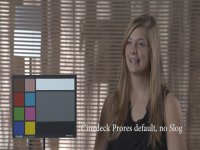
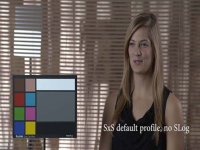
I edited this because I realize I posted way too many screen grabs:
I purchased the Vortex Media external recorders set of sequences and would like to share a few thoughts on my findings. I cleared this with Doug Jensen, but see item #1 below.
A few caveats first:
1) This is an outstanding set of files and I would encourage anyone who is trying to decide on external recorders for their F3 to consider purchasing them. There is no way I could have done all of this work myself (let alone get access to all of the recorders). I can’t say enough about the quality and thoroughness of these tests.
2) These are all just my impressions based on what I see at full resolution and based on a lot of playing with the files.
3) With 126 different shots, there are literally thousands of comparisons one could make (over 7,000 pairs and over 10 million groups of 4). So, I have limited it to a few. I’m not going to be able to do more as I’ve already spent a ton of time on this and I have to get out and do some shooting! (See #1 above)
4) I’m only reviewing female model frame grabs. There are a bunch of others scenes as well, but my main interest is skin tones so I didn’t try to sort through the green screen ones, nor did I do the ChromaDuMonde or table top ones (the latter and the green screens include fine, fast motion but, to tell you the truth, I’m not very good at seeing subtleties in this). (See #1 above)
6) Uncompressed files: there are Gemini uncompressed files in the set but I haven’t even tried to view them. The files are huge and I have almost no disc space left. I am also not looking for uncompressed recorders.
6) These are really tests of recording formats, not the recorders themselves. For each recorder, different formats are used. As Vortex explains it: “in theory, the same settings on two different recorders should provide the exact same results.” They note that future tests may test this theory.
Here are the files types by recorder (there are even more that you can try – see #1 above)
SxS: 35 mbps, 4:2:0, 8 bit, XDCAM EX
Nanoflash: 140 mbps, 4:2:2, 8-bit, XDCAM HD422 (I-frame)
KiPro Mini: 117 mbps, 4:2:2, 10-bit, ProRes 422
Pix 240: 176 mbps, 4:2:2, 10-bit, ProRes HQ
Cinedeck ProRes: 264 mbps, 4:4:4, 10-bit, ProRes
Cinedeck Cineform: 256 mbps, 4:4:4, 10-bit, Cineform
With all that, here goes.
Default picture setting, no SLog.
My impressions: Compared with SxS, the recorders do a better job of capturing tonality overall. The Nano has perhaps the blockiest shadows, followed by the Pix and KiPro (tied) and then the Cinedeck (I personally prefer the Cineform files by a bit).
I purchased the Vortex Media external recorders set of sequences and would like to share a few thoughts on my findings. I cleared this with Doug Jensen, but see item #1 below.
A few caveats first:
1) This is an outstanding set of files and I would encourage anyone who is trying to decide on external recorders for their F3 to consider purchasing them. There is no way I could have done all of this work myself (let alone get access to all of the recorders). I can’t say enough about the quality and thoroughness of these tests.
2) These are all just my impressions based on what I see at full resolution and based on a lot of playing with the files.
3) With 126 different shots, there are literally thousands of comparisons one could make (over 7,000 pairs and over 10 million groups of 4). So, I have limited it to a few. I’m not going to be able to do more as I’ve already spent a ton of time on this and I have to get out and do some shooting! (See #1 above)
4) I’m only reviewing female model frame grabs. There are a bunch of others scenes as well, but my main interest is skin tones so I didn’t try to sort through the green screen ones, nor did I do the ChromaDuMonde or table top ones (the latter and the green screens include fine, fast motion but, to tell you the truth, I’m not very good at seeing subtleties in this). (See #1 above)
6) Uncompressed files: there are Gemini uncompressed files in the set but I haven’t even tried to view them. The files are huge and I have almost no disc space left. I am also not looking for uncompressed recorders.
6) These are really tests of recording formats, not the recorders themselves. For each recorder, different formats are used. As Vortex explains it: “in theory, the same settings on two different recorders should provide the exact same results.” They note that future tests may test this theory.
Here are the files types by recorder (there are even more that you can try – see #1 above)
SxS: 35 mbps, 4:2:0, 8 bit, XDCAM EX
Nanoflash: 140 mbps, 4:2:2, 8-bit, XDCAM HD422 (I-frame)
KiPro Mini: 117 mbps, 4:2:2, 10-bit, ProRes 422
Pix 240: 176 mbps, 4:2:2, 10-bit, ProRes HQ
Cinedeck ProRes: 264 mbps, 4:4:4, 10-bit, ProRes
Cinedeck Cineform: 256 mbps, 4:4:4, 10-bit, Cineform
With all that, here goes.
Default picture setting, no SLog.
My impressions: Compared with SxS, the recorders do a better job of capturing tonality overall. The Nano has perhaps the blockiest shadows, followed by the Pix and KiPro (tied) and then the Cinedeck (I personally prefer the Cineform files by a bit).
Last edited: