FS7: Color Matching FS7 with A7SII

Joshua Milligan

Well-known member
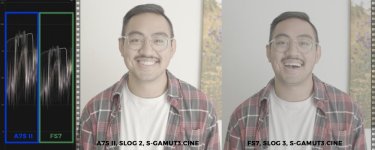
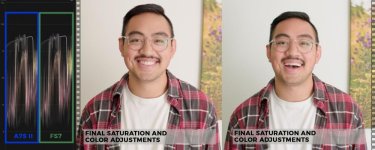
I was working this weekend on coloring with my A7SII and my new FS7 to try and achieve optimal results cutting shots together. I really like using SLog2 SGamut3.Cine on the A7SII as SLog2 seems to hold a grade better than SLog3 on this little 8-bit camera. Using SLog2 with the SGamut3.Cine color space really helps me achieve beautiful shots on the A7SII. So, that being said, the FS7 in Cine EI mode really only gives me one option or the other. One is the same log curve in SLog2 with SGamut, the other is the same color space in SLog3 with SGamut3.Cine.

For those of you who work with these two cameras, would you recommend using SLog2 and the different color space, or SLog3 and the same color space when working with the FS7 to match the A7SII's profile I use? Common sense tells me that working with the same color space is more important than a log curve, but I am not entirely sure.
 
If you grade the log material directly I would always go with sgamut3.cine and the cameras should match reasonably well even with different gammas. You could also try to make a LUT for each camera that goes into something like LC709A with LUTcalc and see how it looks.
 
Hmm. interesting thread.

I have the original a7s and therefore believe i'm relinquished to shoot slog2 on both cameras in order for them to match. Am I correct in thinking this?

I shot an interview with the a7s in slog 2 and the fs7 in slog 3 without realizing and haven't had the best luck making the two match. (only tried in premiere so far)
 
Depends on what you want to achive Wes! Also if you match gamma and gamuts, the cameras might still look a bit different. With SGamut3.cine being available on the A7sII and A6300, it's much better though. S-Gamut on the A7s is really odd and should be used with care.
If you want to use the FS7 in CineEI mode with S-Log3/SG3c, you could do the following:
1) Shoot with the A7s in S-Log2 and with a 709ish color mode (Movie, Pro, ITU, Cinema) and create a S-Log2/709 to S-Log3/SG3c LUT in LUTCalc. You have to test which one you prefer. Movie should be fine out of the box.
2) Shoot with the A7s in S-Log2/S-Gamut and add saturation in camera to reduce noise. Create a S-Log2/S-Gamut to S-Log3/SG3c LUT in LUTCalc. You have to reduce saturation again before applying the LUT and then probably have to adjust the hues to mach the FS7.

If you shoot with the FS7 in Custom mode, you should be able to select S-Log2 with 709 color mode as well, right?
 
A7s has a natural green tint in SLOG2 which the A7s II doesn't. So far I have found it very easy to match them in post without having to create specific LUTs to do so.
 
I just did this and hope the attached images help.

I just did this and hope the attached images help.

I just did this and hope the attached images help.
 

Attachments

  • matchingthefs7anda7siiusingslog2and3_1_SLOG.jpg
    matchingthefs7anda7siiusingslog2and3_1_SLOG.jpg
    45.4 KB · Views: 0
  • matchingthefs7anda7siiusingslog2and3_3_CDLUT.jpg
    matchingthefs7anda7siiusingslog2and3_3_CDLUT.jpg
    58.6 KB · Views: 0
  • matchingthefs7anda7siiusingslog2and3_4_FINAL.jpg
    matchingthefs7anda7siiusingslog2and3_4_FINAL.jpg
    57.6 KB · Views: 0
  • matchingthefs7anda7siiusingslog2and3_2_EV.jpg
    matchingthefs7anda7siiusingslog2and3_2_EV.jpg
    54.5 KB · Views: 0
I generally try to give my a6300 a different angle when shooting in tandem with the fs7 covering more of the shadow side etc.
 
Back
Top