Color Grading

odshannon

Well-known member
Can anyone point me to the right direction color grading Slog/Sgamut?

I just got off my biggest project yet and I'm trying to find the best solutions to color grade F35 footage but I'm not sure what's up to date on the old forum posts.

I am trying ACES right now but all of my footage seems to get super noisy when I apply the lut/change the project settings.

Sometimes just lifting the gain and tweaking the slog footage looks better than anything else I've tried but I can't tell if that's crazy talk.

I know I probably underexposed my footage but it just seems my footage is excessively noisy. (Prores 10bit 422.)

If I am beating a dead horse, please point me to the right thread on color grading and I'll be quiet. haha. But if not, what are your guys color grading methods?

Thank you!
-Shannon
 
start simple, and keep it clean...

select ACEScc, and the closest IDT, the correct ODT
don't touch LUT's
In the first node adjust offset, conrtast, pivot and with LOG selected trim highlights and shadows, don't use the lift/gamma/gain controls, windows, masks or curves for now.
In the second node set the color science to L*A*B and adjust tint (G offset) and temp (B offset) if needed
Once you have a good base with the filmstyle controls then add nodes for triming the shots with the lift/gamma/gain controls, windows, masks or curves
but first get the heavy lifting done as cleanly as possiable
 
shannon, I understand if you can't or don't want to post any frames online but if you want to send me a frame or two to take a look at I can and then let you know what I think, etc..

just send me pm if you like, cheers.
 
Dermot:

When you mean no luts are you saying not even an "ACES" lut but just the colorspace?

Thank you for all the info btw!

Star: Frames sent!
 
Also, what is the "use mac display color profile for viewers" box in the color management tab? Should I have that clicked on?
 
just the IDT, no LUT, keep it clean as possiable do as little to the image as possiable, only what is needed, try a light hand for the base pass

not a clue about the mac color thinggie, i use HP peeeceee's feeding callibrated broadcast mon's
 
Just tried your method and I totally prefer it. I think I still underexposed my image and need to denoise with neat video but besides that the color is looking wonderful.

The F35's slog is already really close to a rich beautiful image, it really doesn't need much. Shot with a lowcon 1 and I feel it gave me that cinematic/creamy look I wanted already anyways. Rather do it with filtration!
 
Shannon I sent you a PM back with what I did in Resolve and screen shots for you to see waveform levels, etc..

For me exposure is normal, or typical, with skin between 384 and 512 on the scale. 38% IRE is middle grey and your skin is around there. The one shot you sent me looked too dark but it's probably how you want it to appear in the final grade so maybe just some noise reduction there and you should be ok.

As mentioned in my message I didn't use ACES or LUTs, it was just gain up a bit, gamma down, and lift down. If needed level off the black pedestal a bit to balance the black color. This is just a normalization of log so no special looks or anything. You could look at film emulation LUTs like the ones from Kodak but they are meant for slog3 so you'd need to convert your gamma to cineon through a few extra steps. If you want to try any film emulation LUTs you will need to apply this LUT first which converts the slog1 to cineon. https://dl.dropboxusercontent.com/u/13362047/F35 slog to cineon.zip

The "noise" you see is the F35 is what I'd call "normal" from what I've seen in other F35 footages when grading them. It has a slight dithering pixel quality to it which may be accentuated on certain monitors, and will mostly be visible in the shadow areas. Neat Video will clean that right up if you want to get rid of it. Others like it as they feel it looks like film pattern grain.
 
Last edited:
Sent you a PM back, thank you Dennis! Super grateful of the attitude everyone has one these forums. It's all about learning and growing here.
 
Guys, just figured out my noise problem. haha. So I haven't full screened my footage in resolve yet and edit on a 15" mac so I it was condensing the noise and making it look weird. I just did the full screen and the grain texture looks amazing. Nothing seems overly noisy. Probably wasted 200 bucks on neat video but I'm sure it will come in handy later!

I am throwing around the idea of posting the sizzle reel on this forum as a thank you for all your help. Stay tuned :)
 
Hey guys, what gamma are you calibrating your reference monitors to? I'm really twisting my head over this. I recently calibrated my monitor to Bt.1886, which comes quite early out of black and proceeds towards gamma 2.4. It's apparently meant as the rec.709 standard, and when looking at test charts all is well and good and I can see everything. The problem is that when viewing real footage, the shadows feel extremely lifted compared to all other displays I have access to (my macbook, televisions, iphone, ipad). S-log with the macgregor lut looks washed out, for example. Am I getting something wrong?

When I lower the shadows to get a good balance on my calibrated monitor, I end up unable to see anything in the lower half of the exposure range on my macbook. Things end up lost in shadows.
 
You need to make sure your Macbook display is set to either REC709 or SRGB color space for comparison with other systems. The default Apple display color space is 1.8 gamma and will look darker and more contrasty with REC709 footage. Typical of Apple non compliance with generally accepted reference standards.
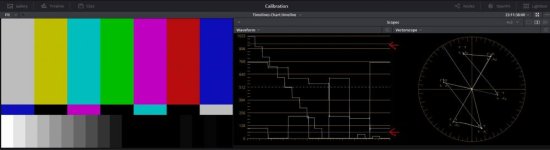
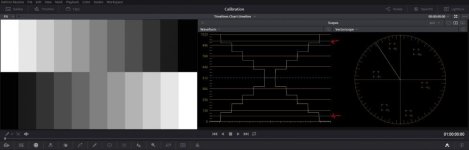
An RGB computer monitor should be calibrated to SRGB gamma 2.2. An HDTV monitor in YCbCr component broadcast legal color space should be calibrated to REC709 2.4 gamma. Those should look pretty much identical to each other. Are you using a log grayscale step chart file to calibrate your monitor contrast range? Screen shots from my SRGB reference calibration in Resolve. The arrows indicate scope reference lines for REC709 black at 64 and white at 940


Calibration.jpggrayscale calibration.jpg
 
Last edited:
Thanks! I'm using an x-rite i1 Diplay Pro with DispcalGUI software. When checking with HD SMPTE color bars, I can see the +2% and the +4% pluges, while the superblacks are indistinguishable from plain black. Still...I can't help but feel that the shadows are too lifted. After all, my material will mostly be viewed on uncalibrated monitors in the future, and if I grade a slightly low-key image in a way which looks good to me on the reference monitor, I can be quite certain that it will be crushed on other viewing platforms; even on the ipad3, which i remember people used to praise for its accuracy a couple of years ago.

Edit: @Razz16mm, regarding your last comment, are you implying that I should not lower my blacks past legal range?
 
Last edited:
I think I figured it out! Things look the way they should as long as I feed the monitor a signal from resolve. If, however, it receives its signal directly from the mac, even when using an icc profile specifically calibrated for that monitor and rec.709 BT1886, blacks are lifted. My mistake was to proof-check my grade via thunderbolt and OSX, instead of doing it via resolve. I guess this is what you meant when you adviced to stick with sRGB for the computer monitor. Making a new icc profile for sRGB now, to use when playing videos directly from the computer.
 
Last edited:
Back
Top