Color correction sky problem

percoplus

Active member
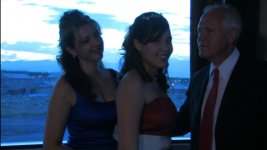
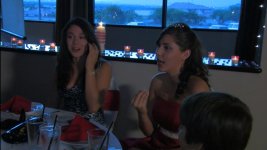
Shot an indoor party during twilight hours with manual white balanced for tungsten. Tinted window in the background made the sky outside look kind of unnatural. How would you color correct it and would you even try? I am leaning towards not doing anything, but if the client wants it fixed I don't know where to start.

I am using Premiere Pro CS4

I played briefly with the "change color" effect to try to darken the individual colors in the window, but it looked really funky.
 

Attachments

  • Grand Entry 131000.jpg
    Grand Entry 131000.jpg
    50.4 KB · Views: 0
  • Grand Entry Cut 1 70125.jpg
    Grand Entry Cut 1 70125.jpg
    37.4 KB · Views: 0
I would work with a mask and make a serparate color correction on the windows.

Cheers

Thomas.
 
Can't do it in Premiere. Or at least not without a lot of painstaking adjustment since the program doesn't have a good masking and keyframing function. I would just apply an overall warm filter to take the blue edge off the windows without making it too warm inside. Although that is some severely underlit footage so any type of color correction is really going to introduce a ton of unwanted noise.
 
I'm hardly an expert, but you might try Adobe After Effects. At least the CS5 version has a pretty useful rotoscoping function that might let you mask off the window and color correct (and darken) it separately as you will. Premiere Pro itself doesn't have anything that will help much with this.

I saw a tutorial on this with After Effects just the other day on the Adobe website. Darned if I can find it now. But it made it look easy (don't they always?).
 
This is one of those sticky situations. Was at a wedding last weekend, and one wall was just all windows, floor to 2nd storey. Of course, the ceremony happens right in front of them. At the reception too.. I was dumbfounded.. 2nd floor of a rec center, the only window was a 4x4 with NO shade, and wouldn't you know it.. the podium was right in front of it. It hurt the eyes to focus on the MC... and video guy didn't seem to care at all.

Last time I encountered this on a location check, I told the client that without strong lights, the footage would not turn out. I wrote that in the contract and they approved.

Come event time, people in the crowd were complaining about my bright lights (two borrowed HMI's), and client told me to turn them off. Again I warned them of the consequences of that, they said fine, whatever.

Oh, they didn't like the footage they got back.. not at all.. and refused to pay for my light rental (because I didn't use them!) ... and then tried to gyp me ("can we see a DVD without all that timecode & watermark crap on the screen?").

In the end, they saw the light (so to speak) and I got my money.

Now, as for your problem.. with some precise colour correcting, you can probably salvage this stuff. There's an RGB corrector which allows you to alter the low, mid & high tones of each colour. You can alter the shade (and some brightness) of the windows, while adjusting the low ends to brighten up the people.

Not perfect, but.. I mean.. you ARE working against the power of the Sun.

This is why location checks are so important, and writing stuff down in the contract will CYA when it all goes South.

Post some grabs of your adjusted scenes, curious to see what you end up with.. but don't freak, this isn't beyond hope, and Princess will get a good looking video in the end.
 
Back
Top