Color Charts - Different for Photo and Video?

Tim Nitsch

Well-known member
I just picked up a light meter (The Sekonic L-478D) and I also needed to get a color chart to be able to create camera profiles for the meter.

I went down to my local Camera store and looked at the X-Rite's ColorChecker Passport.

When I was talking to one of the guys there he wasn't sure if this would work for video, something about photography cameras using "RGB Color" while video camera use "NTSC Color".

I had never heard of that issue before, Is that true?
 
Last edited:
NTSC - Never Twice Same Color!

I stopped at their booth at NAB (yes, they were there) and the person I spoke to didn't have any idea if it would be useful for video. Which is strange, given they were at NAB! (Actually, they were there promoting a different video related product.) Anyway, check out this link:

http://blog.xritephoto.com/?p=6761

I imagine they could make a plugin for editors that would take the passport target shot on location and convert it to color correction settings if they wanted to. I'd love something like that, but they haven't done it yet.
 
What exactly is the issue with using photo color charts with video?

Is it that the NTSC (color space?) can't accurately replicate the colors on the chart?
 
I just picked up a light meter (The Sekonic L-478D) and I also decided I needed to get a color chart too.

I went down to my local Camera store and looked at the X-Rite's ColorChecker Passport.

When I was talking to one of the guys there he wasn't sure if this would work for video, something about photography cameras using "RGB Color" while video camera use "NTSC Color".

I had never heard of that issue before, Is that true?

There are color targets that when shot by a camera, should produce various patterns on the wave form monitor or vector scope. These are typically not used in still photography.

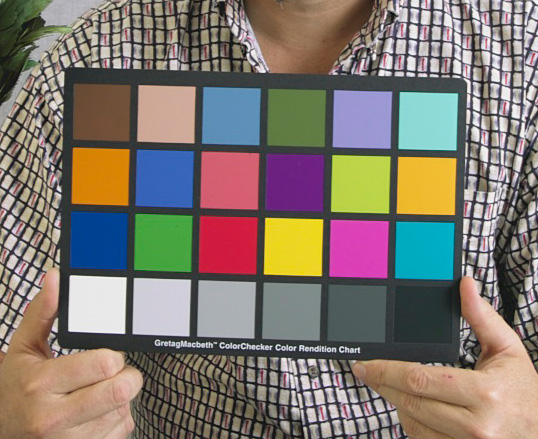
The color chart that I'm most familiar with for still photography, is the gretag mcbeth color swatches such as:

Gretag-Macbeth_ColorChecker.jpg


I have seen this used on BTS shots on film sets for color calibration presumably, along with matte balls and reflective balls to useful in lighting and color matching for CGI augmentations.


For HD digital video/film Rec. 709 is the 'color space'. What charts specifically address that color space I don't know...
 
Last edited:
I'm on a tablet, so this has to be short.
1) are you trying to color match or grade your footage to the chart?
2) are you trying to calibrate your footage to a standard SMPTE color chart?
They are different actions.
I only shoot (10 seconds) of the standard SMPTE compliant chart as a target ,right after accomplishing white balance using my own system.
This way, my footage can be easily graded in post, since my monitors are calibrated to that same chart..
No one calibrates an NTSC footage To a Macbeth chart! Those are used for print reproduction.
 
I'm on a tablet, so this has to be short.
1) are you trying to color match or grade your footage to the chart?
2) are you trying to calibrate your footage to a standard SMPTE color chart?
They are different actions.

The real reason I got the color chart was because I needed it to create a Camera Profile for the light meter.

I know full well that they are used for much more than that.
But of your two choices, #1.
I'm not trying to do anything special, just trying to get all my footage in the same ballpark color and exposure wise.
 
Last edited:
The real reason I got the color chart was because I needed it to create a Camera Profile for the light meter.

I know full well that they are used for much more than that.
But of your two choices, #1.
I'm not trying to do anything special, just trying to get all my footage in the same ballpark color and exposure wise.

A light meter is not calibrated with regards to color, specifically. The light meter is going to just read the quantity of light. The standard to setting exposure is to use a 50% grey and can be done by the use of a Grey Card. When using a light meter for incident reading, the white dome is going to give you the exposure at 50% grey. If using a spot meter you will want to take a meter reading off of a Grey Card. Understand though, that this is just a point of reference for setting your exposure. The overall light level and the the look you want from the shot you are setting up should dictate you final exposure choices. I do like to get a shot of a Grey Card in every lighting set up, that gives me a point of reference for adjustments in post. As for color, to me, what I want is something with a color standard that I can give the Ol' Eye Ball Test to; that is, something that I know the color of that I can look at in the footage and see where the color is. On one shoot, I stuck a white square, from a piece of matte paper, a black square, cut from Duvatyne, a Grey Card and a United States Flag to the bottom of the slate and made the clapper loader wear a Michigan State Spartans green sweatshirt, to have a consistent exposure and color reference. This is not the standard way of doing it, and I am sure there are charts out there that have been standardized, but it worked for me. I still use a Grey Card but color wise I look to the overall image,especially skin tones, when working towards the final image.
 
You need sekonics camera profile chart. It's a specific chart with specific values from white to black. It's made specially for that meter and nothing else will give you an accurate result! I've been waiting for mine for like 2 months though...sort of hard to get your hands on.
 
You need sekonics camera profile chart. It's a specific chart with specific values from white to black. It's made specially for that meter and nothing else will give you an accurate result! I've been waiting for mine for like 2 months though...sort of hard to get your hands on.

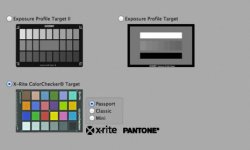
Not sure thats 100% true. According to the calibrating software, they accept a few different ColorChecker cards as well.

Screen Shot 2012-12-29 at 1.56.33 PM.jpg
 
Last edited:
A light meter is not calibrated with regards to color, specifically. The light meter is going to just read the quantity of light.

I guess I worded that wrong,

"I'm not trying to do anything special, just trying to get all my footage in the same ballpark color wise (with a chart) and exposure wise (with a light meter)."

Thanks for the info!
 
Look. you can use the Macbeth color checker for Video, but you cannot judge it by eye. You need a way to measure the values of a shot chart from your Color Grading application.
To judge your footage reproduction by eye, you need a calibrated broadcast monitor. And for that you will need the SMPTE target .
In the ideal world, we use a chart generator in camera but most DSLR's do not have this feature.
For checking exposure values, yes a cine light meter will help you discover what kind of range you are capturing.
Not to sound rude but, are you familiar with sensitometry and colorimetry? The whole lighting/colorimetry/exposure process is fairly complicated.
If not. just stick to while balance (properly) and grab your exposures off the scene
Here's a link that talks about the Macbeth chart...
 
Not sure thats 100% true. According to the calibrating software, they accept a few different ColorChecker cards as well.

View attachment 64316

Ah! I guess I was fed some wrong information. It seems like their charts would be much more accurate though looking at the number of values between black and white vs the color checker target.


Look. you can use the Macbeth color checker for Video, but you cannot judge it by eye. You need a way to measure the values of a shot chart from your Color Grading application.
To judge your footage reproduction by eye, you need a calibrated broadcast monitor. And for that you will need the SMPTE target .
In the ideal world, we use a chart generator in camera but most DSLR's do not have this feature.
For checking exposure values, yes a cine light meter will help you discover what kind of range you are capturing.
Not to sound rude but, are you familiar with sensitometry and colorimetry? The whole lighting/colorimetry/exposure process is fairly complicated.
If not. just stick to while balance (properly) and grab your exposures off the scene
Here's a link that talks about the Macbeth chart...


Now that apparently everything I know is wrong, I'm not too sure about this, but from what I understand you don't have to judge anything from your monitor. You shoot the chart and feed it into the program and it figures out the dynamic range of the camera for you. Not entirely sure how, but that's the big appeal of this specific meter.
 
Last edited:
Now that apparently everything I know is wrong, I'm not too sure about this, but from what I understand you don't have to judge anything from your monitor. You shoot the chart and feed it into the program and it figures out the dynamic range of the camera for you. Not entirely sure how, but that's the big appeal of this specific meter.

Wow, that is a pretty spiffy little gizmo. I looked it up and found this video from Sekonic. It looks like you can use X-Brite charts to input the dynamic range of your cameras, but, from the short shot in the video, it looks like they are doing that with a Grey Scale Chart. i don't see where a color chip chart is used. For the money that looks like a very good meter.

 
Wow, that is a pretty spiffy little gizmo. I looked it up and found this video from Sekonic. It looks like you can use X-Brite charts to input the dynamic range of your cameras, but, from the short shot in the video, it looks like they are doing that with a Grey Scale Chart. i don't see where a color chip chart is used. For the money that looks like a very good meter.


Looks very cool. Thinking a hardware attachment that plugs into an iOS/Android device would be even nicer!
 
Well Sekonic offered to lend me that very meter for review. I declined. We are going to work together to bring you a revolutionary meter for indie video. You see, this meter is primarily for stills. We want a cine meter AND color meter in one. The challenge is to integrate both sensors in one box. I truly suggest some quality time understanding sensitometry and colorimetry .camera profiles are key to repeatable settings, but you still need to know the fundamentals of scene evaluation, profiles are no help in that.
 
Wow, that is a pretty spiffy little gizmo. I looked it up and found this video from Sekonic. It looks like you can use X-Brite charts to input the dynamic range of your cameras, but, from the short shot in the video, it looks like they are doing that with a Grey Scale Chart. i don't see where a color chip chart is used. For the money that looks like a very good meter.

My question is... are the models included in the setup package for the light meter... if so, it's a bargain...
 
In the ideal world, we use a chart generator in camera but most DSLR's do not have this feature.

Don't know how a color generator 'in the camera' would assist in capturing the color of lighting, and the effect on a color chart on the set.

Color bar generators had a use in analog world, and perhaps have a use if the generated image is fed in before any analog circuitry in the camera, to determine any shifts or nonlinearities in the camera electronics, but again that has nothing to do with the scene being shot, other than as a contributor to differences.
 
Don't know how a color generator 'in the camera' would assist in capturing the color of lighting, and the effect on a color chart on the set.
Color bar generators had a use in analog world when film and tape stock varied, yes, and perhaps have a use if the generated image is fed in before any analog circuitry in the camera, to determine any shifts or nonlinearities in the camera electronics, but again that has nothing to do with the scene being shot, other than as a contributor to differences.
I may be misundertanding the OP, unless the OP doesn't understand the 'process'.
Color bar generators had a use in analog world when film and tape stock varied, yes.
In the digital realm, Pro cameras still record signal bursts (internally generated) on your footage before you mark slate so that the colorist has them on hand to lock his color grading application. In RAW capture particularly.And footage colors are adjusted in post, lust like in the analog days. In truth, you only need to shoot 5 secs of a 50% gray card, smack in front of your main subject to accomplish the same thing with any camera in any paradigm.
That is, recording a known baseline (Color and density of a 'standard gray card') for reading and adjusting in post, to get a baseline 'grade'.
In Summary
1) If the objective is to lock camera capture in to a predetermined, factory programmed camera calibration (100CRI) . In Video this is the White Balance function. If you omit this critical step in any capture other than RAW, you will loose color data right from the get go.
2) If the objective is to monitor and adjust the color balance of a scene, you need to do step 1) and then read the scene with a color meter and if necessary, adjust the relative ambient/ supplemental lights' color temp.
3) If the objective is to then standardize to facilitate post color grading, you need to record bars. The Colorist will first equalize the footage so that the bars read as per spec, then nuance and manipulate footage color at will based on the Director's and scripts call outs.
In still print photography, particularly reproduction, the same process is achieved using a shot of the Macbeth color checker (which by the way, you ought to have a DIGITAL profile of in your image editing software, AE, PS etc.) You still need to white balance properly and in complex scenes, take separate readings from various parts of the scene so as to control relative temperature and exposure.
Because 100% of my stills are destined for screen, I prefer to shoot the SMPTE bars chart (vs the color checker) to compare with a digital version in Photoshop ( comparing the known values)
If you try to bring your camera profile into alignment with a Macbeth chart, it could only be possible/useful is your camera's circuitry could compensate for ambient light striking the chart. The Sekonic meter simply tells you ( if it's a color meter) where you are on the Kelvin scale. The non-color meters are NO HELP in this, as they merely measure levels of illumination.
Once we have an integrated spot meter that can measure color and level of illumination with exposure readouts based on frame-rate and shutter, and that can feed data output visually onto a screen (ideally a snapshot of the scene), THAT will solve the two issue of getting the scene prepped for shooting. Camera 'profiles', as I said before, are canned algorithms , with one at least, being NEUTRAL the factory default..
In a dream world, the camera contains the necessary senors to call out color temp in each zone of the scene allowing for nuanced ilumination.... but now I'm jumping ahead ;)
 
Last edited:
Ok I think I know where all the confusion is, (and some of you may have already said this but I'm just reiterating it)

The only thing(s) the Sekonic program is using to create a camera profile from the Color chart is Black, middle gray, and white.
All the other colors mean nothing to it, thats why there is a chart option that is just that, Black, middle gray, and white.
That's also why there are only a couple charts you can use, ones that the program knows where to find Black, middle gray, and white.

So for this very specific thread, throw color out the window, it doesn't matter here.

For everyone else that's now interested in the L-478D, it's pretty cool. And makes life a lot easier. (It does for me at least)
 
Back
Top