Clips not showing up on my card/computer

I did the 1.16 update, but other than that, haven't used the camera since November. When I shoot, everything is fine and dandy. Playback works fine, and I even have older clips on the card, and they play fine. When I open the card on my Mac, I get the DCIM(empty), MISC, and PRIVATE, there are no clips. Someone please tell me I am doing something sensationally stupid. Thanks
 
Bump as I am still lost with this. Updated to 1.17 and still no files on my cards. I am using the same cards as I have used in the past, the same computer... I just can't see the vid files. The free space on the card is going away when I shoot, but no video files. Please help.
 
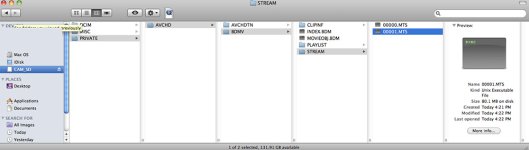
I think this is right, but my computer no longer recognizes these files. I can't even do a log and transfer(This was a no brainer the last time I used the camera).
40w1D.jpg

Also, yes I have formatted. This is the card I used to install the updates.

Where are the .AVI files?
 
Last edited:
For some reason I used to be able to import AVI files through Compressor and convert them to ProRes422. Maybe I am insane, but anyway. I figured it out, I can log and capture using FCP. I guess I will look for some other software to batch files through more efficiently than FCP. Soz for the stupid question guys.
 
The video itself is stored in the MTS files in the STREAM folder. Other files store timecode and other metadata. AVI is not a format used in AVCHD. FCP and any other app that supports AVCHD will be able to utilize the MTS files.
 
Back
Top