Clip Naming?

Crosby!

Active member
Looking to change the clip names from Clip #1, Clip #2, etc. to something else. I thought I'd read of a way to change the naming of clips but I can't seem to find it now. Is it doable? Was there something on the original CD (I didn't one with mine) that allowed for this? Thanks.
 
You can use the metadata to set a User Clip Name. However, be aware that it's not all that well supported by NLE's. Your clip will still be named 00000.mts as a filename, but if your NLE recognizes and uses the User Clip Name function, then it can show your custom clip name when you import it and work with it.
 
Too bad camera manufacturers did not go for a 201412111000 naming convention (yyyymmddhhmm).

Under the present recycling number protocol, you have to resort to a fairly elaborate process . . .

1. Pre-label your SD cards with at least "hhmm"
2. Always record to two SDs.
3. Offload one SD to a new empty Directory that has a name "yymmddhhmm"
4. Make the three sub-directories read-only (hopefully none of the NLEs try to do a writeback)
5. repeat 2-3-4 for the 2nd SD card to a new empty Directory on a different drive.
6, then, for overkill, burn a blu-ray for the project for today of one / both of directory contents.
7, back up your hard drives daily
 
You can use the metadata to set a User Clip Name. However, be aware that it's not all that well supported by NLE's. Your clip will still be named 00000.mts as a filename, but if your NLE recognizes and uses the User Clip Name function, then it can show your custom clip name when you import it and work with it.

Thanks, I'll look at it this weekend and see what happens -- using FCPX. I did try following the manual on setting up the metadata previously but the Meta Card Read was always greyed out. I re-read the manual and the Meta Data section in your book and see if I can find something that works.
 
Too bad camera manufacturers did not go for a 201412111000 naming convention (yyyymmddhhmm).

Under the present recycling number protocol, you have to resort to a fairly elaborate process . . .

1. Pre-label your SD cards with at least "hhmm"
2. Always record to two SDs.
3. Offload one SD to a new empty Directory that has a name "yymmddhhmm"
4. Make the three sub-directories read-only (hopefully none of the NLEs try to do a writeback)
5. repeat 2-3-4 for the 2nd SD card to a new empty Directory on a different drive.
6, then, for overkill, burn a blu-ray for the project for today of one / both of directory contents.
7, back up your hard drives daily

Thanks for the workflow suggestion. The HMC40 I'm using only has one SD card slot. Looking for a different naming from the camera on the card itself, if possible. I can (and have) renamed the clips to something more meaningful to me in the NLE (FCPX) but would like to save a step, if possible.
 
Ah, now I understand. My HMC40 didn't come with the CD I so I need to get the program to do the metadata setup on the SD cards on my computer.
 
Has anyone here downloaded and used Panasonic AJ-SK001G (the P2 Viewer http://pro-av.panasonic.net/en/sales_o/p2/p2viewerplus/)?

It seems rather pricey at $150.

Will it work on SD cards?

Is it possible this software would allow a person . . . .

1. to set up metadata info by typing up a text file in a form within the "P2 Viewer" software.
2. upload this to an SD card,
3. then following recording of an event
4. move the entire SD card content to a computer hard drive
5. and have some better way than 0000.mts, 0001.mts . . . . to identify what was on the card?


Ideally, what would be nice is as you put the SD card in a USB converter, start up the "viewer" software, see the metadata on the card (what project, date, etc) so that you could decrease the chances of mislabeling the content of an SD card.

This 0000.mts, 0001.mts nonsense is actually ridiculous. I can see news videographers going out and coming back with a day's worth of events across multiple SD cards. Lots of opportunities for errors the way many of these cams (not just Panasonic) have designed file "identification" systems.

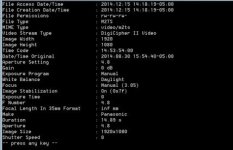
I found a free software program called exiftool(-k) that lets you view some of the SD card data
 

Attachments

  • panasonic sd.jpg
    panasonic sd.jpg
    19.2 KB · Views: 0
Last edited:
Back
Top