It's probably been discussed, but I am looking for a reasonably-priced clapper/dry erase slate with meaningful information, like fps and other info categories. What has worked for the pros here? The colored synch boards look inconsistent from brand to brand, and nonstandard. I think a simple black and white would work for me. Thoughts on what works for you?

Navigation
Install the app
How to install the app on iOS
Follow along with the video below to see how to install our site as a web app on your home screen.
Note: This feature may not be available in some browsers.
More options
You are using an out of date browser. It may not display this or other websites correctly.
You should upgrade or use an alternative browser.
You should upgrade or use an alternative browser.
clapper/slate
- Thread starter daplight
- Start date
I get my clappers from ebay.ca. If you're in the US, just go to eBay.com and do a search for clapperboard. Get an acrylic one and you should be fine. The prices are pretty cheap.
If you're not in the US, the local Amazon might be more expensive, so going to ebay and buying from a seller in Hong Kong or China will get you a good deal in terms of price.
If you're not in the US, the local Amazon might be more expensive, so going to ebay and buying from a seller in Hong Kong or China will get you a good deal in terms of price.
If you want a slate that will last, make sure you get one with the info engraved into the plastic, the painted on ones will eventually wear off.
Alan Gordon Enterprises Color Combo Scene Slate with Pouch and Marker
Alan Gordon Enterprises Color Combo Scene Slate with Pouch and Marker

THIS is a pretty solid slate.
HERE is a decent one at a lower cost. It used to be sold under Pearstone and has been discontinued from them, but this looks like the same one under another badge. I have had the nuts keeping the clapper on its hinges loosen on this model in the past, but a little tightening solution took care of that.
One note about dry-erase slate boards is that they get dirty quickly as the dry erase ink gets smudged easily and then mixed with oil from human skin. I much prefer to keep a roll of paper console tape and a Sharpie on hand. Keeping a selection of numbers and letters on the back of the board also makes changing scenes and takes a bit easier.
HERE is a decent one at a lower cost. It used to be sold under Pearstone and has been discontinued from them, but this looks like the same one under another badge. I have had the nuts keeping the clapper on its hinges loosen on this model in the past, but a little tightening solution took care of that.
One note about dry-erase slate boards is that they get dirty quickly as the dry erase ink gets smudged easily and then mixed with oil from human skin. I much prefer to keep a roll of paper console tape and a Sharpie on hand. Keeping a selection of numbers and letters on the back of the board also makes changing scenes and takes a bit easier.

ProfessorU
Veteran
I second the vote for the Pearstone Clapper/Slate (still available on Amazon). I also had the original nuts pop off, and replaced and glued them.
While having accurate colors is nice on a slate, it's far more important to have precise color. As long as you use the same slate for every shot, the accuracy of the slate colors is less important.
While having accurate colors is nice on a slate, it's far more important to have precise color. As long as you use the same slate for every shot, the accuracy of the slate colors is less important.

silyn
Well-known member
if you have an iPad you should at least take a look at MoviSlare app - http://www.movie-slate.com
Last edited:
if you have an iPad you should at least take a look at MoviSlare app - http://www.movie-slate.com
I have a couple of iPad slate apps. They're neat and all, but I find it much faster to change info on paper tape. It's a bit cumbersome to enter all the info on an iPad, and though the shot logging (available on some apps) is a handy feature it's also something that doesn't take much time by hand on a clipboard.
Many thanks to everyone for their input. I ordered the 'Pearstone' variation. Good idea on the engraved lettering. Last night on 60 Minutes I saw a feature on a Chinese tennis star with footage showing her shooting a commercial with chinese production team 'tail-slating' a take. Thought they didn't do, or need to do that anymore? Thanks again.
Last night on 60 Minutes I saw a feature on a Chinese tennis star with footage showing her shooting a commercial with chinese production team 'tail-slating' a take. Thought they didn't do, or need to do that anymore? Thanks again.
Tail slate still has its usefulness. If something is happening and you need to roll on it NOW so as not to miss the moment, skip the slate and put it at the end. Just be sure your PSM marks TS on the sound report so that the editor doesn't waste time trying to figure out where the sync mark is.
A note about tail slating: while the board should be upside down when the sticks are clapped, I have seen some folks instert the slate upside down through the entire process. I find this annoying in post. Make life easier on your editor and put the slate in right-side-up for a brief moment, then spin it upside down to slate.
Last edited:

CharlesPapert
Director of Photography
You may have noticed that big productions use custom slates (here is one of ours from Key & Peele):
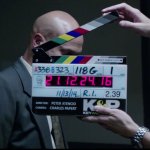
There are a number of companies who service the industry, I order them from customsyncslates.com. Clapper slates cost $75, this being a timecode faceplate it cost $45.
While it would probably seem a luxury for an indie production to spend money on a custom slate, if one has a small production company and is often turning over footage to clients, it may be something to consider for branding/promotional purposes. Having your company logo imprinted on the slate along with your name if you are the in-house DP is a small but lasting way to suggest professionalism both on set and via the footage. Using a p-touch for the director's name, the production etc. continues the "class act".
There are a number of companies who service the industry, I order them from customsyncslates.com. Clapper slates cost $75, this being a timecode faceplate it cost $45.
While it would probably seem a luxury for an indie production to spend money on a custom slate, if one has a small production company and is often turning over footage to clients, it may be something to consider for branding/promotional purposes. Having your company logo imprinted on the slate along with your name if you are the in-house DP is a small but lasting way to suggest professionalism both on set and via the footage. Using a p-touch for the director's name, the production etc. continues the "class act".

Why or how do you work with the timecode on the slate? Always wondered about this...
This is used when either the sound recorder, or both the sound recorder AND the camera utilise time code. An external time code generator (master clock) is used to sync the time codes of each recording device and the slate (though some TC slates serve as master clocks). This allows easy logging and sync of audio and footage in post using the TC flags for each shot.
In the world of DSLR and similar cameras, TC isn't an option for the camera and rarely is used with the second-system sound recorder. The dumb slate (plain, ol' slate board with no clock or electronics) is plenty for this kind of scenario.
And for camcorders like the Panasonic AG-AC90A, while the camera itself uses TC and can have user-set TC, there is no ability to jam-sync to an external clock, so the TC slate would not work with this kind of camera.

Steve House
Veteran
Here's another source ... http://donearlslates.com/index.html