FS5: Cinegamma - Slog

Hello everyone,

I'm new to the FS5 so looking for a tip:

If i wanted to shoot flat but not as flat as Slog2/3 but more in line with the F3 Slog or C300 C-log what Cinegamma would people recommend?

I have a shoot coming up and need to get as close as possible to C-Log etc.

At the moment I'm looking at Cinegamma 1, with Cine Matix, it appears the flattest out of all the cinegammas to me, but I'm no expert.

Thanks for help,

K:happy:
 
Welcome to DVX, I pleased to meet your acquaintance.

Well basically slog3 is practically identical to the same curve that the C300 uses (C-Log) and both of these are based on the cineon gamma curve.

Slog (let's call it slog1) on the F3 is Sony's original slog. Slog2 is the same gamma curve as slog1 except slog1 is exposed almost one stop brighter. Slog2 and Slog3 are not close to each other at all.

ScreenShot2014-02-15at65331PM_zps438a4526.jpg
 
Last edited:
Well basically slog3 is practically identical to the same curve that the C300 uses (C-Log) and both of these are based on the cineon gamma curve.

Boy that's not my experience. I think Slog3 is very similar to the Arri LogC ( I always get confused as to which is LogC and which is C-Log) . I find the Canon C-Log to be much more saturated and contrasty . Different animal.

Lenny
 
Last edited:
Yes me to, I find C-Log very close to Arri Log and they both grade well together.

My observations are that Slog2/3 are very very different, hence my question as to a closer PP.
 
StarC I think your getting Canon C log and Arri log C mixed but..the 8bit C300 so called log is about the same as Sony Hypergamma 7/8.. Arri Log C is almost the same as Slog 3 .. or well the other way round.. which was itself lifted from Kodak Cineon..
 
Yes you are right guys, Canon is a bit of the oddball between ARRI Log-C and Sony Slog3.

Karl if you really want to end up with Canon C Log you might be able to use Ben Turley's LUT CALC program to create a 3D LUT for post to convert your slog3 from the FS5 to Canon C Log which you seem to like more.

The Cinegammas hold less dynamic range than Slog2/3 so I would be inclined to shoot with the log format on Sony over the cinegammas, but that's just me.
 
Slog2/3 are more filmic than cinegammas but are not what the production/director require. If my Alexa was free i'd be shooting with that ;) unfortunately its not so I need to get a Canon C-Log look from my new FS5.
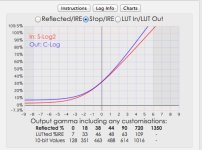
Thanks for the tip star central regarding the LUT CALC, i have no idea how to use it but i'll take a look.

I just thought someone out there in the world might have already tried to match a FS5/7 to Canon log and thought id try here :)
 
Hi Karl,

just to clear up the provenance / relationship of various log flavours.

All logs tend to be referred to as 'Cineon derived' in marketing materials. As far as I can tell this just means taking the notion of spreading information evenly stop to stop above mid gray (ie log).

Cineon itself was derived from scanning film, so encompassed the kind of range that could be expected from filmstock / scanner combinations of the time.

S-Log3, LogC (Arri), Canon C-Log2 and Panasonic V-Log are all very close to each other in terms of response stop-to-stop.

LogC, S-Log3 and C-Log2 are very, very similar to each other in terms of response and all place black at 10-bit 95. LogC and C-Log2 in particular are extremely close in response. 10-bit 95 is also the value of black in Cineon.

In contrast terms Panasonic V-Log is very like Arri LogC overexposed about half a stop. The big difference is that it places black at 10-bit 128. This could cause issues interchanging 1D LUTs or looks.

The log curves mentioned so far are intended for passing on information as efficiently as possible (at 10-bits or deeper). S-Log, S-Log2 and C-Log are both true log curves, but with additions to the data efficiency goal.

S-Log and S-Log2 are numerically identical, the difference being that S-Log2 is the same as S-Log underexposed half a stop, ie giving half a stop more headroom. Sony developed these to give that even distribution in the highlights, but be a bit closer to conventional gamma below mid gray. On a monitor this gives the sense of thicker blacks, looks a bit more 'user friendly' without an MLUT applied and keeps the inherent noise of the system hidden in a way that a more even distribution (LogC, S-Log3) does not. The actual amount of noise is consistent for a given camera and sensor. S-Log / S-Log2 black is 10-bit 90.

The downside of S-Log and S-Log2 is that by reducing the data spread below mid gray, increasing ISO in post (CineEI) is going to be less successful than with a curve spreading low data more evenly. As the post adjustment of ISO through metadata is Sony's preferred approach, S-Log3 has been pushed much more heavily on the F5, F55 and FS7.

On an FS5 CineEI doesn't exist (as far as I understand) - I don't think that the codecs are amenable to it - so ISO is baked-in and the choice of S-Log2 and S-Log3 is more a matter of personal taste.

The Canon C300mkI is an 8-bit camera. All of the logs so far have been designed to work well with 10-bit capture, with deeper bit depths than that offering more flexibility. The difference between 10-bit and 8-bit is huge. 8-bit is more than enough to fool the eye (why it has become standard for broadcast and JPEGs), but that is based upon the whole data range being used to fill the limited dynamic range of sRGB or Rec709. The point about log recording though is to record much wider dynamic ranges than that, an as such 8-bit starts to fall apart fast.

In order to work around that, C-Log pulls several tricks. Black is relatively high (8-bit 32, 10-bit 128), but C-Log uses the whole of extended range (above 100% IRE). ISO shifts are baked in, hence you only get the full dynamic range at native ISO. Above and below that data is clipped. As with S-Log/S-Log2, the 'loggy' response of even distribution is emphasised above mid gray, with the shadows closer to conventional gamma and a relatively dark mid gray. Lastly, the dynamic range is relatively limited - about 11 1/2 - 12 stops with the bottom few little more than decorative. To get any more dynamic range, Canon needed a new curve, so moved towards the Arri LogC approach with C-Log2.

It is relatively easy to convert from one log curve to another (or to conventional gamma) using a 1D LUT. The big differentiator between cameras and setups is in the colourspace or gamut, the thing which 3D LUTs add. S-Log3 and LogC may be very similar, but S-Gamut3.cine and Arri Wide Gamut are less so. That's where ACES or mathematically-derived LUTs can help.

The C300mkI's 8-bittiness throws in one last curveball here. 8-bit is way too small for a combination of wide dynamic range and wide gamut, so instead Canon made the CPLock gamut Rec709-based. That's why Canon's C300 LUTs are all 1D. A 'purist' Rec709 gamut doesn't tend to look great and clips fairly easily, so Canon tweaked the Rec709 gamut in the C300. Fine for nice pictures, a total headache if you want to dial it out or mimic it. The C300mkI ACES IDT includes a really complicated, ugly cubic volume calculation where all the others so far mentioned are a simple linear-space 3x3 matrix. The C500 and C300mkII include 'Canon Cinema Gamut' which is a much tidier, matrix based gamut but really needs 10-bit or deeper.

Ben

NB I've written an app called LUTCalc which can be used to build LUTs or get info such as exposure levels, and so have spent far too much time pawing over the technical documentation for all these logs! :)
 
Last edited:
Karl,

if you do try knocking an MLUT up in LUTCalc, I've been told by a couple of camera people that they have got a 'close enough' match to a C300mkI using Canon Cinema Gamut as the output gamut, but then increasing the saturation a little using the 'ASC-CDL' option. I don't own a C300 myself to confirm this.

I have included a couple of 'Canon CP IDT' options which are derived from inverting Canon's ACES IDTs. One of the original purposes of LUTCalc was that producers were familiar with the C300 but not the F5/F55, so I wanted to be able to offer my Sony as a drop-in for every job. The upshot is that to me the Canon CP IDT options don't seem quite right and are the one bit of LUTCalc I've never quite been happy with. These days, most people are very happy to shoot my Sony to it's best and the C300mkII is out with more sensible log, but every now and then I still go back and take another stab at C300mkI CP Lock. ;-)

What I'm saying is, if you have both a Sony and a Canon, give them a go and compare, if not either a 1D log conversion or trying the Canon Cinema Gamut option might be a safer bet,

Ben
 
Thanks Ben for all that, Ill digest it all as I can.

I purchased yr LUTCalc today and will have a play to see what look I can get closest to Canon C-log.

The reason Canon C-Log is preferred for this Production / Director is that C-Log needs very little grading and makes skin tones look very nice. But we only have access and funds for the FS5.

BTW - LUTCal is a greap app :) Much appreciated.
 
Karl,

if you do try knocking an MLUT up in LUTCalc, I've been told by a couple of camera people that they have got a 'close enough' match to a C300mkI using Canon Cinema Gamut as the output gamut, but then increasing the saturation a little using the 'ASC-CDL' option. I don't own a C300 myself to confirm this.

I have included a couple of 'Canon CP IDT' options which are derived from inverting Canon's ACES IDTs. One of the original purposes of LUTCalc was that producers were familiar with the C300 but not the F5/F55, so I wanted to be able to offer my Sony as a drop-in for every job. The upshot is that to me the Canon CP IDT options don't seem quite right and are the one bit of LUTCalc I've never quite been happy with. These days, most people are very happy to shoot my Sony to it's best and the C300mkII is out with more sensible log, but every now and then I still go back and take another stab at C300mkI CP Lock. ;-)

What I'm saying is, if you have both a Sony and a Canon, give them a go and compare, if not either a 1D log conversion or trying the Canon Cinema Gamut option might be a safer bet,

Ben

Do u suggest to shoot in Slog2 or 3 for this?
 
As I understand it, at 4k the FS5 XAVC-L codec is 8-bit, with a 10-bit option at HD. If shooting 10-bit, either S-Log2 or S-Log3 should be fine, I'd say go for what you feel more comfortable with. Just make sure that any LUT you use is setup for your choice of log curve / colour space. I'm very much an S-Log3/S-Gamut3.cine user myself (on Fs7 / F5 and F55, I haven't worked with the FS5 yet).

If you are shooting 8-bit - if you really, really must - S-Log2 would be my suggestion. Sacrificing shadow data for a greater highlight spread are a couple of tricks Canon C-Log itself uses to work around the limitations of 8-bit.

Ben
 
"The downside of S-Log and S-Log3 is that by reducing the data spread below mid gray, increasing ISO in post (CineEI) is going to be less successful than with a curve spreading low data more easily. As the post adjustment of ISO through metadata is Sony's preferred approach, S-Log3 has been pushed much more heavily on the F5, F55 and FS7."

Ben in the above.. should the top line be S-log and S-log 2...( rather than Slog-3..) hasn't Slog-3 got more data below mid grey..
 
Karl,

ahh yes, you are after an in-camera setup. Gamma-wise, you are right, S-Log2 is the closer option to Canon C-Log (same mid gray, slightly lower contrast highlights to fit six stops rather than five and a bit in headroom, both go all the way in extended range).

In post, the thing to be aware of is that C-Log's black level is rather higher than S-Log2. The consequence would be that adjustments designed for C-Log when applied to S-Log2 will tend to crush blacks rather heavily (S-Log2 hits 7% IRE - C-Log's black - at about 3 and a bit stops under). As long as they account for that blakc level, it should feel fairly familiar.

The other thing is that the colourspace generally associated with S-Log2 - S-Gamut - is a wide gamut with primaries which make it rather different to Rec709. It might be worth customising the picture profile to use a different matrix (eg ITU709) to reduce the colour fiddling involved,

Ben
 
Thanks heaps Ben,

Blacks are always brought down a bit in post anyways so Slog2 is looking very close to a in-camera set up. I'll try matrix 709 or Pro and see if this gets me nice skin tones etc.

K
 
I tried matching an FS7 to a C300 shooting C-Log , by making a LUT in LUTCalc to transform Slog 3 to C-Log. When I got the cameras together, the contrast looked pretty close, but the saturation was way down on the Sony and the color itself looked different. I didn't have a chance to make a better LUT when I had both cameras together unfortunately. I might have left the FS7's LUT at slog3.cine though. Next time I'll try the ITU709 . It looked like a promising idea though and the client said they had no problem matching in post, so I think I helped them along with the curve .
Just need sometime with both cameras. I'm surprised no one has come up with a solution yet as this is a common situation with all those C300's out there. Would be nice to be able to say - "Oh yeah I can match that with a LUT"
 
Im experimenting with Cine 4 & lifting Gamma Low/Medium +7, Color Pro, Phase +1 & Detail -7 and getting closish.

My aim is to not have to apply a LUT in post, just slight correction as the end production calls for a flat kind of look like C-Log.
 
Back
Top