David W. Richardson
Chapelgrove Films
Okay, put this in the category of 'Wish List'. My church has asked me to look into the feasibility of doing this, and the costs involved.
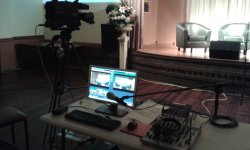
Currently we record our Sunday morning service -- video and audio -- using a single camcorder (Canon HF R500) and an audio mixer (Soundcraft EPM-8). The edited video is uploaded to the church's website. Also, DVDs are burned and distributed to our shut-in members.
During the course of the service I have to operate the camera and also handle the audio levels. Previously they would just set the audio levels and pretty much leave them alone throughout the service. However, I noticed problems with that. For instance, when the preacher is delivering his sermon, rustling sounds can be heard from the choir through their mics. So audio control is fluid during the service now, in order to minimize distracting noise issues.
As it stands right now, the videos are pretty dull, visually speaking. Lots of long locked shots. We do zoom in on the preacher for a tighter shot during the sermon, and a couple of other times. But mostly it's long locked shots.
They're wanting to see if it's feasible to do something along the lines of a 3-camera, live-switching kind of setup. I am not knowledgeable in that area, but I suspect what would be needed is the following:
- 3 camcorders, which can be started/stopped/zoomed remotely, preferably through the mixer interface
- 3 wall-attached mounts which can be panned/tilted remotely
- an A/V mixer, or just a video mixer - we could record sound separately and mix it with the video in post
- something to properly record the mixed video and audio from the A/V mixer
- some way to connect everything together, either via cabling or wirelessly
- some kind of monitor to display the video from all 3 cameras, as well as the output video (for mixing purposes)
Have I forgotten anything?
I know it would, in some ways, simplify things if we just recorded from all 3 camcorders and then did the mix in editing, rather than trying to do a video mix on-the-fly. I'm sure that's a skill earned after a long time of training and practice. Controlling 3 camcorders alone is likely going to be challenging, even without having to worry about the audio stuff.
However, I am the only person there who is capable of doing any kind of video editing. Doing the mix in post would greatly lengthen the amount of time it takes to get the finished video uploaded, and anytime I cannot be there to do the editing, they'll be up the creek. Of course, we can do that in the beginning if we have to build this system a little bit at the time, for financial reasons. But I think the ultimate goal is to not only be able to record the 3-camera mix for uploading and distribution, but maybe even to stream the service live. So eventually that's going to require on-the-fly video mixing.
What we do right now is run all of the mics and other audio inputs through the Soundcraft mixer, mix them appropriately, and output them (via an attenuated cable) to the mic input on the Canon camcorder. This gives us a well-mixed audio track on the video in the camera. When it's done, all I have to do is pull the video files from the card into Vegas, trim them, and change the words on a couple of titles that overlay the beginning. Then I render it out and upload it.
We also output the video and audio from the camcorder to a DVD recorder, which makes a master DVD that is currently what is copied and distributed to the shut-ins. I could, of course, make a DVD that's identical to the uploaded video, complete with trimming and titles. But doing it the way they do, they are able to get their DVD copies done very shortly after the service is over, so they can deliver them to the shut-ins within hours, so they will probably continue to do that. And I am able to do the edit and get the video uploaded to their website within a few hours as well.
With the new setup, I suppose we would feed the audio mixer output into the A/V mixer. So really, audio mixing isn't strictly required with an A/V mixer, other than being able to port the mixed audio track from our current mixer into the A/V mixer. So if there's a less expensive option that solely mixes video, that would work.
Can you give me any recommendations for the equipment? Whatever we do, we're going to have to find the money for it. I'm not saying "just tell me the cheapest thing", but we're not loaded either.
I appreciate all your excellent advice!
Currently we record our Sunday morning service -- video and audio -- using a single camcorder (Canon HF R500) and an audio mixer (Soundcraft EPM-8). The edited video is uploaded to the church's website. Also, DVDs are burned and distributed to our shut-in members.
During the course of the service I have to operate the camera and also handle the audio levels. Previously they would just set the audio levels and pretty much leave them alone throughout the service. However, I noticed problems with that. For instance, when the preacher is delivering his sermon, rustling sounds can be heard from the choir through their mics. So audio control is fluid during the service now, in order to minimize distracting noise issues.
As it stands right now, the videos are pretty dull, visually speaking. Lots of long locked shots. We do zoom in on the preacher for a tighter shot during the sermon, and a couple of other times. But mostly it's long locked shots.
They're wanting to see if it's feasible to do something along the lines of a 3-camera, live-switching kind of setup. I am not knowledgeable in that area, but I suspect what would be needed is the following:
- 3 camcorders, which can be started/stopped/zoomed remotely, preferably through the mixer interface
- 3 wall-attached mounts which can be panned/tilted remotely
- an A/V mixer, or just a video mixer - we could record sound separately and mix it with the video in post
- something to properly record the mixed video and audio from the A/V mixer
- some way to connect everything together, either via cabling or wirelessly
- some kind of monitor to display the video from all 3 cameras, as well as the output video (for mixing purposes)
Have I forgotten anything?
I know it would, in some ways, simplify things if we just recorded from all 3 camcorders and then did the mix in editing, rather than trying to do a video mix on-the-fly. I'm sure that's a skill earned after a long time of training and practice. Controlling 3 camcorders alone is likely going to be challenging, even without having to worry about the audio stuff.
However, I am the only person there who is capable of doing any kind of video editing. Doing the mix in post would greatly lengthen the amount of time it takes to get the finished video uploaded, and anytime I cannot be there to do the editing, they'll be up the creek. Of course, we can do that in the beginning if we have to build this system a little bit at the time, for financial reasons. But I think the ultimate goal is to not only be able to record the 3-camera mix for uploading and distribution, but maybe even to stream the service live. So eventually that's going to require on-the-fly video mixing.
What we do right now is run all of the mics and other audio inputs through the Soundcraft mixer, mix them appropriately, and output them (via an attenuated cable) to the mic input on the Canon camcorder. This gives us a well-mixed audio track on the video in the camera. When it's done, all I have to do is pull the video files from the card into Vegas, trim them, and change the words on a couple of titles that overlay the beginning. Then I render it out and upload it.
We also output the video and audio from the camcorder to a DVD recorder, which makes a master DVD that is currently what is copied and distributed to the shut-ins. I could, of course, make a DVD that's identical to the uploaded video, complete with trimming and titles. But doing it the way they do, they are able to get their DVD copies done very shortly after the service is over, so they can deliver them to the shut-ins within hours, so they will probably continue to do that. And I am able to do the edit and get the video uploaded to their website within a few hours as well.
With the new setup, I suppose we would feed the audio mixer output into the A/V mixer. So really, audio mixing isn't strictly required with an A/V mixer, other than being able to port the mixed audio track from our current mixer into the A/V mixer. So if there's a less expensive option that solely mixes video, that would work.
Can you give me any recommendations for the equipment? Whatever we do, we're going to have to find the money for it. I'm not saying "just tell me the cheapest thing", but we're not loaded either.
I appreciate all your excellent advice!