Choppy panning -1080 24p

I didn't see where the Tessive system reduces strobing from fast panning. Would be nice to see a before and after with the same camera and fast pan.


Go to 3:10 to really see the difference. It's just easier on your eye when there's constant motion of a fixed pattern, pretty good. The motion blur dissolves beautifully and there's no pattern stacatto.
 
Yeah it works great for the things it makes claims for but I still see strobing in the background. Which is the real subject of this thread.
 
If you pause at 3:36 you'll see that the 180 degree shutter has more defined patterns on the fence while the Tessive Filter is blurred out.

pattern.png
 
I see that the fence is blurred out, but when it comes to motion strobe, it's not the near objects which are the worst offenders. It's the mid- to long-range stuff which strobes the worst, and in this case it's the trees and the mountains in the background. Pause on any frame and you'll see they're rendered exactly the same in both.
 
The filter seems to smooth out objects that blur a lot, the mountains at a distance won't move enough to be affected considerably it I presume. Then I think the problem is not the "hard-edge" motion blur causing stacatto (something I tend to notice more) but the inherent characteristic of the frame rate.

I don't know the video frame rate but I'm viewing this on a 60hz monitor, if it's 24p it's bound to have some strobe/stutter IIRC. I'm not sure a 120hz monitor (with no motion interpolation BS) would be better at that, never tested myself.
 
When you do a pan, it's the background stuff which moves the most. Look at the Tessive stuff at 2:36 -- the background is strobing horribly, every bit as bad as the 180-degree shutter stuff.
 
Well, not as much as something passing in front of the lens (like the fence) and the other examples show clearly how it smoothes out motion blur. In the image that I linked I can clearly perceive the folliage silhouette against the sky in the 180 degree example while in the Tessive it's smoother. How it doesn't affect the far background strobing is beyond me.
 
*I prefere movement without filter cause if there is too much blur then it gets this camcorder ugly dreamy amateur look.
 
Well, not as much as something passing in front of the lens (like the fence)

No, it moves more. On a lateral dolly slide, nearer objects may move more, but not on a pan. It's just geometry.

Besides, you shouldn't have a fence in front of your shot on a regular basis.


How it doesn't affect the far background strobing is beyond me.

Because of the frame rate.
 
with tessive filter BG moves smoother than without it on shots with bike, still strobes but less cause theres more blur and contrast difference isnt so jarring.
 
Choppy panning and the relationship of shutter behavior to visual frequency

Choppy panning and the relationship of shutter behavior to visual frequency

Hello everyone,

This has been a fascinating thread to follow, and I'm hoping I can help. One of the difficulties in looking at footage is to quantitatively compare the visual differences people see. Fortunately, cinematography is the fusion of art and science, so putting some numbers to things can be very helpful. The most useful way to discuss motion representation in motion picture cameras is to talk about the frequency response, which is entirely determined by the shutter. The second effect is aliasing, which is entirely determined by the frame rate. The interplay between these two will determine the overall rendering of motion in a motion picture camera.

So some quick answers: The Panasonic running at 24 frames per second with a 180 degree shutter will have essentially the exact same motion representation (frequency response and aliasing) as any other camera, film or digital, with those same parameters. The only caveat there is that film cameras do have a slight penumbral blur with the shutter (it fades in and out just slightly because it is out of focus.) This will very slightly soften the higher (aliasing) frequencies.

The "judder" is actually temporal aliasing. The real world doesn't judder when you move your head. The fundamental frequency of the judder is the same as the frame rate (so 24 Hz here). A 360 degree shutter, such as a video camera typically uses, will suppress the 24 Hz fundamental, but it has lots of higher harmonics, so you'll still have undesirable artifacts.

The Tessive Time Filter does almost completely eliminate temporal aliasing, so the judder is reduced, but the 24 Hz fundamental aliasing frequency isn't entirely suppressed. It's just much better than a 180 degree shutter in this regard, and eliminates effectively all of the higher harmonics in the aliasing band. A 360 degree shutter actually reduces that particular frequency better, but the loss to the overall look is usually undesirable. It's a very bad trade.

The Time Filter yields footage with substantially different frequency response compared to video cameras with 360 degree shutters. 360 degree shutters lose a great deal of contrast in the "base band", the frequency band which the camera can actually reproduce. That's why they make things look smeary. The Time Filter system has higher frequency response in the base band than even a 180 degree shutter. It just eliminates most of the aliasing noise above Nyquist (12 Hz for 24 fps).

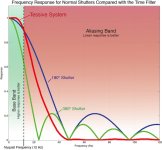
The very best way to quantify these effects is to look at the following graph:
MTF Curves.jpg
In this graph, the green area is the base band, or the region that can be represented by a 24fps camera. The red region is the aliasing band. Any real-world frequency in this band will become noise in the image. The fundamental panning "judder" frequency is 24Hz. The goal is to design a shutter that preserves the base band and suppresses the aliasing band. The shape of the curve is entirely determined by how the shutter works, and nothing else. Typical "square wave" shutters always make that bouncy (sinc function) curve, and the length of the shutter just stretches or compresses that curve. The Tessive Time Filter isn't a square wave, and has been mathematically optimized to create a better frequency response.

This is, I believe, the best way to understand judder in motion picture imaging.

Someone pointed out, correctly, that YouTube is really not the best way to see the effects of these things. We have a free Blu-ray disc available with the footage if anyone is interested in it. Just contact us and we'll mail one out to you.

Also, it was noted that having a chain-link fence in front of your subject isn't a very natural shot to do. Agreed! The point of that particular shot was to show that even simple things can cause strange artifacts in a shot. I don't think anyone would argue that the artifacts produced by panning across a chain-link fence with a 180 degree shutter are realistic. That's an error in imaging that the Time Filter corrects. We do have some very interesting footage from an independent test conducted at Shepperton Studios that we can share with you. It shows the effect of eliminating aliasing on human motion.
http://www.tessive.com/active/martial-arts-test

Anyway, sorry for the super-long post. This is obviously a topic that I spend a lot of time (too much time?) thinking about.

Thanks!

Tony Davis
CEO, Tessive
www.tessive.com

P.S. If you're in New York and are planning on attending Cine Gear Expo next weekend, please stop by our booth where we'll be demonstrating the Time Filter live. Also, I'll be giving a seminar on this topic at Cine Gear on Saturday the 24th at 3:30pm.
 
Sorry, but I don't see it in the video. The background is strobing just as much.
*I see it, i dont know why you dont.Maybe ask someone at your house to look at both examples and tell you which one is smoother.
---
Hey Tony threads like this "24fps too strobey" is something that comes up about once per 2 months on forums like this, there was more discussions about this in the past but i cant find these threads now, anyway i didnt thought what you guys doing is even possible.
Is it possible to control actual shutter speed or is it just for one 180 degree option, can you apply faster shutter speeds with it ? *Sometimes i find too much motion blur to look more like camcorder not film camera.
 
Last edited:
Back
Top