Chinese 2K RAW S35 Cinema Camera, 8000 dollars

Kodak sensor quad issue and dark masking

Kodak sensor quad issue and dark masking

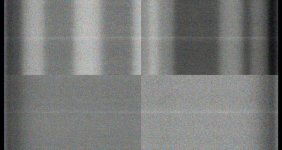
Someone from Germany sent me some black frames said to have been shot in Acam dII (tm) which I processed to show the issue with Kodak quad readout sensors, and how my software can be used to mask the artifacts that their cameras seems not to. I have attached these in reduced size so you can see what I mean. digital Bolex (tm) should understand this issue while they have time to deal with it before their camera design is final. Its good news that they will try to support full sensor mode, Arri Standard 35mm lenses could be used with an Arri to C-mount adapter maybe.

I also made some AVI to look at their moving pattern noise but those are too large to upload here now as they are uncompressed. Those faint bands you see in the masked image going side to side are mostly the moving patten noise that flickers around, probably due to digital noise in the camera not being shielded or bypassed enough on the power rails, although some may be internal to some chips because of the single power pin and some internal crosstalk etc.

Being able to mask the FPN improves the ISO range of any camera, I have that built into my de-Bayer program for processing the KineRAW (tm) tests.

Kinefinity (tm) tells me that they will be shooting some more S35 tests in a few hours using the new parts they ordered so things seem to be moving forward.
 

Attachments
  • F_0db_without_dark_masking_A1.jpg
    F_0db_without_dark_masking_A1.jpg
    100.1 KB · Views: 0
  • F_0db_with_dark_masking_A1.jpg
    F_0db_with_dark_masking_A1.jpg
    97.3 KB · Views: 0
Last edited:
I've got samples people have shot with the Acam dII (tm) with various lenses and lateral chromatic aberration and other issues show up that impact the resolution in the corners of the frame. Its a bit odd to say you have a 2K camera if the lens does not focus better than 0.25K at high MTF polychromatic as the point of more pixels is to resolve something using them.

Another issue is the negative spherical aberration and negative curvature of field caused by the glass thickness of the OLPF making the corners focus at a different point than the center, with any given lens the angle of the rays is greater with a larger sensor, although the bigger pixels in part offset that by having a lower spatial resolution requirement.

Just having light over the frame does not mean that you have single pixel resolution at high MTF equal from center to corner.
 
Thanks again for the posts Dan. Based on the specs and your early footy, I'm still watching this group of cams for sure! I have checked in on the recent Canon announcements (and yes as it was implied earlier in this thread, that's what I was referring to in my prior post), I'm watching the Sony stuff too.....so far so good for KineRAW! I'm going to temper my patience for delivery and anticipate a Fall 2012 delivery. Hopefully it will come sooner (as they have planned as much). Thanks again Dan!
 
S35 update

S35 update

I'm still watching this group of cams for sure!

I got some sample KineRAW-S35 (tm) (second prototype) DNG today using the re-designed OLPF and the results look very good, I ran them through my full finish processing and there is fine detail and no obvious noticeable aliasing or moire on normal subjects like brick wall, telephone wires, metal mesh on windows, a guy with a striped shirt etc. with that processing on first glance (with any digital image if you over sharpen aliasing will show up no matter what camera is used for the most part) (I'm just looking at single frames, to be sure one would need to make an uncompressed AVI and see it play at speed to look for runners and such). What's more the noise is just about invisible at minimum ISO, and "zero" compression artifacts.

Colors look good to and lots of shadow detail.

They will have to decide if the results are OK, if so then maybe shooting can start to make some demos before too long.

After so many years of work, its great to see something look that good.
 
Last edited:
I got some sample KineRAW-S35 (tm) (second prototype) DNG today using the re-designed OLPF and the results look very good, I ran them through my full finish processing and there is fine detail and no obvious noticeable aliasing or moire on normal subjects like brick wall, telephone wires, metal mesh on windows, a guy with a striped shirt etc. with that processing on first glance (with any digital image if you over sharpen aliasing will show up no matter what camera is used for the most part) (I'm just looking at single frames, to be sure one would need to make an uncompressed AVI and see it play at speed to look for runners and such). What's more the noise is just about invisible at minimum ISO, and "zero" compression artifacts.

Colors look good to and lots of shadow detail.

They will have to decide if the results are OK, if so then maybe shooting can start to make some demos before too long.

After so many years of work, its great to see something look that good.

Great to hear! The good news just keep coming. Do you think they're going to let you post some of said S35 footy anytime soon? That would be simply TERRIFIC! (First time I've ever used that word...not sure I'll do it again, lol)
 
So far it looks like Chinese "junk" manufacturer will be able to develop and produce 4K cameras
with solid rich colorspace and onborad raw recording with afordable pricetag,
quite earlier than really huge and famous Japan companies with their elegantly designed cameras,
which record only to paper thin junky 8 bit colorspace!!
... Not to mention their insane rocket high pricestags.

:thumbsup::evil:

I love this this development.
 
I got an email back today about the test conversions I sent to them and they seem positive on the results for the most part.

They asked for suggestions on additional test subjects and I suggested just going out and making some grab shots as any camera can be made to show some issues on test charts and the ones that give the best test chart results may not give the best looking results on real subjects, so you do need to do both, more so because in a Digital Cinema Camera the goal is to capture a wide dynamic range like you would with movie film, so you need to see how the sensor reacts to specular reflections and under-exposure levels.

Last I heard the plan was to use the two S35b prototypes to shoot some demo footage and lens test reels etc. and hopefully have some footage to show when that can be worked out. As they are taking the camera outdoors to shoot with they may have it put together, last photo I saw some of the panels were off for internal access to make adjustments maybe?

We still need to see what the results are with various lenses and light levels, but they did a dynamic range test from +1 to -14 stops and if the exposures were done right its the best one I've seen so far. I asked them to calibrate the reference level at minimum ISO for low contrast subjects and then count from there. I want to re-do that test before I talk about the results, but next time its going to have to go to -16 stops.

To me $8000 to $6000 is a lot of money, but from what I have seen in these last tests I think they are getting on the right track with the optics company doing a two week "crash program" to supply a new design for the OLPF filter, that's phone call to delivery of the custom optical unit in sample quality.
 
Hi Dan

Are you testing both CinemaDNG and Cineform Raw from the S35b camera? If so can you please post video or a frame of each when you've completed the testing? :thumbsup:
 
Cineform (tm)

Cineform (tm)

If so can you please post video or a frame of each when you've completed the testing?
You would have to ask Kinefinitty.com (tm) about when they would have Cineform (tm) samples. Cineform (tm) is a stream file I think so samples would probably be in the form of several seconds long shot rather than a single frame. I don't have the Cineform (tm) programs at this time, as I'm just processing with my free de-Bayer program using CinemaDNG. The KineRAW-S8p (tm) (prootype) just records CinemaDNG (tm) to make it smaller, lighter, and lower cost. It seems that Cineform (tm) has a converter that can convert DNG to Cineform (tm) and another to convert Cineform (tm) to DNG, so if you are interested in seeing what losses if any you might observe, you can just do the DNG to Cineform to DNG conversion using the Acam dII (tm) sample DNG or other DNG you have from DSLR conversion in the Adobe (tm) RAW converter program etc. There is a DPX Cineform (tm) frame based option for Cineform (tm) file conversion utilities I think, but that's something done after de-Bayer by the end user maybe?
 
What's going on at Kinefinity (tm) today...

What's going on at Kinefinity (tm) today...

Hey Dan, any updates? Thanks! :)
I got a bunch of S35 test subject frames from ISO 80 to 800 today shoot using the re-designed OLPF to make monitoring look files from and check things. They went out and shot some grab shots, but they used the other camera with the older OLPF a few days ago (?) the image tones and color look very good not like any video camera I have seen, but since they did not use the new OLPF I cannot tell quite what the ultimate image quality will be. Based on the other outdoor frames they shot with the new re-designed OLPF the prospects look good. Shooting side-by-side with Vision III would be an interesting experiment. I'm finishing up the KineRAW-S8p (tm) hand held lens test reel for my Kowa 3.5mm f/2.4 HR megapixel lens, its mostly barrel distortion free. I did not shoot with the Schneider Nizo Ultrawide III on yet but I did look in the viewfinder and it might work with it on, that makes it a rectilinear about 2mm. People watching this new video will have to have a fast computer so as not to confuse the media-player playback artifacts with jell-o and skew from the computer, playing back on my Brother's 8 core 3.6GHz computer (?) after playing a few times so the HDD was cashed in DRAM it looks smooth for the most part other than my shaky hand held work because its a bit awkward to have the 7" LCD monitor on top when shooting hand held, I'll have to make some block for side mounting, and maybe use the Konvas Body pod, if my Brother can find where he put it. With the body pod things should work better maybe as my arm was a bit sore after walking around for three hours on three consecutive days each day with the camera held on an old Bolex pistol grip made for the electric motor model that I got on ebay. Someone with stronger arms would not have an issue, but I'm a bit out of shape as I've been on the computer just about 24/7 the last four years... I hope to put the new hand held video on Vimeo as soon as I get the OK from Kinefinity (tm) and move on to shooting the next ones. Anyway, as far as I can see things are moving forward. You can email them with your thoughts and questions, but they are busy so don't get too concerned if you don't get a reply ASAP, if its something important and they don't get back in a few weeks let me know and I can maybe mention your interest to them etc.
 
Last edited:
Hand held KineRAW-S8p (tm) video on Vimeo now

Hand held KineRAW-S8p (tm) video on Vimeo now

I posted the fourth Vimeo video, D1, showing some hand held footage made with the KineRAW-S8p (tm), you can read my text on that video's page for more information about how it was done and the 1920x817 crop from 1920x1440 shooting mode used.


http://vimeo.com/40921094
 
Yeah, this looked very nice indeed. Loved the saturated look. I did notice a little skew in a couple of places, which I'm sure weren't play back related, but nothing show stopping. There was also a ghosting effect on the shot of the guys feet going up the steps. Only points I could nitpick really. This is a very interesting camera.
 
The 'look'

The 'look'

Yeah, this looked very nice indeed. Loved the saturated look. I did notice a little skew in a couple of places, which I'm sure weren't play back related, but nothing show stopping. There was also a ghosting effect on the shot of the guys feet going up the steps. Only points I could nitpick really. This is a very interesting camera.

The ghosting seems to be due to the MPEG4v2 compression as I do not see it in the uncompressed frames, its also noticeable on the plant with the saw edge and some other places. I send a sample of some other footage with a passing cable car to Kinefinity (tm) and they emailed be back a screen shot showing an 'after ghost' of the cable car on the building behind it thinking it was a flaw in my programs, but I found the original frame I made the compressed AVI with and there was noting there, so it was a compression issue it seems at least in that case, there have been others like in the C1 video when the scrolling titles pass by in the compressed version little white spots are left behind. It may look different on a MAC rather than a PC or with various media players.

The 3.5mm lens is wide angle so just my twisting the camera a bit can cause a sort of radial skew that is unrelated to the shutter. Also there are motion estimation issues in the MPEG4v2 compression that make their own sort of jell-o that is not in the original uncompressed frames maybe. Motion estimation is used to reduce bandwidth in some kinds of compression, but if you jiggle the camera, even a film camera, the motion estimation makes things slide around.

Also the monitor updates in a rolling fashion, and if the update speed is not fast enough it can skip a field so that can make the motion jump. You need a fast computer updating at 120fps. Or better yet making an uncompressed DI to 35mm print and watching the uncompressed playback from a 35mm print projected in a movie projector on a movie screen, so that any rolling issues are confined to just the camera.

Try setting the viewer to 50% or half size image and see if the motion issues change a bit. You may see aliasing at 50% size though.

There may be a little skew the shutter is at about 56% readout time in the 1920x817 mode, in the 72fps mode it may be closer to 30% for 24fps skip frame use. For SD end use like DVD the 144fps mode may reduce that to about 15% perhaps (?).

The production model may use a sensor that is about twice as fast, so what small skew you see, if any, could be cut in half. If a mechanical shutter is also included in the production model there would be zero skew or jell-o from the rolling shutter because the readout would be done when the shutter is closed so it would look like a movie camera to a larger extent used that way.

==

I got some more samples of grab shots along with the last batch of calibration frames from the KineRAW-S35 (tm) and the results with the new OLPF filter design seem to my eye much better, it seems to be getting to the level it needs to be to support the asking price. Its great to see such results after so many years of work on the camera design. I wonder how it would compare side by side with the Aaton (tm) using DNG from both through my 100% uncompressed workflow with both ending up as [FONT=Arial, Helvetica, sans-serif]1828 X 988[/FONT] uncompressed frames for side by side transfer to 35mm print for projection and seeing them both on the same movie screen that way. [FONT=Arial, Helvetica, sans-serif]1828 X 988 is the standard 2K image area for transfer to 35mm movie prints, see this celco (tm) table,

http://www.celco.com/FormatResolutionTableKodakCineon.asp
[/FONT]
 
Last edited:
First video from KineRAW-S35 (tm) second prototype as MOV file

First video from KineRAW-S35 (tm) second prototype as MOV file

I got an email today from Kinefinity.com (tm) that their field tester using the second prototype of the KineRAW-S35 (tm) for field testing had made a MOV file of some footage he has shot to check out the monitoring LUT.

You may see some FPN in some shots, the monitoring LUT are still in development, and the FPN masking code used was part of the Cineform (tm) library codes as far as I can make out. I have been talking with them about the FPN masking development for the DNG workflow through my de-Bayer program (not used in this test footage, as it was shot Cineform (tm) recording mode).

The KineRAW-S35 (tm) can shoot:

1) DNG only.

2) Cineform (tm) only (requiring dark calibration before shooting).

3) Or Both DNG (CinemaDNG) and Cineform (tm) AT THE SAME TIME.

The advantage of the Both mode is that if there is a problem with the dark calibration for the wavelet compressed Cineforn (tm), as seems to happen with RED's (tm) cameras from time to time using their version of wavelet compression called REDCODE (tm), you have a fall back on the 100% sensor data in the CinemaDNG frames.

You can also use the Cineform (tm) compressed version as a proxy for fast editing and do you DI from the fully uncompressed CinemaDNG (tm) frames to get lossless data all the way to the movie screen if you make an IMAX (tm) print etc.


Quote: [

There are 720p H.264 mov for downloading:
http://115.com/file/e7jl12ad#final-422hq-QuickTime-H.264.rar

There are some Cineform RAW footages for downloading:
Clip1: http://115.com/file/c2exeutq#clip1.rar
Clip2: http://115.com/file/bemsmxgt#clip2.rar
Clip3: http://115.com/file/dpk7t4vt#clip3.rar

The Cineform (tm) player is here,

http://cineform.com/gopro-cineform-decoder

]


You can open the rar with the free program 7-Zip (tm).

The MOV is at least double compressed since the camera original was Cineform (tm) compressed, as the people testing in China seem to mostly be interested in Cineform (tm) workflow for the present. There is also a version of the MOV on youku but I do not recommend looking at it since it shows ghastly compression losses. Just download the MOV and look at it 1:1 pixel (not resized to fill your screen) to avoid aliasing from the viewers resizing the images.

==

I'm continuing to work on the 4:3 black and white oversample lens test video for the KineRAW-S8p (tm) its mostly done I just have some more shots to process and to do the titles and final editing, so hopefully I can get that done in a couple of weeks. After that I have part of another color oversample video shot to finish showing the KineRAW-S8p (tm) 2.35, 2:1, and 16:9 oversample modes of the same subject.

I have a sample KineRAW-S35 (tm) here now, it came a few days ago, to use for a while perhaps to shoot calibration frames for making the monitoring LUT, as many such monitoring LUT are needed for the various K, ISO, and look type such as low contrast, normal, high contrast, FILMLOG, SOFTCLIP etc, it gets to be maybe 100 or so LUT I need to calibrate to be able to be downloaded by camera users to put into the camera via a USB memory stick drive. So I'm busy getting that on the way so people will have enough monitoring to use for the start of sales of the camera.

I have already made quite a few LUT from EI/ISO 80 to 5120 for Daylight and Florescent. For some reason they seem to not use Tungsten 3200K lights in China? So that was one reason that I was sent the camera, I have lights here, and there is no smog in San Francisco so the daylight should be more true to 5600K for the making of the calibration DNG frames.

At least in the above link to the MOV you can see the flesh colors may look better than in the first prototype video and there are no serious pink highlight issues, so the monitoring and color matching seem to be progressing on track. I don't know all the details of the workflow that was used, if that is important to you, you can write directly to Kinefinity.com (sm) and ask any questions you like about their MOV file and how it was made.

If you can't get the .rar file to unzip you need to re-download because sometimes files get corrupted on downloading. You need to click on the green button on the page that comes up for their download company, in Firefox if you check "always ask the folder to save to" in its options, a pop-up window will open on your PC and you can select the folder to save the rar file into. You cannot open the download twice without closing the windows it seems, but you can have Firefox download all four rar files at once if you have a high speed connection by selecting the green button that comes up on the Chinese page at those links above. If you have any problems try again or write to Kinefinity.com (sm) for help.
 
Last edited:
KineRAW-S35 (tm) photos of making first demo video in China

KineRAW-S35 (tm) photos of making first demo video in China

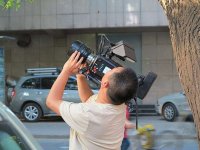
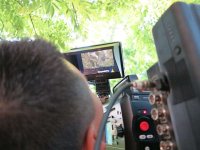
Here are some photos of the first KineRAW-S35 (tm) [second prototype] demo video being made in China, see the link above for MOV and Cineform (tm) shots from this demo.

If you use a DI system you can ask them for the 3D-LUT used, they said they will post some on the same download site for people to try out.

When I know more about that link I may add it here.

The playback in Quicktime (tm) player of the Cineform (tm) clips may look green and washed out, that's because its playing at native sensor color balance maybe, I asked them about the issue of using the 3D-LUT with Quicktime (tm), anyone know if there is a way to get Cineform (tm) to playback in Quicktime (tm) with the LUT applied?

They said to pass this information on:

Quote: [
When you post clips, you need to tell them that:
1. Lens: SONY 35mm and 80mm PL mount lens.
2. KineRAW-S35 Digital Cinema Camera, with KineMAG-64GB SSD.
3. Viewfinder is SONY CLM-V55.
4. Clips are Cineform encoded RAW files, it needs to download free Cineform decoder if not, as following link:http://cineform.com/gopro-cineform-decoder
5. Attached are some photos onsite.

]

Quote: [They can just use the LUT in Speedgrade or Davinci.]

Quote: [...People can use following looks commercial grading software as starting points:
1. xxx.look for Speedgrade
2. xxx.cube for DaVinci Resolve.
]

They are working on the color matching to the camera's monitoring so in time the list of supported workflows may expand. You get an image with the Adobe (tm) tags in workflows that use them from the CinemaDNG (tm) frames, but its not fully calibrated yet. In the case of my workflow you can use manual corrections at any time, if things progress as planed then I should add presets calibrated to 'match' the monitoring in the camera.

KineRAW-S35_shooting_first_demo_1.JPGKineRAW-S35_shooting_first_demo_2.JPGKineRAW-S35_shooting_first_demo_3.JPG

If you would like the full resolution version of those JPG you can email me or them, I reduced them and increased the compression so I could fit them into this post, the originals do not show aliasing and are about 4x the area.
 
Last edited:
KineRAW-S35 (tm) 3D-LUT download links for Da Vinci Resolve, SpeedGrade NX Firstlight

KineRAW-S35 (tm) 3D-LUT download links for Da Vinci Resolve, SpeedGrade NX Firstlight

I got another email today from Kinefinity.com (sm) with the links to the LUT needed for working with the Cineform (tm) samples,

Quote: [Here are links for Low-Contrast Rec709 LUT.


1. daylight-160.look: http://115.com/file/c2elxws7#daylight-160.look
2. daylight-160.cube: http://115.com/file/dpkn5su4#daylight-160.cube

Speedgrade NX, Firstlight can use .look file, while Da Vinci Resolve uses .cube file. People can use the LUT as monitoring LUT, but also use it as a starting point of grading .

]

As before you click on the green button, and in Firefox if you have the "always ask folder to save to" option selected a window will pop-up so you can select the folder to save the files into.

Those 3D-LUT are made by the camera from the monitoring LUT selected during the shooting of each shot, and each shot folder gets the matching 3D-LUTs to view it matching the monitoring.

The idea behind the LowCon709 look group is that you would re-grade the images, its a bit like FILMLOG or Cineon (tm) type 'LOG-C' but adjusted so that there is softclip included and it uses a wider range of tones but not the full range so that there is no strong S-curve or major clipping other than white balance.

I made those monitoring LUT for the camera so they could shoot some test footage and re-grade it with an S-curve and black crush, but it seems that concept got lost along the way a bit, so if you try to use those 3D-LUT keep in mind that they do not make finished Rec709 nor were they intended to. So you will see more FPN than would be normal because of the stretch in the shadow detail part of the curve, that is to give the widest latitude in shooting and to overcome the poor shadow and highlight detail of the small LCD monitors used for camera monitoring, with the intention that the black and white ends of the tonal range would be rolled off in grading by a skilled colorist while still giving some latitude for small exposure errors in shooting.

I have since changed my developmental code for making the camera monitoring tables so I have better control of the foot and toe of the transfer curve at the higher ISO speeds (where the curves are steep at the bottom end) so I can add some roll off to the toe when I revise these tables and that would show less FPN and shadow noise, some of which I have already done in the Normal and HighCon look groups for monitoring tables since those were made after the program revisions.

BTW: Those 3D-LUT are just made to work with the native sensor color balance of the current KineRAW-S35 (tm) and its improved OLPF+IR cut filter, using them on any other camera's data will not yield useful results, they are just for use with the Cineform (tm) clips linked to above if you want a starting white balance to grade from.
 
Last edited:
Sure, it will be maybe 4 to 8 weeks before I can post some of my own KineRAW-S35 (tm) footage, I need to make some lens adapters so I can use our best lenses to get good results maybe. From what I have seen in the many test DNG frames they have sent me shot at various ISO I should have no problems getting the kind of tonal range needed for replacement of 35mm movie film in the type of filmmaking I am interested in. Its not the same, as each media has its positive and negative aspects, but compared to video of just a few years ago, its getting there I think. State of the art, dual CinemaDNG (tm) and Cineform (tm) simulations recording to highspeed SSD in a standard 2.5" drive SATA case.

Someone from Poland I think emailed me saying they had a problem downloading, and could not find the green button. I had no problems downloading over ADSL connection on my Brothers computer, mine at the end of a long LAN cable did not work as the connection broke. But I did notice on restart some kind of error page came up in place of the download page, so I think it only lets you download once, maybe you have to close the Browser and re-boot to get the green button page back, so if you have a problem that may be a clue.

Still some work to do on the monitoring look tables, and some details with the camera's firmware, but the image on the 7" monitor looks great with my f/1.5 85mm M42 lens, real movie film like DOF etc. and long tonal scale, smooth colors and no blockey things and no mosquito noise like HDSLR.

Right now the firmware supports 2048x1080 (for both 1.85:1 and 2.39:1 DCP), 1920x1080 and 1280x720, other modes may be added, several sync sound frame rates are supported as well as tables for about EI/ISO 80 to 5120.
 
Last edited:
Back
Top