
Navigation
Install the app
How to install the app on iOS
Follow along with the video below to see how to install our site as a web app on your home screen.
Note: This feature may not be available in some browsers.
More options
You are using an out of date browser. It may not display this or other websites correctly.
You should upgrade or use an alternative browser.
You should upgrade or use an alternative browser.
Chinese 2K RAW S35 Cinema Camera, 8000 dollars
- Thread starter HHL
- Start date

Dan Hudgins
Well-known member
Hi I did not put up the link to the over compressed version on youku and there is now a copy that someone posted on Vimeo that looks about as messed up maybe at least on my computer but here is the link,
https://vimeo.com/43192586
There is a vimeo video someone made from the Cineform (tm) clip #3 that THEY graded at this link, I think its 1920x1080,
I got this message from Vimeo,
Quote: [Dan, I downloaded Clip 3 and did a quick color grade. https://vimeo.com/43199024 Dan was very kind to post the links to some Kineraw S35 video footage. So I downloaded a clip and did a quick color grade. Thanks again Dan! ]
So:
https://vimeo.com/43199024
That is a re-compressed version of the Cineform (tm) from the camera, so was compressed three times, and maybe graded a bit dark in the mid-tones but did not look too bad when I was able to see the first frame in the vimeo title page.
==
Its much better to look at the original MOV file they made from the download site. There are four buttons on the page that is linked to, the one on the left is blue and has an arrow and the one on the right is also blue and has a cloud. Don't click those. The is a orange button close to the blue button on the right half of the screen with an arrow, don't click that one as well.
You want to click the green button, if you have firefox setup in its tool options to ask you every time for the folder to save to firefox will pop-up a window that asks you what folder to save the MOV rar or Cineform (tm) or 3D-LUT rar to. You just pick a folder or make one and the firefox downloader will show you the progress, it will take about two hours to download the MOV and about half an hour to download the Cineform (tm) samples.
Please do not judge the camera by the messed up over compressed images in some of the links you will find. I have a KineRAW-S35 (tm) here and got some new firmware to test today they say improves the FPN issue, so hopefully I can shoot CinemaDNG (tm) and make a 6000Kbps MPEG4v2 to upload to vimeo that will not look too messed up, at some point a way to make uncompressed AVI available will need to be worked out as there is little point in having a camera that shoots 100MB/s and looking at examples that look worse than cell phone video to judge it by.
Someone in Poland told me that when I emailed him the original links they worked, so if you cannot get these links to work, maybe you can email me at: tempnulbox [at] yahoo [dot] com with "DVXuser wants original links" in the subject line and I can try to send you what I sent him, them maybe they will work, I notice that those links a blue in the email, but the ones I sent out are black, so maybe there is something with the way the browser opens the new window?
Here are the quotes again:
Quote: [
Hi, Dan,
Here are our show reel by our domestic partner:
This on youku(like Chinese youtube.com) link:
http://v.youku.com/v_show/id_XNDA0MTMzNzMy.html
There are 720p H.264 mov for downloading:
http://115.com/file/e7jl12ad#final-422hq-QuickTime-H.264.rar
There are some Cineform RAW footages for downloading:
Clip1: http://115.com/file/c2exeutq#clip1.rar
Clip2: http://115.com/file/bemsmxgt#clip2.rar
Clip3: http://115.com/file/dpk7t4vt#clip3.rar
...
]
https://vimeo.com/43192586
There is a vimeo video someone made from the Cineform (tm) clip #3 that THEY graded at this link, I think its 1920x1080,
I got this message from Vimeo,
Quote: [Dan, I downloaded Clip 3 and did a quick color grade. https://vimeo.com/43199024 Dan was very kind to post the links to some Kineraw S35 video footage. So I downloaded a clip and did a quick color grade. Thanks again Dan! ]
So:
https://vimeo.com/43199024
That is a re-compressed version of the Cineform (tm) from the camera, so was compressed three times, and maybe graded a bit dark in the mid-tones but did not look too bad when I was able to see the first frame in the vimeo title page.
==
Its much better to look at the original MOV file they made from the download site. There are four buttons on the page that is linked to, the one on the left is blue and has an arrow and the one on the right is also blue and has a cloud. Don't click those. The is a orange button close to the blue button on the right half of the screen with an arrow, don't click that one as well.
You want to click the green button, if you have firefox setup in its tool options to ask you every time for the folder to save to firefox will pop-up a window that asks you what folder to save the MOV rar or Cineform (tm) or 3D-LUT rar to. You just pick a folder or make one and the firefox downloader will show you the progress, it will take about two hours to download the MOV and about half an hour to download the Cineform (tm) samples.
Please do not judge the camera by the messed up over compressed images in some of the links you will find. I have a KineRAW-S35 (tm) here and got some new firmware to test today they say improves the FPN issue, so hopefully I can shoot CinemaDNG (tm) and make a 6000Kbps MPEG4v2 to upload to vimeo that will not look too messed up, at some point a way to make uncompressed AVI available will need to be worked out as there is little point in having a camera that shoots 100MB/s and looking at examples that look worse than cell phone video to judge it by.
Someone in Poland told me that when I emailed him the original links they worked, so if you cannot get these links to work, maybe you can email me at: tempnulbox [at] yahoo [dot] com with "DVXuser wants original links" in the subject line and I can try to send you what I sent him, them maybe they will work, I notice that those links a blue in the email, but the ones I sent out are black, so maybe there is something with the way the browser opens the new window?
Here are the quotes again:
Quote: [
Hi, Dan,
Here are our show reel by our domestic partner:
This on youku(like Chinese youtube.com) link:
http://v.youku.com/v_show/id_XNDA0MTMzNzMy.html
There are 720p H.264 mov for downloading:
http://115.com/file/e7jl12ad#final-422hq-QuickTime-H.264.rar
There are some Cineform RAW footages for downloading:
Clip1: http://115.com/file/c2exeutq#clip1.rar
Clip2: http://115.com/file/bemsmxgt#clip2.rar
Clip3: http://115.com/file/dpk7t4vt#clip3.rar
...
]
Dan Hudgins
Well-known member
KineRAW-S35 (tm) links working
KineRAW-S35 (tm) links working
When I click on the links above the seem to work, when I click on the green button I get the firefox download dialog pop-up.
Both Vimeo links work on my computer as does the youku link.
I did notice that if you try to download the same file twice some kind of error page comes up, so maybe you clicked the wrong button and then when you tried again it gave an error.
Try closing the browser and erase all cookies etc.
Then shut down your computer, let it rest for a few minutes and turn it back on and start over again, maybe that will work, it did for me.
Otherwise email me or Kinefinity.com (sm) and ask for the links in an email to see if that helps, like it did for the guy in Poland.
KineRAW-S35 (tm) links working
When I click on the links above the seem to work, when I click on the green button I get the firefox download dialog pop-up.
Both Vimeo links work on my computer as does the youku link.
I did notice that if you try to download the same file twice some kind of error page comes up, so maybe you clicked the wrong button and then when you tried again it gave an error.
Try closing the browser and erase all cookies etc.
Then shut down your computer, let it rest for a few minutes and turn it back on and start over again, maybe that will work, it did for me.
Otherwise email me or Kinefinity.com (sm) and ask for the links in an email to see if that helps, like it did for the guy in Poland.
Dan Hudgins
Well-known member
I have posted two more KineRAW-S8p (tm) videos on vimeo showing the use of over-sample modes 1920x1440, 2228x1252, 2400x1200, 2952x1104.
Sorry about the compression artifacts, if you want to see what the uncompressed original BMP frames used to make the video uploaded look like you can email me and ask for sample frames, my email is: tempnulbox [at] yahoo [dot] com and put "DVXuser wants frames" in the subject line so I know its not junk mail., thanks.
https://vimeo.com/44417714
https://vimeo.com/44424450
The work on the KineRAW-S35 (tm) continues, I made a new kind of monitoring LUT for it, and the results for color matching on all workflow options seems improved in compatibility and image quality. The tonal range, resolution, and color all look good so far as does the noise level from the CinemaDNG workflow as well as some improvement on the Cineform (tm) workflow quality as well maybe. Each firmware revision and progress on the monitoring LUT development seem to get closer to the goal of a functional Digital Cinema Camera.
I shot some Cineform and CinemaDNG at the same time the other day to test the new experimental monitoring LUT and my brother installed the Cineform codec on his fast computer and we were able to load the 3D-LUT the camera makes for color matching of each shot and were able to watch color correct 2048x1080 playback from the Cineform camera version on my Brother's 2K monitor full size both in Quicktime and loaded into Sony Vegas NLE. The advantage of using the Both mode is that you can record both Cineform and CinemaDNG, and use the Cineform as a high quality proxy for editing and then do the uncompressed DI from the CinemaDNG if you like, or just finish from the Cineform and hold the CinemaDNG for later use.
Be sure to watch the videos 1:1pixel on a 1920x1080 or larger monitor, don't "fit to screen" if you have a larger or smaller monitor as that can make aliasing.
Sorry about the compression artifacts, if you want to see what the uncompressed original BMP frames used to make the video uploaded look like you can email me and ask for sample frames, my email is: tempnulbox [at] yahoo [dot] com and put "DVXuser wants frames" in the subject line so I know its not junk mail., thanks.
https://vimeo.com/44417714
https://vimeo.com/44424450
The work on the KineRAW-S35 (tm) continues, I made a new kind of monitoring LUT for it, and the results for color matching on all workflow options seems improved in compatibility and image quality. The tonal range, resolution, and color all look good so far as does the noise level from the CinemaDNG workflow as well as some improvement on the Cineform (tm) workflow quality as well maybe. Each firmware revision and progress on the monitoring LUT development seem to get closer to the goal of a functional Digital Cinema Camera.
I shot some Cineform and CinemaDNG at the same time the other day to test the new experimental monitoring LUT and my brother installed the Cineform codec on his fast computer and we were able to load the 3D-LUT the camera makes for color matching of each shot and were able to watch color correct 2048x1080 playback from the Cineform camera version on my Brother's 2K monitor full size both in Quicktime and loaded into Sony Vegas NLE. The advantage of using the Both mode is that you can record both Cineform and CinemaDNG, and use the Cineform as a high quality proxy for editing and then do the uncompressed DI from the CinemaDNG if you like, or just finish from the Cineform and hold the CinemaDNG for later use.
Be sure to watch the videos 1:1pixel on a 1920x1080 or larger monitor, don't "fit to screen" if you have a larger or smaller monitor as that can make aliasing.
Last edited:
Dan Hudgins
Well-known member
Sample image from KineRAW-S35 (tm) 2nd prototype
Sample image from KineRAW-S35 (tm) 2nd prototype
Here is a JPG half size taken from a 2048x1080 frame shot in the KineRAW-S35 (tm) using a 35mm f/2 Soligar M42 mount lens by way of a M42 to Canon mount adapter using a Canon to sub-PL mount adapter on the camera, the camera has a sub-PL mount for quick change of lens mounts, like PL, Canon and others like OCT-19, BNCR, and such under development. If you have a 2K monitor so you can look 1:1 you can email me for the original TIF and BMP, although these are just rough tests not full finished results. Looking at it on a 2K monitor from the uncompressed version it shows less artifacts than from the reduced JPEG here and shows more detail etc.
I shot using the both mode so I have CinemaDNG and Cineform (tm) for this shot, the Cineform (tm) can play in Quicktime when you load the corresponding 3D-LUT into the Cineform (tm) codec, its C:\ > Windows > Programs > Cineform > Tools then drag the 3D-LUT files *.cube and *.look onto the Cineform (tm) LUT installer exe program. The camera saves the 3D-LUT files into each shot's folder that correspond to the look used for monitoring in the camera while shooting that shot, so the download with the shots files when you download the shots from the SSD by copying the whole shot folder to your editing HDD.
The de-Bayer sharpen is adjustable, so you can make the wrinkles more or less visible, and this JPEG shows blocks and posterization that are not part of the camera's uncompressed results.
My Brother was able to load the Cineform (tm) 2048x1080 clips into Sony Vegas NLE and play them on his 2K monitor, as well as edit them and output, it can output to DVD or TIF image sequence etc. But in the version of Sony Vegas he has it only seems to output them as letter-boxed into 1920x1080 as far as we could tell on the first try.
My freeish DI system can process the CinemaDNG frames full size and color correct and output them all in uncompressed work-flow to avoid compression losses. My DI system can then output an uncompressed DPX frame sequence for making a 35mm print or DCP for digital projection. This 2048x1080 is the full size of the projection element in the digital theater projector, you can crop it to 2048x858 for 2.39:1 projection, or 1998x1080 for 1.85:1 projection as is the norm, but if the lens is changed and the curtains adjusted (digital theaters may not have adjustable curtains) and the right lens used on the projector you might get the full 2048x1080 on the screen for better results.
Sample image from KineRAW-S35 (tm) 2nd prototype
Here is a JPG half size taken from a 2048x1080 frame shot in the KineRAW-S35 (tm) using a 35mm f/2 Soligar M42 mount lens by way of a M42 to Canon mount adapter using a Canon to sub-PL mount adapter on the camera, the camera has a sub-PL mount for quick change of lens mounts, like PL, Canon and others like OCT-19, BNCR, and such under development. If you have a 2K monitor so you can look 1:1 you can email me for the original TIF and BMP, although these are just rough tests not full finished results. Looking at it on a 2K monitor from the uncompressed version it shows less artifacts than from the reduced JPEG here and shows more detail etc.
I shot using the both mode so I have CinemaDNG and Cineform (tm) for this shot, the Cineform (tm) can play in Quicktime when you load the corresponding 3D-LUT into the Cineform (tm) codec, its C:\ > Windows > Programs > Cineform > Tools then drag the 3D-LUT files *.cube and *.look onto the Cineform (tm) LUT installer exe program. The camera saves the 3D-LUT files into each shot's folder that correspond to the look used for monitoring in the camera while shooting that shot, so the download with the shots files when you download the shots from the SSD by copying the whole shot folder to your editing HDD.
The de-Bayer sharpen is adjustable, so you can make the wrinkles more or less visible, and this JPEG shows blocks and posterization that are not part of the camera's uncompressed results.
My Brother was able to load the Cineform (tm) 2048x1080 clips into Sony Vegas NLE and play them on his 2K monitor, as well as edit them and output, it can output to DVD or TIF image sequence etc. But in the version of Sony Vegas he has it only seems to output them as letter-boxed into 1920x1080 as far as we could tell on the first try.
My freeish DI system can process the CinemaDNG frames full size and color correct and output them all in uncompressed work-flow to avoid compression losses. My DI system can then output an uncompressed DPX frame sequence for making a 35mm print or DCP for digital projection. This 2048x1080 is the full size of the projection element in the digital theater projector, you can crop it to 2048x858 for 2.39:1 projection, or 1998x1080 for 1.85:1 projection as is the norm, but if the lens is changed and the curtains adjusted (digital theaters may not have adjustable curtains) and the right lens used on the projector you might get the full 2048x1080 on the screen for better results.
Attachments

Last edited:
Here is a JPG half size taken from a 2048x1080 frame shot in the KineRAW-S35 (tm) using a 35mm f/2 Soligar M42 mount lens by way of a M42 to Canon mount adapter using a Canon to sub-PL mount adapter on the camera, the camera has a sub-PL mount for quick change of lens mounts, like PL, Canon and others like OCT-19, BNCR, and such under development. If you have a 2K monitor so you can look 1:1 you can email me for the original TIF and BMP, although these are just rough tests not full finished results. Looking at it on a 2K monitor from the uncompressed version it shows less artifacts than from the reduced JPEG here and shows more detail etc.
I shot using the both mode so I have CinemaDNG and Cineform (tm) for this shot, the Cineform (tm) can play in Quicktime when you load the corresponding 3D-LUT into the Cineform (tm) codec, its C:\ > Windows > Programs > Cineform > Tools then drag the 3D-LUT files *.cube and *.look onto the Cineform (tm) LUT installer exe program. The camera saves the 3D-LUT files into each shot's folder that correspond to the look used for monitoring in the camera while shooting that shot, so the download with the shots files when you download the shots from the SSD by copying the whole shot folder to your editing HDD.
The de-Bayer sharpen is adjustable, so you can make the wrinkles more or less visible, and this JPEG shows blocks and posterization that are not part of the camera's uncompressed results.
My Brother was able to load the Cineform (tm) 2048x1080 clips into Sony Vegas NLE and play them on his 2K monitor, as well as edit them and output, it can output to DVD or TIF image sequence etc. But in the version of Sony Vegas he has it only seems to output them as letter-boxed into 1920x1080 as far as we could tell on the first try.
My freeish DI system can process the CinemaDNG frames full size and color correct and output them all in uncompressed work-flow to avoid compression losses. My DI system can then output an uncompressed DPX frame sequence for making a 35mm print or DCP for digital projection. This 2048x1080 is the full size of the projection element in the digital theater projector, you can crop it to 2048x858 for 2.39:1 projection, or 1998x1080 for 1.85:1 projection as is the norm, but if the lens is changed and the curtains adjusted (digital theaters may not have adjustable curtains) and the right lens used on the projector you might get the full 2048x1080 on the screen for better results.
Now that looks pretty good.
Dan Hudgins
Well-known member
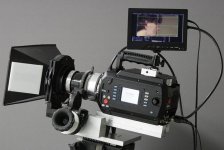
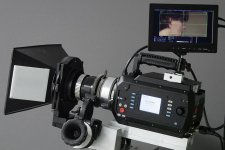
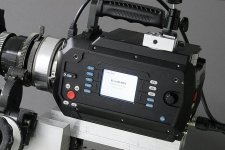
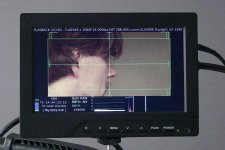
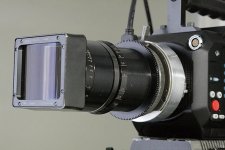
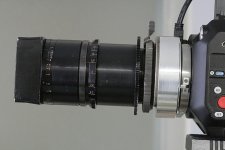
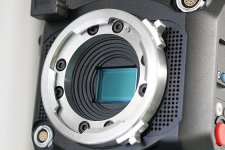
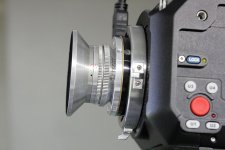
Photos of KineRAW-S35 (tm) with lens adapters, matte box, and follow focus and VF
Photos of KineRAW-S35 (tm) with lens adapters, matte box, and follow focus and VF
I'm getting the sample KineRAW-S35 (tm) ready for shooting some more test footage and for making calibrated monitoring tables that can go out in the field for use when the cameras go on sale. Workflow testing has been going on the last few months to test color matching strategies and things seem to be shaping up.
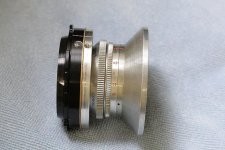
The shiny aluminum parts in these photos are the ones I made so I can use our Konvas matte box, Mitchell follow focus, and lenses from Eyemo, Mitchell NC, Bell and Howell 2709, and OCT-19 Konvas lenses, as well as I have a Canon to the camera's sub-PL mount that I put an M42 adapter in that was used for the S35 frame sample shown in the post above. But to shoot I need the camera setup with a package and so I'm just adapting the things we already have, as other 35mm filmmakers would.
Photos of KineRAW-S35 (tm) with lens adapters, matte box, and follow focus and VF
Now that looks pretty good.
I'm getting the sample KineRAW-S35 (tm) ready for shooting some more test footage and for making calibrated monitoring tables that can go out in the field for use when the cameras go on sale. Workflow testing has been going on the last few months to test color matching strategies and things seem to be shaping up.
The shiny aluminum parts in these photos are the ones I made so I can use our Konvas matte box, Mitchell follow focus, and lenses from Eyemo, Mitchell NC, Bell and Howell 2709, and OCT-19 Konvas lenses, as well as I have a Canon to the camera's sub-PL mount that I put an M42 adapter in that was used for the S35 frame sample shown in the post above. But to shoot I need the camera setup with a package and so I'm just adapting the things we already have, as other 35mm filmmakers would.
Attachments
-
 KineRAW-S35_with_Mitchell_follow_focus_OCT-19_150mm_Konvas_matte_box_A.jpg73.4 KB · Views: 0
 -
 KineRAW-S35_with_Mitchell_follow_focus_OCT-19_150mm_Konvas_matte_box_B.jpg68.6 KB · Views: 0
 -
 KineRAW-S35_with_Mitchell_follow_focus_OCT-19_150mm_Konvas_matte_box_C.jpg93.7 KB · Views: 0
 -
 KineRAW-S35_monitor_image_6954.jpg78.9 KB · Views: 0
 -
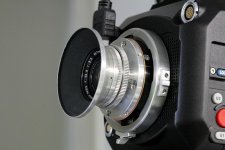 KineRAW-S35_Eyemo_lens_adapter_14mm_A.jpg75 KB · Views: 0
 -
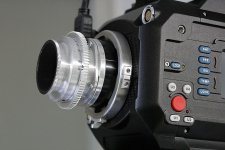 KineRAW-S35_Mitchell_NC_lens_adapter_35mm_Baltar_A.jpg93.8 KB · Views: 0
 -
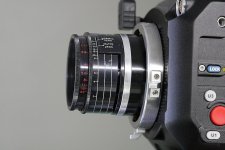 KineRAW-S35_2709_lens_adapter_32mm_Cooke_Speed_Panchro_Series_II_A.jpg77 KB · Views: 0
 -
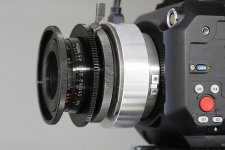 KineRAW_S35_OCT-19_adapter_V_mounted_on_camera.jpg80 KB · Views: 0
 -
 KineRAW-S35_OCT-19_adapter_LOMO_80mm_anamorphic_mounted_on_camera_A.jpg79.6 KB · Views: 0
 -
 KineRAW-S35_OCT-19_adapter_LOMO_80mm_anamorphic_mounted_on_camera_B.jpg73.5 KB · Views: 0
 -
 KineRAW-S35_sub_PL_mount_and_sensor.jpg104.5 KB · Views: 0
 -
 KineRAW-S35_Eyemo_lens_adapter_14mm_B.jpg69.8 KB · Views: 0
 -
 KineRAW-S35_Eyemo_lens_adapter_14mm_C.jpg77.6 KB · Views: 0
I'm getting the sample KineRAW-S35 (tm) ready for shooting some more test footage and for making calibrated monitoring tables that can go out in the field for use when the cameras go on sale. Workflow testing has been going on the last few months to test color matching strategies and things seem to be shaping up.
The shiny aluminum parts in these photos are the ones I made so I can use our Konvas matte box, Mitchell follow focus, and lenses from Eyemo, Mitchell NC, Bell and Howell 2709, and OCT-19 Konvas lenses, as well as I have a Canon to the camera's sub-PL mount that I put an M42 adapter in that was used for the S35 frame sample shown in the post above. But to shoot I need the camera setup with a package and so I'm just adapting the things we already have, as other 35mm filmmakers would.
That is one sexy body. Is that HD-SDI or HMDI out to your monitor, and do you know what the possible frame rates are? And actual photo site sampling? I pre-ordered a BMC, and this may be a great addition to the BMC because of the larger sensor.

Derek Chingwell
Well-known member
Are there any specific Anamorphic modes? I notice you're testing with Squarefronts 
Personally I like the body aesthetic much better than the BMC. This looks like a camera, a machine I can use to capture images. The BMC looks like tupperware.
Haha yah... from a purely aesthetic view the KineRaw looks legit, where I feel like I will need to explain to my clients that, "no, this isn't an iCamera."
But in the end I would rather have beautiful pictures than a sexy camera body. Only side-by-sides will tell how these compare.
Last edited:
Mitch Gross
Veteran
The lens mount appears extremely shallow. It looks like a PL but is it in fact an in-between neutral mount to which one uses various adapters to get where they wish to go? It appears to be identical to the P+S IMS mount system, which also uses a shallow PL as the in between mount.
Dan Hudgins
Well-known member
about KineRAW-S35 (tm)
about KineRAW-S35 (tm)
The test camera I have only has HDMI output, but the production cameras are meant to have the HDMI on the front and two BNC for HD-SDI on the back, you can see them at the bottom center of the back. There are two drive slots so you can dump the SSD to notebook HDD in the camera to avoid packing a computer with you all the time. Its easy to pack by the top handle. You can also have two SSD installed or just one.
Some of the details are not public. The sample camera shown in the photos has 2048x1080, 1920x1080, and 1280x720. The 1280x720 goes up to 59.94 I think. Both 23.976 and 24.000 are supported, as are 25.000 and 50.000 I think, I've just been using 24.000 so far.
At 144.0 and 288.0 fps all flicker from 60Hz florescent lights seems to go away at 24.000 and the camera's crystal seems very stable.
Shutter angles go from 0.7 degrees to 358 degrees, so far.
The KineRAW-S8p (tm) has many more modes and goes up to 220fps, but in the S35 they are focusing on some other features to develop so just have the basic resolutions for DCP and HD programed so far.
about KineRAW-S35 (tm)
That is one sexy body. Is that HD-SDI or HMDI out to your monitor, and do you know what the possible frame rates are? And actual photo site sampling? I pre-ordered a BMC, and this may be a great addition to the BMC because of the larger sensor.
The test camera I have only has HDMI output, but the production cameras are meant to have the HDMI on the front and two BNC for HD-SDI on the back, you can see them at the bottom center of the back. There are two drive slots so you can dump the SSD to notebook HDD in the camera to avoid packing a computer with you all the time. Its easy to pack by the top handle. You can also have two SSD installed or just one.
Some of the details are not public. The sample camera shown in the photos has 2048x1080, 1920x1080, and 1280x720. The 1280x720 goes up to 59.94 I think. Both 23.976 and 24.000 are supported, as are 25.000 and 50.000 I think, I've just been using 24.000 so far.
At 144.0 and 288.0 fps all flicker from 60Hz florescent lights seems to go away at 24.000 and the camera's crystal seems very stable.
Shutter angles go from 0.7 degrees to 358 degrees, so far.
The KineRAW-S8p (tm) has many more modes and goes up to 220fps, but in the S35 they are focusing on some other features to develop so just have the basic resolutions for DCP and HD programed so far.
Dan Hudgins
Well-known member
about KineRAW-S35 (tm)
about KineRAW-S35 (tm)
It feels and works like a movie camera, we have a Mitchell NC (you can see the lens re-mounted) but this is a fraction of the weight and no film cost and the speed goes up to EI/ISO 5120 so far, so way past film, and if you shoot 288 degrees rather than 144 you get an advantage of an additional T/ stop over shooting movie film.
about KineRAW-S35 (tm)
Personally I like the body aesthetic much better than the BMC. This looks like a camera, a machine I can use to capture images. The BMC looks like tupperware.
It feels and works like a movie camera, we have a Mitchell NC (you can see the lens re-mounted) but this is a fraction of the weight and no film cost and the speed goes up to EI/ISO 5120 so far, so way past film, and if you shoot 288 degrees rather than 144 you get an advantage of an additional T/ stop over shooting movie film.
Dan Hudgins
Well-known member
Right now I'll have to test with the modes I have, I have asked them to at least add maximum sensor height with 1.2:1 aspect which would be within the SSD bandwidth, but as anamorphic lenses are uncommon in China (?) they may not see the domestic need, so I encourage you to email them and ask them to add additional resolutions for maximum vertical height. The sensor can support anamorphic shooting, but the would need to change some of the sensor setup and that may take a while to get around to as they have other things to finish.
The viewfinder does support anamorphic unsqueeze, as does the KineRAW-S8p (tm) which I used at 1828x1556 mode, see the video on Vimeo, that one suffered a bit from shooting most of it at f/0.95. The viewfinder unsqueeze works with 1.25x, 1.33x, 1.5x, 1.75x and 2.0x anamorphic lenses.
Anyway, I have the anamorphic Lomo to test with, so we can see what that looks like letter boxed into HD when I get a chance to shoot something. My Brother may take me out soon to shoot some outdoor shoots, so there may be some DNG and Cineform (tm) samples before too long. I have a video processed for Vimeo, but need a few days to put titles and leader on it before i upload.
If you email Kinefinity.com (tm) you can ask them for links to download a few Cineform (tm) samples, be sure to also ask for the 3D-LUT that go with the clips as you need to use the Cineform (tm) tool to load the 3D-LUT into your computer so Quicktime (tm) and other programs will play the clips with the right color balance.
The viewfinder does support anamorphic unsqueeze, as does the KineRAW-S8p (tm) which I used at 1828x1556 mode, see the video on Vimeo, that one suffered a bit from shooting most of it at f/0.95. The viewfinder unsqueeze works with 1.25x, 1.33x, 1.5x, 1.75x and 2.0x anamorphic lenses.
Anyway, I have the anamorphic Lomo to test with, so we can see what that looks like letter boxed into HD when I get a chance to shoot something. My Brother may take me out soon to shoot some outdoor shoots, so there may be some DNG and Cineform (tm) samples before too long. I have a video processed for Vimeo, but need a few days to put titles and leader on it before i upload.
If you email Kinefinity.com (tm) you can ask them for links to download a few Cineform (tm) samples, be sure to also ask for the 3D-LUT that go with the clips as you need to use the Cineform (tm) tool to load the 3D-LUT into your computer so Quicktime (tm) and other programs will play the clips with the right color balance.