F35: Checking the F35 Hours Meter

David3

Active member
Hey everyone,

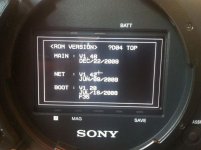
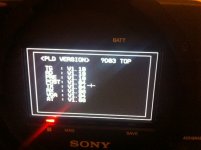
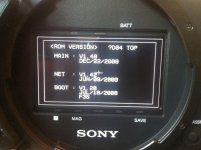
I know this was already a topic by Viddovation last year, but I was not able to find the Hours Meter in the F35. I was able to access the SERVICE menu by following his instructions. But there was no SERVICE menu page that let me read the camera hours. I have the firmware installed that you see on the photo. Help would be much appreciated. Thanks.


The topic of how to check the Sony F35 camera hours has come up a few times, but I don't beleive a clear simple answer was given.

If you would like to check the camera hours, you may do so in the "SERVICE" menu. This is a hidden menu.

To get access to the Service menu, you need to instruct the camera to unlock all VF menus. The standard method to unlock the Top Menu and Diagnosis menu is not enough here.

With the camera on, and fully booted, click the VF Menu button to close the menu and display. With them close, you will push and hold all three assignable buttons (exclude the toggle #4). This will execute whatever those toggles are programmed to do, but ignore that. With the assign buttons still held down, press and also hold down the rotary encoder. With all of these buttons pressed and held down, tap the VF Menu button twice. This should bring you to the Top Menu with the SERVICE menu listed at the very bottom.

One of the Service menu pages will let you read the camera hours. It stores both a total hours for the camera, and a second resettable value (which you can use like the trip meter in a car... useful for rentals perhaps).

Other Service menu pages include RPN fix and Firmware. Another page allows for inverting and mirroring viewfinder images.

The Service menu remains available until the camera is powered off.
 

Attachments

  • firmware.jpg
    firmware.jpg
    85.4 KB · Views: 1
I believe the hours counter is in the diagnostics menu, I am sure. It's not hidden.

Also I think your ROMs might be out of date, could be wrong though...
 
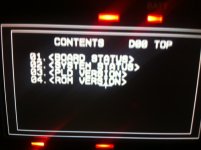
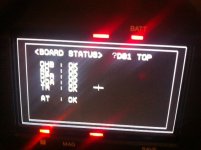
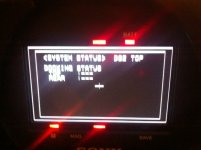
I just checked the Diagnosis menu. There is no hours meter there. Just these 4 pages.
 

Attachments

  • firmware.jpg
    firmware.jpg
    85.4 KB · Views: 1
  • 1.jpg
    1.jpg
    88.7 KB · Views: 1
  • 2.jpg
    2.jpg
    108.9 KB · Views: 1
  • 3.jpg
    3.jpg
    99.8 KB · Views: 1
  • 4.jpg
    4.jpg
    99.6 KB · Views: 1
I know that the Service menu is a hidden menu. That's why I posted Viddovation's instructions from last year in my first post. But the hours meter is not there.

I also know that the Service menu is NOT the diagnosis menu. That's why I just posted these 5 screenshots of the diagnosis menu, what you have suggested, but there is also NO hours meter. Both menus, hidden Service and diagnosis menu have no hours meter.
 
Just checking... it is also possible that your camera being out of date has something to do with it. I could be wrong but I am sure the last version of the F35 was 2.21. Sony do change pages around between firmware updates.
 
That's what I have also thought, but the hours meter is an essential thing which should be visible in every firmware normally, because it wouldn't make any sense not to have it.
 
This is true. HOWEVER, it is possible that for whatever reason in early firmwares Sony did not bother. After all, the only moving parts inside the F35 itself are the fans. There is no real reason to worry about hours - the tape deck will have had hours on and that was important. The camera body, less so.

In any case you're quite out of date on the firmware so an upgrade would be a good place to start. It isn't too scary to do yourself.
 
Well, the only reason why I need to check the hours meter is because I am selling the F35 and the buyer wants to know the hours on the camera. I am not quite sure if a firmware update would also influence the User settings, as I have the PanaLog settings on my camera.
 
It shouldn't, but your local Sony tech should be able to tell you if it would. I wouldn't consider having Panalog on there to be of tangible value, personally (also be careful as Panavision actively keep an eye out for anything that shouldn't be in the wild)
 
Well, as I have tested both S-Log and PanaLog, it is definitely a valuable option to have it. As the used camera was sold like this, it is not any issue for Panavision to worry about, as it is a User setting that was added by a DP and was specifically made for the F35 in order to use PanaLog, but thanks for your help anyways.
 
No problem. May be worth calling your local Sony centre, if you are near one they might have another way of finding the hours. I wonder if it is shown in the web menu?
 
Back
Top