Changing White balance at sunset will make it look daytime

PhilipD

Well-known member
I keep reading about White balance and having to set it against white to show what white is. But Our eyes see white as different colors depending on the time of day so at sunset the white paper would be slightly orange. Well wouldnt the camera (not tried it yet) be displaying a false color if I white balanced it at sunset because It will try to adjust to pure bright white wouldnt it?
I'd like to get the sunset look. Sorry I'm just a bit confused as our eyes dont have white balance :lipsrseal
 
White balance exists so images can look the same regardless of time of day.
Use the sunlight preset if you want sunset to look like sunset. Good luck!
 
White balance exists so images can look the same regardless of time of day.
Use the sunlight preset if you want sunset to look like sunset. Good luck!
Thanks, It would be great to understand all this, and would be great if it could be like our eye that sees what it sees when the time of day changes.
 
This is a serious question if anyone could put it in a detailed yet non-technical way. Like say you had a piece of white paper in a red lit room you wouldnt want to white balance it because the white paper that is reflecting red will be white again. Same as for the sunset or any other color of day we see with our own eyes. Surely there's professional people that could help me understand. :)
 
Here's a screen grab of sunset using 5.6k white balance.

image002.jpg
 
A white balance is telling the camera what is white. So, if you had a room that was lit with RED lighting and you put up a white card and it looked red and then you did a white balance off of this.... your camera would understand "red card" as white. This is most likely not what you want. You need to give the camera a starting point so that it knows what true white is. You need what ever you balance off of to look white for this to help you. There is a lot more you can than do with the white balance to effect color temp. but you need to start with the understanding of you're telling your camera what "white" looks like. Hope this helps...
 
A white balance is telling the camera what is white. So, if you had a room that was lit with RED lighting and you put up a white card and it looked red and then you did a white balance off of this.... your camera would understand "red card" as white. This is most likely not what you want. You need to give the camera a starting point so that it knows what true white is. You need what ever you balance off of to look white for this to help you. There is a lot more you can than do with the white balance to effect color temp. but you need to start with the understanding of you're telling your camera what "white" looks like. Hope this helps...
Thanks, I'm guessing I should just do a standard set-up maybe in the day and then keep it as that for when I'm filming at sunset. I will make one of those scene files up from the sticky's posted here for the film look. That would be great and I can then try out my DVX for the first time :)
 
It sounds like you're just starting out, so i suggest play around with various settings. But, I would definitely start with using the white balance preset for 56K as your starting point. After you see how that looks you can try to test out other settings. have fun with the camera.
 
I don't mean to hijack the thread. And I'm in no way tooting my own horn but I have used extreme examples of weird white balance combined with in-camera settings. This simply demonstrates how goofy and subjective 'white' can be. That is, of course, if you're interested in how weird white can get.

This thread has been compiled.

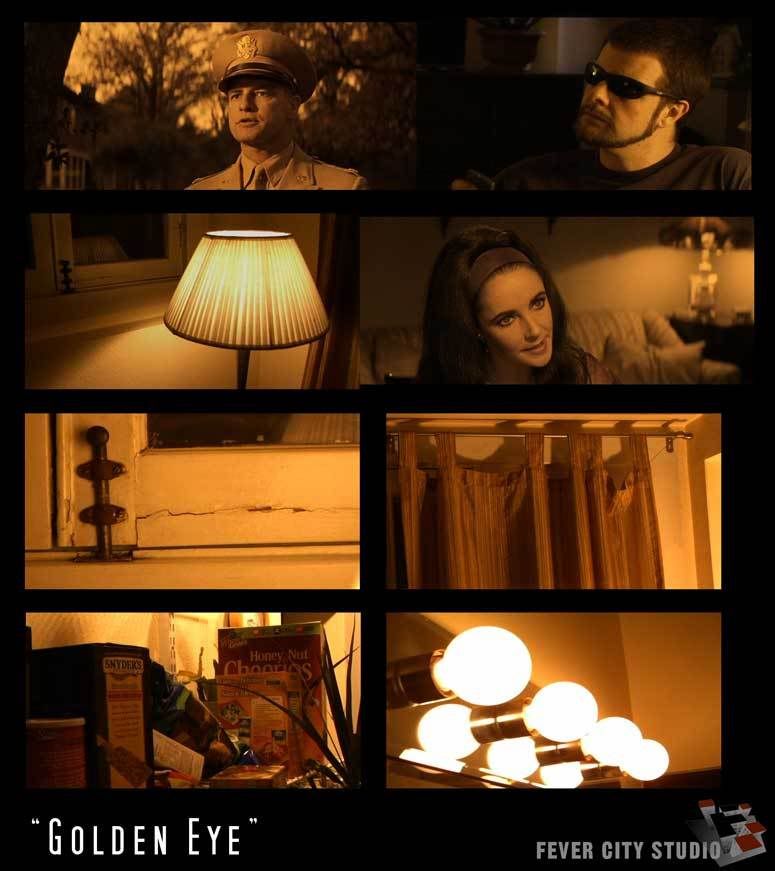
This is one of my favorite weird ones - "GoldenEye". It actually used a blue envelope for white balance and some settings tweaks.


GoldenEyeCOMP1.jpg
 
for instance... if you have a white at 200, which we will say is basic.. but you're in a room that has red light, which makes white 400. It will make the white more red... So, depending on the conidition, will determine what "white" is... White has different "colors" in the light setting you are in..
 
I don't mean to hijack the thread. And I'm in no way tooting my own horn but I have used extreme examples of weird white balance combined with in-camera settings. This simply demonstrates how goofy and subjective 'white' can be. That is, of course, if you're interested in how weird white can get.

This thread has been compiled.

This is one of my favorite weird ones - "GoldenEye". It actually used a blue envelope for white balance and some settings tweaks.
Hey No problem! Your thread really helped me last night I was reading it in bed and playing with the camera. I dont have the cards but I just played with the gamma and settings etc. So thanks very much for doing this :)
 
It sounds like you're just starting out, so i suggest play around with various settings. But, I would definitely start with using the white balance preset for 56K as your starting point. After you see how that looks you can try to test out other settings. have fun with the camera.
Thanks I will do that :)
 
for instance... if you have a white at 200, which we will say is basic.. but you're in a room that has red light, which makes white 400. It will make the white more red... So, depending on the conidition, will determine what "white" is... White has different "colors" in the light setting you are in..
Yes true so basically just try and make the white the same as what your eye sees. I was playing with my stills professional camera and only just looked at the white balance this month when I saw the white of the airport way too white like bleached so it can work the other way that it's too white :)
 
Back
Top