FS7: Catalyst Browse - export / copy info from "file" tab in Inspector as a text.

broughtonfilm

Well-known member
Catalyst Browse - export / copy info from "file" tab in Inspector as a text.

In Catalyst Browse, is there a way to save the metadata from the "file" tab of Inspector window as a text? I can't seem to find a way to select / copy / paste the contents of this tab. Is there an alternative file / metadata reader that has that functionality? Or is there way to at least maximize this tab so that everything is easily readable without abbreviations? Thanks.
 
What Metadata are you looking to extract? You could use Exiftool to read the XML files, and even make a script to output them somewhere. Or some sort of text editing software (Bbedit, etc). Not ideal, but possible!
 
What Metadata are you looking to extract? You could use Exiftool to read the XML files, and even make a script to output them somewhere. Or some sort of text editing software (Bbedit, etc). Not ideal, but possible!

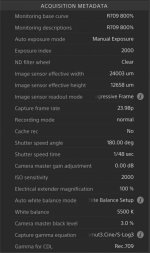
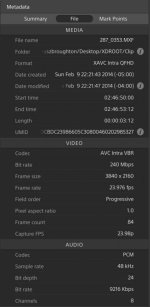
I tried several programs but they would only get very basic information. In addition I tried FCPX and Premier Pro with its metadata read functionality (it supports XMP files and is able to write new info but can't seem to access what I want which is info such as color temperature, ND wheel position, shutter angle, LUT, etc). I ended up taking a screen shots of the inspector window but even that is not good because it is impossible to make the window any wider so that some info is not abbreviated. Below are screen grabs of the "file" tab in inspector window. Basically I'd like to be able to highlight all the info, copy and use as a text file. There is more info which I'm not including in the screen grabs such as GPS and other things so ideally I'd like to be able to copy it all.

UHD 23.98p - screen 1.jpgUHD 23.98p - screen 2.jpg
 
Back
Top