Capturing in squeeze mode

Ok, I just did another test. Setup at 23.98 and captured using the anamorphic setting and it still rendered 4x3. Having said that the image displays 16:9 on the canvas so I'm sure the problem is in my export settings. Obviously as this is my first day on FCP I've got a lot to read up on.

EDIT

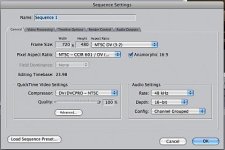
I just checked the sequence setting and it does show the 16:9 anamorphic box checked so it really is my export options that are giving me 4x3.
 
Last edited:
?
export setting?

And your time line shows 23.98 as frame rate?

Look at the clip in your browser ... one of the right hand columns will tell you its frame rate and another will tell you if its anamorphic.
 
You use it for Anamorphic adapter or Squeeze mode. They are identical to FCP. Which was the original question of this thread.

I don't see how they could be. FCP can automatically handle squeeze mode footage, regardless of capture settings. If you didn't import using an ana setting, it makes no difference, because you can, without rendering time or any other penalty, merely enable the anamophic setting in the sequence settings once you have your footage on the timeline. That's why I said it doesn't enter into the capture settings. Poco shot squeeze mode, not with an ana adapter.

I've never used an anamorphic adapter, but I am guessing that is the only time you'd really want to be sure you selected or created an anamorphic caputre preset. If the anamorphic conversion is done optically, the footage has no ana flags for FCP to work with.

But as far as using squeeze modes you can change it on the fly after the footage has been captured without having to wait for a render.
 

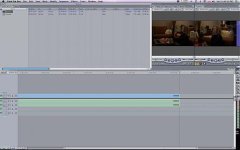
In the browser I'm showing 23.98. The aspect shows anamorphic. The canvas displays 16:9. Like I said I exported with Compressor as a DV file and it came out 4x3.
I just now exported with QTConversion to H264 and it came out almost 16:9
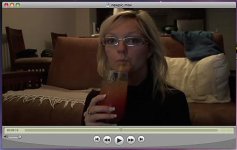
Does this pic look !6:9 to you?
It looks a bit short on the 16 side to me.

IMG%5D
IMG%5D

Anyway I am showing 23.98 and anamorphic with no judder or interlacing so all must be good except for export.
 
Last edited:
Yeah it's about a hundred pixels too tall for some reason. Does it look like that in the FCP canvas?

Can you take a screenshot of your sequence settings? And of your canvas too?
 
I'm just noticing now that the aspect ratio in shows 3x2 although there really isn't another option that makes sense. And the anamorphic box is also ticked.
 
Ok. Yeah the Quicktime movie you're exporting is just using the current settings of your sequence, which is a standard dv resolution of 720 x 480. I don't know what your workflow is but assuming you're just trying to get that quicktime movie to look normal, just open up movie properties and resize it. The proper 16:9 pixel dimension for sd is 853 x 480.
 
I don't see how they could be. FCP can automatically handle squeeze mode footage, regardless of capture settings. If you didn't import using an ana setting, it makes no difference, because you can, without rendering time or any other penalty, merely enable the anamophic setting in the sequence settings once you have your footage on the timeline. That's why I said it doesn't enter into the capture settings. Poco shot squeeze mode, not with an ana adapter.

I've never used an anamorphic adapter, but I am guessing that is the only time you'd really want to be sure you selected or created an anamorphic caputre preset. If the anamorphic conversion is done optically, the footage has no ana flags for FCP to work with.

But as far as using squeeze modes you can change it on the fly after the footage has been captured without having to wait for a render.

No.

Anamorphic and Squeeze are the same to FCP. Yes you can change them both after capture.


Please read my post about that. The second post.

All NTSC digital video is 720 X 480, be it 4:3 or 16X9. That is the only two flavors there are. Squeeze and Anamorphic Adaptor are both recorded to the tape the same way. In fact 4:3, Squeeze, Anamorphic Adapter are all recorded to the tape the same way. The tape has no idea what you put on it, which is why it doesn't matter to FCP whether your footage was made 16X9 electronically by squeeze or optically by the adaptor.

The ONLY thing you can put on a DV tape is 720X480, squareish shape. Period. That is why to get 16X9 you have to squish the image/distort it so that your NLE and then your DVD player can unsquish it.

So the adapter or squeeze mode or a little magic lepricaun in your camera could make the video squeezed / anamorphic in camera and then it will record to tape.
FCP has no way of knowing how it got squeezed. Be it optically, electronically, or wizard magic.

If you have a DVX100A and put the ana adapter on then take it off and compare that with squeeze mode they will look identical in the viewfinder - squished, just like they do to FCP.

Sure you can tag things anamorphic after you import them. Just like you can add advanced pulldown after you've imported. But the question was how do I import 24pA Squeeze. And the answer still is, as it has always been, whether you use a preset, or do it manually, for the least hassle later for a beginner:
DV NTSC
29.97
Anamorphic, checked
Advanced pulldown removal, checked.
 
Last edited:
Ok. Yeah the Quicktime movie you're exporting is just using the current settings of your sequence, which is a standard dv resolution of 720 x 480. I don't know what your workflow is but assuming you're just trying to get that quicktime movie to look normal, just open up movie properties and resize it. The proper 16:9 pixel dimension for sd is 853 x 480.

Right but only do that for web preview or something. This is what your video actually looks like, the NLE, or a DVD player make it look unsqueezed.
 
No.

Anamorphic and Squeeze are the same to FCP. Yes you can change them both after capture.


Please read my post about that. The second post.

All NTSC digital video is 720 X 480, be it 4:3 or 16X9. That is the only two flavors there are. Squeeze and Anamorphic Adaptor are both recorded to the tape the same way. In fact 4:3, Squeeze, Anamorphic Adapter are all recorded to the tape the same way. The tape has no idea what you put on it, which is why it doesn't matter to FCP whether your footage was made 16X9 electronically by squeeze or optically by the adaptor.

The ONLY thing you can put on a DV tape is 720X480, squareish shape. Period. That is why to get 16X9 you have to squish the image/distort it so that your NLE and then your DVD player can unsquish it.

So the adapter or squeeze mode or a little magic lepricaun in your camera could make the video squeezed / anamorphic in camera and then it will record to tape.
FCP has no way of knowing how it got squeezed. Be it optically, electronically, or wizard magic.

If you have a DVX100A and put the ana adapter on then take it off and compare that with squeeze mode they will look identical in the viewfinder - squished, just like they do to FCP.

Sure you can tag things anamorphic after you import them. Just like you can ad avanced pulldown after you've imported. But the question was how do I import 24pA Squeeze. And the answer still is, as it has allways been, wherther you use a preset, or do it manually, for the least hassle later for a beginner:
DV NTSC
29.97
Anamorphic, checked
Advanced pulldown removal, checked.

I'm not arguing that the footage looks any differently based on whether you're obtaining anamorphic footage through an adapter or squeeze mode. But the tape most definitely knows what you put on it. It can't tell you you shot with an anamorphic adapter, but it does hold data to tell you shot 4:3 or squeeze.

Think about it. If you shoot squeeze mode, there is data that FCP can interpret (and does- no leprechauns or wizard magic here) to adjust the anamorphic settings automatically.

If you're using an adapter, there's no such info. FCP has no way of knowing that the footage is intended to be unsqueezed because you're not shooting in "anamorphic adapter mode." In that case, you have to select it in the capture settings.

What I was trying to reconcile was your statement that in shooting squeeze mode, you better select an anamorphic capture sequence, otherwise you're in for render time to switch it over after the fact. Not true. Possibly with an adaptor- I've never shot with one but I can see why speculatively that might be the case.
 
Last edited:
Ok. I rendered again and changed the size setting in QTConversion.
All is OK - looks like 16:9.
Do I now import not knowing my ratios and have to depend on output setting to get a simple aspect ratio?
Don't beat me up guys but all this seems needlessly complicated.
I come from a Sony Vegas PC background.
I switched to Mac/FinalCut to ramp it up a notch but holy sh*t, with Sony I just imported 24PA 16:9 edited as such and exported as such.
To be honest I can't believe how complicated a simple capture, edit and export seems to be with Final Cut.
Again, this is my first day but I'm confused on things that should be dead simple.
Thanks for all the help though. :)
 

Attachments

  • newpic.jpg
    newpic.jpg
    18.2 KB · Views: 0
Ok. I rendered again and changed the size setting in QTConversion.
All is OK - looks like 16:9.
Do I now import not knowing my ratios and have to depend on output setting to get a simple aspect ratio?
Don't beat me up guys but all this seems needlessly complicated.
I come from a Sony Vegas PC background.
I switched to Mac/FinalCut to ramp it up a notch but holy sh*t, with Sony I just imported 24PA 16:9 edited as such and exported as such.
To be honest I can't believe how complicated a simple capture, edit and export seems to be with Final Cut.
Again, this is my first day but I'm confused on things that should be dead simple.
Thanks for all the help though. :)

Well it is made unecessarily complicated by two guys arguing over semantics, or how the inside of the camera works or whether to use a preset or not.

AGAIN. If we can turn the noise down. The answer has always been. Whether you use a preset or do it manually ...
DV NTSC
29.97
Anamorphic, checked
Advanced pulldown removal, checked.

But you can change all of that after you import as well.

Now for output. What are you outputting to? The QT movie you output using EXPORT QT MOVIE is like a raw master. Its not really for anything except turning into something else. If you want a web movie or an mpeg for a DVD you go to compressor and select whatever you want your final viewing format to be and it will take care of it for you. You might have to tell it its anamorphic but it will be ok. From within FCP you can also choose EXPORT USING QT CONVERSION, and then it will give you options that should take care of the aspect ratio for you as well, rather than just EXPORT QT MOVIE which just outputs a flattened copy of the sequence.

I have had problems sending an mpeg for someone on a windows system to burn to DVD, so I usually change my mpeg to square pixels before doing so. 720X404 actually, which is what I was told, but maybe it would work, make more sense, to change vertical instead of the horizontal as Jarred suggested.
 
Thanks Jack.
I've got about an 8inch manual to get through. I'm sure it will all make sense in the end.
 
you shouldn't really need that too much to get started, should be "fairly intuitive"
once you get cutting.

I would highly recommend this:
http://www.callboxlive.com/store/product_info.php?products_id=28

worth every penny and much better than reading that giant manual, which I don't think most people ever have. I have the HVX version of the above. Which brings up another possible source of confusion in this thread ... I haven't captured 24pa footage from a DVX in over a year since I switched to HVX and there have been a few significant updates of FCP since then.

Order that DVD. It will come with in three days, and within 4 days you will be sailing around FCP no problem.
 
Pfft ... editing I get. It's the export thats a pain in the ass.
I was multi-tasking tonight with talking to you guys and trying to convert a .mov file to a .wmv file for my father-in-law. He's scared of viruses and won't download QT. He's old and scared.
I first imported into FCP and exported using QTCoversion to .wmv and no matter what I did it would only render half the file.
So ... I imported into MPGStreamclip and it just froze.
So ... I took advantage of Bootcamp and went over to PC and tried to convert in Windows Media Converter and was told I needed a codec.
As a last resort I went to my little $99.00 simple Ulead program that's been gathering dust and tried it there.
It asked me how I wanted to export and gave me a nice clean little .wmv for upload.
I didn't even try Sony because it hates .mov
It's amazing sometimes how the simplest of programs seem to be the ones to do the simplest of jobs.
 
Pfft ... editing I get. It's the export thats a pain in the ass.
It's not a how to edit video, its a workflow optimization, for the DVX and FCP.

I was multi-tasking tonight with talking to you guys and trying to convert a .mov file to a .wmv file for my father-in-law...

I think that's because you need "flip for mac" to get full wmv compatibility out of FCP. When my demo of flip for mac expired it would only do a portion of what I exported in wmv until I payed.
 
Last edited:
I think that's because you need "flip for mac" to get full wmv compatibility out of FCP. When my demo of flip for mac expired it would only do a portion of what I exported in wmv until I payed.
Yeah, you're absolutely right. Wmv files will only play about halfway or for some weird duration in quicktime without flip4mac. Drove me nuts until I figured it out.
 
Back
Top