Can't install Compressor

Jaimebailon

Well-known member
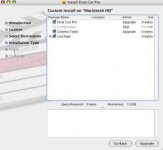
so recently something went wrong with my fcp in which i would try and open a project and the icon on my dock would bounce as if it was opening but then it just stopped and quit it never opened. so i decided to re-install final cut pro so i deleted final cut pro, compressor, cinema tools and livetype using appzapper(www.appzapper.com) to ensure i deleted all the files that come with it and final cut and cinema tools and livetype install just fine but now i don't even have the option of installing compressor has this ever happened to anybody does anybody know what to do??:furious3:i don't know what to do here is a screen shot of what my install window looks like

http://http://i35.tinypic.com/30t18w6.jpg
 

Attachments
  • Picture 3.jpg
    Picture 3.jpg
    10.2 KB · Views: 0
Last edited:
What version of Final Cut Pro? What Mac?

What OS version?

Remember that appzapper may not delete all the files that FCP installs.

Help us out with some details?
 
it is final cut pro 5 on a powermac G4 runing Mac os 10.4(the latest update of that)

also all the programs ran fine before this if there is anything else anybody would like to know please let me know
 
The problem with programs like appzapper is they often screw up the system prefs and registry to a point where the standard Final Cut Installer can't reinstall. The only way to fix this would be completely reinstall OS X on your system- a clean slate. Then install Final Cut Studio from scratch. And never use a program like appzapper, especially on Final Cut Studio.

-Noah
 
wow=( i wasn't expecting anything this harsh

I hope you meant my recommendation not my choice of words. :) It's pretty easy to do a reinstall OS X and FCS.

But sorry to say I can not recommend any application remover apps other than the uninstallers the come with applications themselves. There are so many hidden files in different locations installed on a Mac by Final Cut you can very easily cause problems with a third party app remover.

-Noah
 
oh i'm sorry no your words were not harsh at all yeah i guess i have to what i have to do and make sure i have backed up doubles of all my mov and fcp files. this is off topic but do you also have to delete all your documents as in your music and photos and then put them back into itunes? I've never had to do this before this is my first problem with my mac
 
thank you so much for being so helpful noah k
i contacted apple and they walked me through the steps i needed to do and i now got it to work i learned my lesson not to use appzapper for a pro app like this


-Jaime
 
Back
Top