
Navigation
Install the app
How to install the app on iOS
Follow along with the video below to see how to install our site as a web app on your home screen.
Note: This feature may not be available in some browsers.
More options
You are using an out of date browser. It may not display this or other websites correctly.
You should upgrade or use an alternative browser.
You should upgrade or use an alternative browser.
Can't CC.
- Thread starter Evan S
- Start date


 )
)Joshua Provost
Veteran
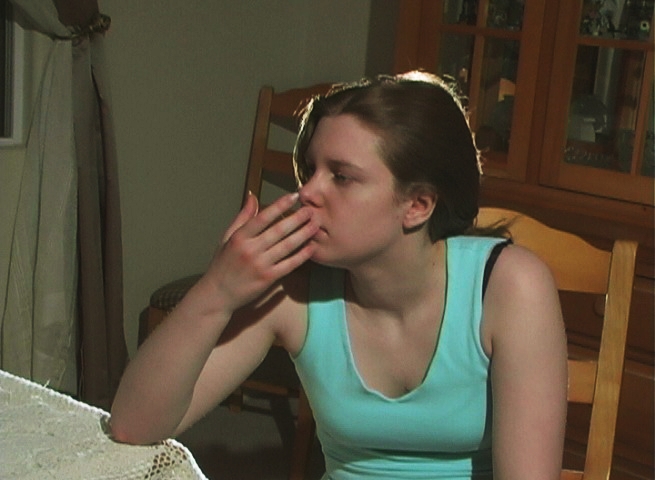
I took a quick swag at it. You don't say whether you intend to color correct for an ideal image, or for a certain look, so I just fixed some things. The original was a bit flat and underexposed, with too much red. I used color curves to add contrast and correct the exposure, then took some of the blue out to bring the skin tone to a more peachy color. Most of this could be done in-camera with the right contrast, iris, and white balance.

Jeremy Ordan
Major Contributor
Check out this thread: http://www.dvxuser.com/V6/showthread.php?t=50587
A bunch of Vegas users got together and practiced color correcting for neutral and then for some specific looks. It was a great experience and I think on most of the results people posted the exact steps they took to correct the image.
Since your image looks flat and without definition, what would most likely be the best course of action would be for you to first use a color curve and use a standard S curve for results (I learned this technique from Horse and now use it for everything). That will add some contrast and give you more range. At that point you just want to make everything look natural.
Remember, Color Correcting is just balancing the image to 0/neutral. Color Grading (the image you posted) is going for a specific look in post ie: Magic Bullet.
That is a weird image, just because that head light makes it look like she just had a witty thought.
-Jeremy
A bunch of Vegas users got together and practiced color correcting for neutral and then for some specific looks. It was a great experience and I think on most of the results people posted the exact steps they took to correct the image.
Since your image looks flat and without definition, what would most likely be the best course of action would be for you to first use a color curve and use a standard S curve for results (I learned this technique from Horse and now use it for everything). That will add some contrast and give you more range. At that point you just want to make everything look natural.
Remember, Color Correcting is just balancing the image to 0/neutral. Color Grading (the image you posted) is going for a specific look in post ie: Magic Bullet.
That is a weird image, just because that head light makes it look like she just had a witty thought.
-Jeremy


ovjamaica
Well-known member
Wow. Looks like two different people to me. I think the correction was a little severe on this latest one, but I do like the color of her eyes and the red hair. Looks better, I'd just mute it a bit. Not as intense. You took a flat image and just abut overexposed it. Keep her forehead from shining and I think it would look great.
Another thing to consider, if you haven't already, is that you should try to CC on an actual video monitor, not just your computer monitor. It's quite a bit different, and you'll get better results if you are checking this with a monitor.
Another thing to consider, if you haven't already, is that you should try to CC on an actual video monitor, not just your computer monitor. It's quite a bit different, and you'll get better results if you are checking this with a monitor.
 well. I mean there are cheap ones... are those worth it?
mikkowilson
Steadi-Guru
Even a cheap CRT TV is a good start (read: better than nothing) as it shows a Video, not computer, image.
The more you can adjust it the better, of course it wont' be near a production monitor, but it will give you a good idea at least.
- Mikko
The more you can adjust it the better, of course it wont' be near a production monitor, but it will give you a good idea at least.
- Mikko

HorseFilms
Look ma no hands
TheYankee said:first use a color curve and use a standard S curve for results (I learned this technique from Horse and now use it for everything).
It's the easiest way I've found to make footage look 1000 times better. I'm glad it's working for you too, Yankee.
Here's my take on that last still using color curves and the 6-way color corrector:

HorseFilms
Look ma no hands
I just put an S curve on it that's roughly like this:

Experiment with that until you like what you see. It doesn't take much practice for you to see what looks good to you. It's a great filter.
From there, I used the 6-way color corrector available for free at www.moosehill.se
I cheated a little and used a bezier mask to isolate her hair and boosted the reds on that layer. On the layer with her face I jacked up the greens and blues to make her eyes pop. That's about it.
Experiment with that until you like what you see. It doesn't take much practice for you to see what looks good to you. It's a great filter.
From there, I used the 6-way color corrector available for free at www.moosehill.se
I cheated a little and used a bezier mask to isolate her hair and boosted the reds on that layer. On the layer with her face I jacked up the greens and blues to make her eyes pop. That's about it.
Joshua Provost
Veteran
legend,
Your results are looking quite extreme. Is this what you are going for? A very stark look? If not, then perhaps you do need to find a better way to calibrate your monitor. Your footage is really flat and your corrections are really extreme. Need to find a way to find a middle ground.
Josh
Your results are looking quite extreme. Is this what you are going for? A very stark look? If not, then perhaps you do need to find a better way to calibrate your monitor. Your footage is really flat and your corrections are really extreme. Need to find a way to find a middle ground.
Josh
Actually, we (VASST) have a brand new training DVD in the Absolute Training for Vegas+DVD, Vol. 4, Color Correction in Sony Vegas. Glenn Chan and Douglas Spotted Eagle do an outstanding job of teaching this often difficult to understand subject. This is one of those topics that you just have to see it being done to understand how to do it. There is a stream on the page I linked to that you can watch to get an idea of what’s on the DVD.directinglegend said:I guess, I should be asking where I can find some good documentation on how to CC. or.. something
I had read a lot of articles on this topic as well but it wasn’t until I saw Glenn & DSE’s finished DVD that I finally “got it”. They show you how to use your scopes to quickly find the problem and correct it. I wish I had seen this DVD years ago.
I know you must take what I say with a "grain of salt" because I work at VASST but I can honestly say that I learned everything I know about CC from watching this DVD and here are my interpretations of your pictures color corrected using those techniques:
CC: of your first photo

CC: of your second photo

Glenn also has a free tutorial on the subject on the VASST site but the training DVD goes into much more detail.
~jr

bklyndv
Well-known member
The Hullfish and Fowler "Color Correction for Digital Video" book is a good overview of the process with specific, generalised examples and a nice intro to a lot of the core theories and practices out there. Pair it with Vegas' internal Help guide and you're off to a good start. Much of the rest is perusing forums like these, and practice practice practice.

Matt Grunau
Adobe Demigod
I think many of your issues would be helped with lighting. I have had the same issues as you, and I have found that the footage that looks the best was the footage with the best lighting setup. I know it may sound corny, but lighting really is the most imporant thing.
I have CC'd my own video, and CC'd video shot by people who know a whole lot more about lighting than I do. I don't have to tell you which one looked better.
Also, I always attack my CC issues in Photoshop and then apply what I did there to Vegas. This is especially handy, because you can quickly add layers and basic adjustments and refine your look. Vegas can do all (and yes I said all) the basic kinds of corrections that Photoshop can. The only thing really lacking in vegas is the extra blending modes, which would be awsome.
I have CC'd my own video, and CC'd video shot by people who know a whole lot more about lighting than I do. I don't have to tell you which one looked better.
Also, I always attack my CC issues in Photoshop and then apply what I did there to Vegas. This is especially handy, because you can quickly add layers and basic adjustments and refine your look. Vegas can do all (and yes I said all) the basic kinds of corrections that Photoshop can. The only thing really lacking in vegas is the extra blending modes, which would be awsome.

logicfilms
Well-known member


Last edited: