Canon R5 Announced with 8k

With the difference being that R5 programming seems to defy the laws of physics....The R5 situation is very different.
No it's clear that the physics of the current technology of that form factor haven't changed much and still apply. They gave everything everyone was clamoring for but the caveat was the heat/time limit. You can't have your cake and eat it too.

I agree with what John said like it or not there are serious video limitations with the R5. Either you live with those or you don't buy the camera. The R5 is a photography camera that can shoot video. You can be mad at the manner and timing the limitations were disclosed or how Canon marketed the camera but it's old news.
 
Having shot both, the FS7 and FX9 are far apart in color science. Maybe if you shot SLog 3 and were a good colorist?

Thanks! I'd only read another member, Lenny Levy, attempting to match them early on, and them mentioning it was not so easy. But I have not used the two cameras together. Years ago I attempted to match the GH with the Canon Rebel cameras, but that was about the time everyone was moving on to newer models, so I abandoned the work. It did show me just how difficult matching cameras could be though.

This was one of the threads about the Fs7 and Fx9
http://www.dvxuser.com/V6/showthread.php?367093-Matching-FX9-to-FS7/page2

It does seem like Sony's work around is that they have had SLOG 1,2,3 for a while. Yet, even then, I find trying to get wildly different Sony models to match is somewhat hit or miss. And I really do trust your opinion and eye in these matters.
 
Last edited:
I just came home from a shooting with the C300iii and R5 and I ran into a serious issue of the R5 and guess what - it was not overheating in first place. Most shots were action shots with a gimbal and I used the Sigma 24-35/f2 as it does not extend the tube when changing the focal length. Normally I check the footage when we have a short break . With the R5 that's hardly possible as the files don't playback on my 2018 maxed out MBP neither with FCPX nor with KYNO.
I let the MBP convert some files in the car and went on shooting. When I came back I saw that the 24-35 Crane3 was totally jittery. The 24-105 EF Canon did well. I have no idea what has happend. I will have to look in this later.

But the problem is that I could not check the footage on the location.

I forgot to switch the camera off when I copied the files.
Capacity of 50p went down from 15min to zero without having shot a single clip.
At leat I could go on with 25p - but not being able to review the footage is a serious concern to me.
 
Sorry to hear that. No way around it right now besides transcoding or external recording. A brutal, taxing format.

You'll have to use a new iPad if you would like to preview the footage as if it were 720p...and wait for more silicon on the way.
 
I just came home from a shooting with the C300iii and R5 and I ran into a serious issue of the R5 and guess what - it was not overheating in first place. Most shots were action shots with a gimbal and I used the Sigma 24-35/f2 as it does not extend the tube when changing the focal length. Normally I check the footage when we have a short break . With the R5 that's hardly possible as the files don't playback on my 2018 maxed out MBP neither with FCPX nor with KYNO.
I let the MBP convert some files in the car and went on shooting. When I came back I saw that the 24-35 Crane3 was totally jittery. The 24-105 EF Canon did well. I have no idea what has happend. I will have to look in this later.

But the problem is that I could not check the footage on the location.

I forgot to switch the camera off when I copied the files.
Capacity of 50p went down from 15min to zero without having shot a single clip.
At leat I could go on with 25p - but not being able to review the footage is a serious concern to me.
Sorry to hear that.

It's easy to forget a camera on not sure why they don't all have auto shut off. My last gig, I got home and realized I left the camera on and the battery was completely dead.

I'm not a fan of lens/camera stabilization for video. Sounds like a miscommunication with the a 3rd party lens.

I usually review in camera but with heat limitations of the R5 I understand. Not being able to review on laptop is a pain.

Unfortunately on the job is where you discover the quirks and limitations of new gear. Honestly as great as the image quality, that camera sounds like a pain in the ass that makes your work harder. Anyways hopefully you have enough good footage or can go back and reshoot what you need.
 
I just came home from a shooting with the C300iii and R5 and I ran into a serious issue of the R5 and guess what - it was not overheating in first place. Most shots were action shots with a gimbal and I used the Sigma 24-35/f2 as it does not extend the tube when changing the focal length. Normally I check the footage when we have a short break . With the R5 that's hardly possible as the files don't playback on my 2018 maxed out MBP neither with FCPX nor with KYNO.
I let the MBP convert some files in the car and went on shooting. When I came back I saw that the 24-35 Crane3 was totally jittery. The 24-105 EF Canon did well. I have no idea what has happend. I will have to look in this later.

But the problem is that I could not check the footage on the location.

I forgot to switch the camera off when I copied the files.
Capacity of 50p went down from 15min to zero without having shot a single clip.
At leat I could go on with 25p - but not being able to review the footage is a serious concern to me.
Very good information. Thank you for sharing! Sorry to hear about the playback.
 
I'm not a fan of lens/camera stabilization for video. Sounds like a miscommunication with the a 3rd party lens.
The 24-35 has no lens stabilization. I will look into it as soon as I find the time.

I usually review in camera but with heat limitations of the R5 I understand.


Unfortunately on the job is where you discover the quirks and limitations of new gear. Honestly as great as the image quality, that camera sounds like a pain in the ass that makes your work harder. Anyways hopefully you have enough good footage or can go back and reshoot what you need.
.
Reviewing in camera was never an option for me. Too small, back, fast forward do not work.
 
Sorry to hear that. No way around it right now besides transcoding or external recording. A brutal, taxing format.

You'll have to use a new iPad if you would like to preview the footage as if it were 720p...and wait for more silicon on the way.

Sounds interesting- what do I have to do for this option? Thanks!
 
Spend $1500 on an iPad Pro with 1TB of storage. lol

And a USB-C 3.1 (Gen 2) adapter if you don't have one.

[Maybe the lesser iPads can deal with it too if you can try one but IDK. And there's also a 512GB Pro version, but anything less than that may not be worth the price difference.]
 
Spend $1500 on an iPad Pro with 1TB of storage. lol

And a USB-C 3.1 (Gen 2) adapter.

Maybe the lesser iPads can deal with it too if you can try one.
Good info. Also, Pure uses the iPad as a wireless monitor, so it could end up being a multipurpose investment.
 
Thanks for the link. Just going to paste it here, so I can watch it in the thread again a bit later.

 
Nice. I think everyone should watch it.

It's truly a joke and an enjoyable microcosm of the entire computer and video industry.

I have never shaken my head more after seeing Max's $15,000 computer struggle.
 
Nice. I think everyone should watch it.

It's truly a joke and an enjoyable microcosm of the entire computer and video industry.

I have never shaked my head more repeatedly when seeing Max's $15,000 computer struggle.

It is funny, because we have very specific needs in the video community, and those needs are constantly in jeopardy to new tech before we even have old tech that works. In part because the camera and computer industry are not making products for photographers, but are making photographers into good consumers.
 
Good info. Also, Pure uses the iPad as a wireless monitor, so it could end up being a multipurpose investment.
I'm not up on the latest ipad, but as far as I know these devices can't be used as monitors. Much like a camera you can send video out but not video in (via a cable). Sometimes this can be overcome by sending the video via wifi/bluetooth which results in a long delay or lag, making it unusable for a monitor. You also might need a video stream encoder and a wifi router, powered in the field... not to mention the expense and hassle...

I don't know if this was already posted. I ran across my favorite wedding filmaker and his review of the R5.

 
Last edited:
Sorry to hear that. No way around it right now besides transcoding or external recording. A brutal, taxing format.

You'll have to use a new iPad if you would like to preview the footage as if it were 720p...and wait for more silicon on the way.
The Intel 10th Generation (Ice Lake) processors and newer include support for hardware 10-bit 4:2:2 HEVC decoding as part of their Quick Sync video features:
https://en.wikipedia.org/wiki/Intel_Quick_Sync_Video#Performance_and_quality

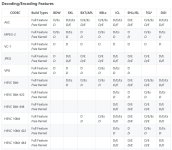
Here is the matrix of hardware encoding/decoding support by Intel processor version. The headers in the table are Intel processor code names (ICL refers to Ice Lake in the table, KBL is Kaby Lake, etc.), with D and E used to denote decode and encode support respectively. Link to Full Table

Intel-Quick-Sync.jpg

Unfortunately, the hardware decoding features of recent NVidia (NVDEC) and AMD graphics processors only support 10-bit HEVC decoding in 4:2:0 and 4:4:4 sub-sampling for some reason. Support for 4:2:0 makes a lot of sense, since that is the most widely used format for video delivery over the web, but I'm not sure why only 4:4:4 was chosen beyond that:
NVidia GPU Encode/Decode Support Matrix

It's important to note that these implementations are fixed-function decoders implemented in hardware. This is part of why they are so fast. But it also means that there is no way to add new features to these decoders via firmware or driver updates. Adding new features requires new silicon, which means buying a new graphics card or processor.

Many of the very recent Windows laptop models use Intel 10th Generation processors or newer, although I think among the current Mac laptops only the 13-inch MacBook Pros do.
 
Nice. I think everyone should watch it.

It's truly a joke and an enjoyable microcosm of the entire computer and video industry.

I have never shaken my head more after seeing Max's $15,000 computer struggle.

Yep. Lame on Apple's part. Overpriced? 192GB of ram? I will check them again but I had those same clips in Edius and they seemed to play fine. It is not all about the video cards but more about the software's support of codecs. My 10-core Skylake-X chip does not have the Intel GPU and Edius as a program is not accelerated by the video card. No idea why they would leave 4:2:2 out of the specs though...
 
Yep. Lame on Apple's part. Overpriced? 192GB of ram? I will check them again but I had those same clips in Edius and they seemed to play fine. It is not all about the video cards but more about the software's support of codecs. My 10-core Skylake-X chip does not have the Intel GPU and Edius as a program is not accelerated by the video card. No idea why they would leave 4:2:2 out of the specs though...

Nothing makes sense anymore.

Are you still thinking about a R5? Final 24 hours for mine if you want it. Special deal for a DVXuser...:happy:
 
Back
Top