I have the avccam viewer program, filled out the meta data info, recorded it to the sd card, set the cam to record the data, and when I tell the cam to read the card for the meta data, it says there is no file. YES THERE IS!!!!! The avccam viewer creates a .p2 file on the sd card, but the cam won't read it. Any ideas?

Navigation
Install the app
How to install the app on iOS
Follow along with the video below to see how to install our site as a web app on your home screen.
Note: This feature may not be available in some browsers.
More options
You are using an out of date browser. It may not display this or other websites correctly.
You should upgrade or use an alternative browser.
You should upgrade or use an alternative browser.
Camera won't read meta data!!!!! AAAAHHHHHGGGGGGG!
- Thread starter pulpwoody
- Start date
Barry_Green
Moderator
Is it stored in the right directory? Did you use the save-to-sd-card option in avccam viewer?
Directory: On the card, the .p2 file that was created is a separate, stand alone item, and yes, I used the save to sd card option. Do I need to update the camera or something?Is it stored in the right directory? Did you use the save-to-sd-card option in avccam viewer?
Barry_Green
Moderator
It needs to be stored in the right directory. On the SD card, it needs to be in the PRIVATE directory, in the following location:
PRIVATE/MEIGROUP/PAVCN/SBG/P2SD/MTDT00.P2
PRIVATE/MEIGROUP/PAVCN/SBG/P2SD/MTDT00.P2
Barry_Green
Moderator
I don't remember if AVCCAM Viewer creates those directories when saving to sd card; I don't have it with me right now. I used P2 Viewer to "save to SD card" a metadata file, and it put it in the above-named directory structure, and loaded right up in the AF100.
Barry_Green
Moderator
For writing metadata files? P2 Viewer will work for that job, certainly.
Frankly I think AVCCAM Viewer is pretty awful and avoid it in all cases...
Frankly I think AVCCAM Viewer is pretty awful and avoid it in all cases...
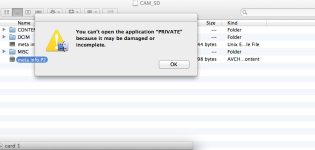
Okay, I tried the P2 viewer plus. I recognizes the SD card, but when I fill out the metadata info, and close the window, it gives me no option of saving to the SD card. When I do the same thing in the avccam viewer, it creates a .p2 file, but I can't put anything into the private, because it's not a folder, it's a QT icon.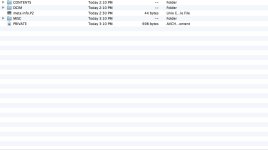
Barry_Green
Moderator
Er... well, that's messed up. I say format a new card and start from there, and use the P2 Viewer functions of "tool->metadata upload" to make your metadata file (check the boxes for what fields you want included) and when it's ready, use file->save to SD card.
EDIT: ah, I see that you're on the Mac. That may or may not complicate matters; I've been using the Windows version of P2 Viewer. Well, assuming it's similar in P2 Viewer Plus, you should have the same options; in the Windows version of P2 Viewer Plus it has the exact same metadata options as P2 Viewer did, so I'm presuming that the Mac version will as well.
EDIT: ah, I see that you're on the Mac. That may or may not complicate matters; I've been using the Windows version of P2 Viewer. Well, assuming it's similar in P2 Viewer Plus, you should have the same options; in the Windows version of P2 Viewer Plus it has the exact same metadata options as P2 Viewer did, so I'm presuming that the Mac version will as well.
Barry_Green
Moderator
Not "file" in P2 Viewer, it's "file" in the metadata entry box. When you choose "tool->upload metadata", that brings up a new window which has its own "file" menu, and that's the one that has "save to SD card".
Barry_Green
Moderator
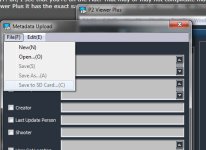
gotcha. I'll check that out.Not "file" in P2 Viewer, it's "file" in the metadata entry box. When you choose "tool->upload metadata", that brings up a new window which has its own "file" menu, and that's the one that has "save to SD card".
Thanks again Barry, I found the 'write to SD card,' and indeed it did, the camera was able to read the data. However, the clip names don't transfer over to Premiere or FCP. I can see the rest of the data in the metadata tab in PP, but the clips are still 0001, 0002, etc. but, in the Mac finder window, the clips show up with the names i gave them through the metadata. I'll keep messing with it, but is there still something I'm missing?