
Navigation
Install the app
How to install the app on iOS
Follow along with the video below to see how to install our site as a web app on your home screen.
Note: This feature may not be available in some browsers.
More options
You are using an out of date browser. It may not display this or other websites correctly.
You should upgrade or use an alternative browser.
You should upgrade or use an alternative browser.
GH4 Camera Settings or Metadata. Is It Readable?
- Thread starter Erik Naso
- Start date


stoneinapond
Veteran
I'm trying to see what ISO settings I used on a 4K GH4 clip in Premiere Pro CS6. I cant seem to find it and think it's not available. Anyone know a way to see basic camera settings? Mainly ISO is what I want, or is it not recorded to the card like photos are.
I don't think there is a complimentary Exif format for moving images (yet). Would be very useful.
j1clark@ucsd.edu
Veteran
I keep coming back to this over the years. Really frustrating. We tweak our cameras and try to learn from our mistakes but I cant always write everything down then I of course I forget. Ha!
The MOV format has the ability to take 'text' or "EXIF" like data, as it is a container format...
But alas, it seems few DSLR manufacturers take advantage and leave the camera settings in some sort of format...
In the 'Bluray-esque' format of AVCHD, there are side car files that could have also served at as metadata info... I think MP4 format also allows for metadata as well, but I could be wrong on that...
The only 'hack' I have at the moment is to snap a still with my 'film' settings... and... well... I often forget...
Peter Berry
Well-known member
The MOV format has the ability to take 'text' or "EXIF" like data, as it is a container format...
The only 'hack' I have at the moment is to snap a still with my 'film' settings... and... well... I often forget...
Yes, JPG stills, at least from GH2-3 had the usual EXIF data.
I just found a way of accessing the metadata, which apparently is safed as EXIF-data in the MOV files. By using ExifTool GUI (with ExifTool by Phil Harvey) you have access to metadata including:
ISO, white balance mode or color temperature (when white balance is set to manual), used lens and focal length (if it is an active lens), f-stop, exposure time, and much much more! It's absolutely amazing how much stuff is recorded there, I can even find the field of view and hyperfocal distance!
All you have to do in ExifToolGUI is select a video file and then click "all" in the metadata field in the upper right-hand corner. Then you can find all necessary data under "---- Panasonic ----" and "---- ExifIFD ----".
ISO, white balance mode or color temperature (when white balance is set to manual), used lens and focal length (if it is an active lens), f-stop, exposure time, and much much more! It's absolutely amazing how much stuff is recorded there, I can even find the field of view and hyperfocal distance!
All you have to do in ExifToolGUI is select a video file and then click "all" in the metadata field in the upper right-hand corner. Then you can find all necessary data under "---- Panasonic ----" and "---- ExifIFD ----".
All you have to do in ExifToolGUI is select a video file and then click "all" in the metadata field in the upper right-hand corner. Then you can find all necessary data under "---- Panasonic ----" and "---- ExifIFD ----".
My Momma always told me, if it sounds too good to be true ....
Well, I tried anyway. I just don't see it. In fact, I don't even see 'ExifFD' after 'Panasonic'. All I see under 'Panasonic' are XMP data fields, and nothing that I can't get from looking elsewhere.
I'm using v9.6 of ExifTool and v5.15.0.0 of ExifToolGUI.
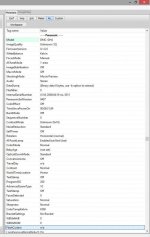
Mine has "Model" in green like yours, then a blank field to the right, and then it starts a new group "---- XMP-X ----". Clearly mine does not have exif data.I'm also using ExifTool V9.69 and ExifToolGUI 5.15 and I'm looking right at the metadata of a GH4 UHD MOV file. Here's a screenshot of how it looks here:
Did you by any chance update your GH4's firmware to the v1.1 version? Maybe that's an added feature (I hope). Otherwise there's some other reason why your body is recording exif data with .mov files and mine isn't. Either way, it's encouraging that someone's does!
Mine has "Model" in green like yours, then a blank field to the right, and then it starts a new group "---- XMP-X ----". Clearly mine does not have exif data.
Did you by any chance update your GH4's firmware to the v1.1 version? Maybe that's an added feature (I hope). Otherwise there's some other reason why your body is recording exif data with .mov files and mine isn't. Either way, it's encouraging that someone's does!
Hmm, that is quite weird. I updated my body firmware to v1.1 two days ago but haven't shot any clips with that yet. So the metadata were definitely recorded with v1.0.
I've captured a few clips just now with the new firmware and the recorded metadata are the same. I also switched to MP4 temporarily and the recorded metadata match the ones in MOV files. This is astonishing, how can it be divergent for different GH4 bodies?
I can't find anything like "---- XMP-X ----" in the metadata by the way.
Darn, I was really hoping it was because your clips had been recorded using v1.1.Hmm, that is quite weird. I updated my body firmware to v1.1 two days ago but haven't shot any clips with that yet. So the metadata were definitely recorded with v1.0.
I've captured a few clips just now with the new firmware and the recorded metadata are the same. I also switched to MP4 temporarily and the recorded metadata match the ones in MOV files. This is astonishing, how can it be divergent for different GH4 bodies?
I can't find anything like "---- XMP-X ----" in the metadata by the way.
I wish others would have a look and see what their .mov files look like. I pre-ordered my body, so it's one of the first, but I don't see how that could possibly matter.
Very weird, indeed. Anyway, thanks for discovering this, and hopefully others can benefit from it. I'd love to be able to see that exif data in my mov files.
Fantastic discovery for me; thanks for sharing. This is such good new information in our video files. My GH4 v1.1, ExifTool v9.69 and ExifToolGUI 5.15 gives me the display you show also. I am a happy camper.I'm also using ExifTool V9.69 and ExifToolGUI 5.15 and I'm looking right at the metadata of a GH4 UHD MOV file...
Fantastic discovery for me; thanks for sharing. This is such good new information in our video files. My GH4 v1.1, ExifTool v9.69 and ExifToolGUI 5.15 gives me the display you show also. I am a happy camper.
You're very welcome! I'm glad that someone else can also benefit from this and that it's not an anomaly in my GH4 body! ;-)