
Navigation
Install the app
How to install the app on iOS
Follow along with the video below to see how to install our site as a web app on your home screen.
Note: This feature may not be available in some browsers.
More options
You are using an out of date browser. It may not display this or other websites correctly.
You should upgrade or use an alternative browser.
You should upgrade or use an alternative browser.
Burn in MLUT, forget Hyper gamma
- Thread starter yachacha
- Start date

rbirnbaum
Well-known member
Forget the paint menu.
I use MLUT in F35 and record burned in stream via Monitor Out. This looks best.
Better than hyper gammas. F35 in paint never works.
Oh yeah? What LUT? Shooting slog sgamut?
In Cine EI mode, just assign the MLUT to any of the custom buttons. It’ll even push the LUT to 1000EI when changed.
You could also change the MLUT to be HG7 or HG8 in CINE mode when s-log is the profile.
I’ve been playing around with the Special HG8ISO800 gamma, really punchy image and when pushed to +6db, it gives a nice “film grain”
Gonna play around with MLUT again !
You could also change the MLUT to be HG7 or HG8 in CINE mode when s-log is the profile.
I’ve been playing around with the Special HG8ISO800 gamma, really punchy image and when pushed to +6db, it gives a nice “film grain”
Gonna play around with MLUT again !
rbirnbaum
Well-known member
In Cine EI mode, just assign the MLUT to any of the custom buttons. It’ll even push the LUT to 1000EI when changed.
You could also change the MLUT to be HG7 or HG8 in CINE mode when s-log is the profile.
I’ve been playing around with the Special HG8ISO800 gamma, really punchy image and when pushed to +6db, it gives a nice “film grain”
Gonna play around with MLUT again !
Jo,
I have played with HG8ISO800 and like it a lot too. With MLUT, which LUT are you using to burn into the image?
Here are my most recent settings...
Went a little extreme to push each setting, looks nice baked in with the MLUT, which allows for 109 IRE with slog.
Expose 18% gray around 33-38 IRE and you’re good to go !
CUSTOM MODE
EXTEND
F900R
MLUT (operation menu)
HG8009G40
PAINT SETTINGS:
S-LOG GAMMA
BLACK GAMMA
M -99
RANGE: LOW ; ON
SATURATION:
-20: ON
LOW KEY SAT: 99
RANGE: HIGH ; ON
DETAIL: ON
LEVEL: -60
CRISP: 99
LVL DEP: 99 : ON
Went a little extreme to push each setting, looks nice baked in with the MLUT, which allows for 109 IRE with slog.
Expose 18% gray around 33-38 IRE and you’re good to go !
CUSTOM MODE
EXTEND
F900R
MLUT (operation menu)
HG8009G40
PAINT SETTINGS:
S-LOG GAMMA
BLACK GAMMA
M -99
RANGE: LOW ; ON
SATURATION:
-20: ON
LOW KEY SAT: 99
RANGE: HIGH ; ON
DETAIL: ON
LEVEL: -60
CRISP: 99
LVL DEP: 99 : ON

SJX
Veteran
Forget the paint menu.
I use MLUT in F35 and record burned in stream via Monitor Out. This looks best.
Better than hyper gammas. F35 in paint never works.
But why not slog? Or this is for jobs that don't grade only?
rbirnbaum
Well-known member
Here are my most recent settings...
Went a little extreme to push each setting, looks nice baked in with the MLUT, which allows for 109 IRE with slog.
Expose 18% gray around 33-38 IRE and you’re good to go !
CUSTOM MODE
EXTEND
F900R
MLUT (operation menu)
HG8009G40
PAINT SETTINGS:
S-LOG GAMMA
BLACK GAMMA
M -99
RANGE: LOW ; ON
SATURATION:
-20: ON
LOW KEY SAT: 99
RANGE: HIGH ; ON
DETAIL: ON
LEVEL: -60
CRISP: 99
LVL DEP: 99 : ON
Thanks for sharing! Will try these. A baked in look with 109 IRE sounds great! Jo, you have any sample clips with those settings?
rbirnbaum
Well-known member
But why not slog? Or this is for jobs that don't grade only?
Slog is great and so is sgamut... but a lot of people screw the color in the grading. Also by using the HG you exploit IRE to 109. Slog is capped at 104 IRE. So in theory you would get even more highlight roll off.
BTW I am now using Color Space Transform in Resolve and its a game changer for me. No more LUTs and getting beautiful results. Add a CST as a Timeline Node, and you just need minor adjustments.
rbirnbaum
Well-known member
I’m talking about standard MLUT built into every F35. Its assignable to show up on monitor out
. It’s not true Hyper Gamma goes up to 109 - still caps at 104 same as SLog, check it in histogram.
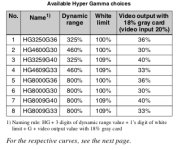
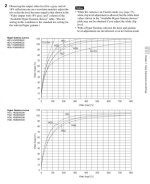
I check on waveform on my PiXE5 and I am getting full values. I have tried Odysseys before where they are capped at 100 (assume a firmware issue) but never saw them capped at only 104. All of Sony's documentation says HG 3, 4, 7, 8 uses 109% for superwhite. How are you going about testing that they are also capped at 104%?
G
Guest
Guest
Thanks for the test.
I typically go with slog for that roll off in the highlights. Will play around with the HG’s again. When i worked in news, i had a lot of nerd fun finding the best hyper gamma, and made the darkest shadows darker to bring back some saturation and contrast, while still getting a more natural roll off. Most of the other cameras in the station were set with rec709, and for some reasson the color channels didn’t clip evenly and yellow appeared right before clipping, and it clipped fast. But the HP was a relief. One of the guys claimed my camera when i left, haha. The geekiest part of all of that was making sure i was legacy tv safe.
I typically go with slog for that roll off in the highlights. Will play around with the HG’s again. When i worked in news, i had a lot of nerd fun finding the best hyper gamma, and made the darkest shadows darker to bring back some saturation and contrast, while still getting a more natural roll off. Most of the other cameras in the station were set with rec709, and for some reasson the color channels didn’t clip evenly and yellow appeared right before clipping, and it clipped fast. But the HP was a relief. One of the guys claimed my camera when i left, haha. The geekiest part of all of that was making sure i was legacy tv safe.
G
Guest
Guest
But i’ll specifically test the benefits of slog’s inherent curve aesthetic (even though it wasn’t exactly design to be awsthetic) and HP8’s potential latitude. May be a shadow detail trade off. I guess, what i enjoy most about this camera is mot needing to dig into the settings or post workflows to get a great image, and i have mever even thought to experiemnt. Just too happy with it. Ha!

Mike Krumlauf
Award Winning Filmmaker
Is there a way to import custom MLUTS into the F23/35 bodies? For example, if i make a monitor lut in Davinci or Film Convert, can i then import that into the camera and use that? Or is it only MLUTS made in CVP?