Building a DIY wireless directors monitor / client monitor

I almost built the 5" as a challenge, since these days there's zero reliance on your wooden cameras providing parts. I don't know how many people will benefit from a 5", I'm thinking more a bonus for crew members to have fewer people crowd around a sumo e.g. HMU, possible lighting assistant working with a Gaffer, B camera operator during an interview to stay out of a wider frame, corporate client just for a wow factor/to stay away from the film people.
In 2020 Covid era I started providing a separate crew monitor to avoid having the faces hovering over the shoulder as you mentioned, and it has proven to be very useful. Given the 6' distancing rule back then I went big and got a 55" LG OLED for this, which still makes a fantastic crew monitor as a number of people can look at it and really see details (so good for H/MU/props/set dressing). Or also works as a client monitor for same reason. I do have a 32" that works fine for this also.

So you can just add a decimator to the chain and have four images on any monitor, appropriate connections assumed? Would a four camera shoot be wireless or usually wired? Would the decimator live close to the monitor, but not necessarily mounted to it, but then with its own power?
I haven't done too many 4 camera gigs that weren't multicam (and then usually more than 4). Gnerally it's a two camera deal so a two-up, sometimes 3. But I can also send reference stills to the director on one of the inputs. For green screen shoots for instance I might send the camera original image and a comp with background.

The Decimator lives inside a case in my cart along with ATEM switcher and DA's and other related bits. The cameras are usually wireless, with receivers going to the respective AC's for their monitors, video village and my cart. From there I'll broadcast a second wireless signal with whatever flavor of quad setup (described above). That goes to the handheld monitor, crew monitor, client monitor and the directors monitor which is usually a Sumo. Each job has slightly different needs so I'll jump receivers around as needed.
 
In 2020 Covid era I started providing a separate crew monitor to avoid having the faces hovering over the shoulder as you mentioned, and it has proven to be very useful. Given the 6' distancing rule back then I went big and got a 55" LG OLED for this, which still makes a fantastic crew monitor as a number of people can look at it and really see details (so good for H/MU/props/set dressing). Or also works as a client monitor for same reason. I do have a 32" that works fine for this also.
Did you just adapt the 55" to film stands and mounted it on a combo stand or did it have its own stand system? I've got a 40" TV collecting dust I could commit to something similar.

The Decimator lives inside a case in my cart along with ATEM switcher and DA's and other related bits. The cameras are usually wireless, with receivers going to the respective AC's for their monitors, video village and my cart. From there I'll broadcast a second wireless signal with whatever flavor of quad setup (described above). That goes to the handheld monitor, crew monitor, client monitor and the directors monitor which is usually a Sumo. Each job has slightly different needs so I'll jump receivers around as needed.
Oh, so the decimator only works with a switcher (makes sense!)?

Why does video village need a receiver if it's potentially getting your second signal/quad setup? Or is video village's receiver getting signal from your cart's transmitter? I know you've mentioned before, I'll have to revisit the cart thread, but your cart to video village is usually a wireless signal, no BNC cable run?
 
Did you just adapt the 55" to film stands and mounted it on a combo stand or did it have its own stand system? I've got a 40" TV collecting dust I could commit to something similar.

Yes, I have a 200mm VESA to 5/8 adaptor on the back (non articulating, to make it more secure--I never need to tilt this display).
Oh, so the decimator only works with a switcher (makes sense!)?
Not specfically. All the incoming feeds (my portable system allows for three) go into their own Decimator HX to convert signal if needed, and to distribute to various other places. The switcher gets one input, the quad gets another. And of course the quad feeds into the switcher as its own source.

Why does video village need a receiver if it's potentially getting your second signal/quad setup? Or is video village's receiver getting signal from your cart's transmitter? I know you've mentioned before, I'll have to revisit the cart thread, but your cart to video village is usually a wireless signal, no BNC cable run?
this is a sort of complicated answer because each job has it's own scale and requirements. On a bigger show, video village is a bunch of chairs and I provide monitors for each camera (used to be 17", then in Covid they went up to 40"), which would either get a receiver direct from camera, or hardwired from my cart.. The director often sits separately and they get their own monitor with the quad feed, sent wirelessly.

Below is a flow diagram I built for a series in 2021, with all the Covid needs illustrated. Signal sent out to 10 odd monitors around set, not counting my cart, plus feeds via iOS to various people's phones thru the Teradek app, and bonded uplink to the network. That was a big one!
 

Attachments

  • KENAN S2.jpg
    KENAN S2.jpg
    202.5 KB · Views: 8
Yes, I have a 200mm VESA to 5/8 adaptor on the back (non articulating, to make it more secure--I never need to tilt this display).
Thanks Charles, you're saving time answering questions I haven't even asked yet! I really like the idea of a larger panel as an option. Then you just have options from 5" all the way up to large TV screens.
All the incoming feeds (my portable system allows for three) go into their own Decimator HX to convert signal if needed, and to distribute to various other places. The switcher gets one input, the quad gets another. And of course the quad feeds into the switcher as its own source.
Why does each feed get its own Decimator instead of one, because you'd run out of both inputs and outputs?
Below is a flow diagram I built for a series in 2021, with all the Covid needs illustrated. Signal sent out to 10 odd monitors around set, not counting my cart, plus feeds via iOS to various people's phones thru the Teradek app, and bonded uplink to the network. That was a big one!
Jeez! Thanks for sharing. In the top left corner, second line "A Rx panel" and "B Rx panel", are these just the monitors on your cart?

Do the ACs get a more direct feed because of latency. As in, it's important for your panels and the AC monitors to have the most direct wireless feed, then anyone else can get a secondary (and beyond) feed a number of ways via your cart?
 
Thanks Charles, you're saving time answering questions I haven't even asked yet! I really like the idea of a larger panel as an option. Then you just have options from 5" all the way up to large TV screens.
It couldn't be easier to use TV's as on-set monitors these days. Nearly all have a USB port on the back, and most micro SDI to HDMI converters run on 5V, so it's just a cheap barrel or USBC to USBA cable to power the converter. Add a 5/8 VESA mount and you are done!

Why does each feed get its own Decimator instead of one, because you'd run out of both inputs and outputs?
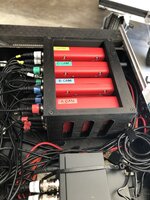
MD-HX's are one input devices, so each source requires its own. This is a custom cradle I had made up to stack them to minimize their footprint.

Dp cart small decimators Large.jpeg

This is the case at the bottom of the cart which houses all the components including the ATEM switcher, the Decimators and various other DA's, converters etc, with a patch panel on the back. If we have to go even more portable like in a follow van, I just slide out the case and the grips make me a makeshift desktop for my laptop and switcher controller.

dp cart small bottom Large.jpeg

here's the top side of the cart on a recent commercial. I was tasked with pulling keys live on set so I had a second laptop with Resolve playing back stills and video (on the right side of frame)--it was a lot to manage!
IMG_5378 Large.jpeg
Jeez! Thanks for sharing. In the top left corner, second line "A Rx panel" and "B Rx panel", are these just the monitors on your cart?

Those are the high-gain Teradek panel antennas, with the receivers mounted on them.
Do the ACs get a more direct feed because of latency. As in, it's important for your panels and the AC monitors to have the most direct wireless feed, then anyone else can get a secondary (and beyond) feed a number of ways via your cart?
yes, that's indeed the idea. As I look at that diagram now, I have a few questions, such as why we didn't put another set of camera receivers at village vs me feeding them hardwired, and also why I had a separate quad feed originating at village that was feeding the network and the rest of the ancillary monitors, instead of a duplication of the quad in my cart. I must have had a reason but it eludes me now.
 
Last edited:
yes, that's indeed the idea. As I look at that diagram now, I have a few questions, such as why we didn't put another set of camera receivers at village vs me feeding them hardwired, and also why I had a separate quad feed originating at village that was feeding the network and the rest of the ancillary monitors, instead of a duplication of the quad in my cart. I must have had a reason but it eludes me now.
Thanks for the pictures and breakdown.I believe you've touched on this before but was there resistance to using your set up on union work vs. a video assist/video assist owner operator? Or was there someone in this role and you were "just" providing the hardware (and sometimes software)?
 
On a job where there is VTR, I am more than happy to leave these sort of things up to them! In fact, on the commercial I just did there was a VTR person in the budget, but all things considered it was better for me to pull the mattes, and apply the savings elsewhere. In a union situation, I wouldn't be doing that because it would fall out of my jurisdiction into another local. I do keep that cart with me, and will grab stills and occasionally record clips for visual references, which is still acceptable as they are for my usage in determining exposure and keeping continuity.
 
@CharlesPapert re connex mini, can you have two transmitters, one per camera, to work with a single receiver, if only one tx is ever on? If you turn one off, then turn the other one on, will the receiver change to whichever transmitter is on?

I'm just wondering with the system being as cost effective as ever, if I have a camera on a gimbal, then another rig for a different camera, could they both have their own tx that lives with each build, while using a single receiver, or will this only work with two complete sets e.g. tx/rx per camera?
 
Rob: each receiver needs to be paired to a single transmitter, so in the instance you describe you'd have to re-pair each time you switch cameras unfortunately. And it's a bit of a wiggly process compared to more recent systems, involving a paper clip and going back and forth between tx and rx. Definitely worth picking up an additional receiver if you can. I haven't looked in a while but last I did, there were quite a few cheap systems floating around as few people are using Connex these days. The main advantage of that system is the tiny size of the transmitter (mitigated by the funky power connector and vulnerable micro-HDMI), and the 3000 ft range with the Fusion (silver) receiver.
 
Rob: each receiver needs to be paired to a single transmitter, so in the instance you describe you'd have to re-pair each time you switch cameras unfortunately. And it's a bit of a wiggly process compared to more recent systems, involving a paper clip and going back and forth between tx and rx. Definitely worth picking up an additional receiver if you can. I haven't looked in a while but last I did, there were quite a few cheap systems floating around as few people are using Connex these days. The main advantage of that system is the tiny size of the transmitter (mitigated by the funky power connector and vulnerable micro-HDMI), and the 3000 ft range with the Fusion (silver) receiver.
Thanks. I saw a broken rx working tx for about $70 USD (missed it), almost worthless to some people! Locally, you can get both brand new for $1,100 AUD/$750 USD, so I'll either check ebay or buy new when the time comes. If you had a large project coming up, would you move away from the amimon system at this point or stick with it?

I FINALLY need to buy a BM micro converter to work with the BM pyxis, which doesn't have HDMI, after all these years using the connex mini with HDMI. I'll also play around and test a usb-c to HDMI adapter out of curiosity. It's a shame with so many accessories that the connections are the bottleneck - imagine a connex mini tx with native SDI instead! I thought I could use the pyxis USB-C to power the converter, but the technical response I received was that it's not recommended as connecting to a converter, which is then connected to other equipment may introduce grounding issues. So I'm back to BYO power for both converter and tx. I remember seeing the camera motion research splitter cable, but it looks like their website is down, maybe they went under.
 
imagine a connex mini tx with native SDI instead!

That's essentially how I've been working with the Connex since 2018, when I had both transmitters and receivers mounted into custom 3D housings with AJA converters (at the time, the only ones that could convert 24psf signals). I've never had grounding issues powering this system off cameras.

connexmini.jpeg

I later designed other housings that just made the connections more robust, converting to full size HDMI and 2.5mm barrel connectors.

connexminirehouse1.jpg
 
Sorry explain? 1/4 screw too long? add washers?
I'd like to pass a screw through a 1/4 20 thread of a cheese bar https://www.smallrig.com/au/cool-cheese-bar-with-1-4-inch-and-3-8-inch-screw-hole-1091.html

and thread it into the 1/4 20 thread of another cheese bar.

It's similar to how a tripod screw has an unthreaded shoulder, making it "partial" to allow fore/aft adjustments. I need an unthreaded section of screw to passively pass through the first cheese bar, rather than engage with the threads, before actually screwing into the second cheese bar. If the screw is entirely threaded, you can "connect" the cheese bars, but they can't quite get flush.

If I use the amazon linked screws above, the non-threaded section isn't long enough, I need a longer shoulder to pass through the cheese bar, which is thicker than most off the shelf partial screw use cases.
 
If you have a Dremel tool, you could likely grind the threads down.

Also, I've done what you described with cheese bars like this by feeding a standard 1/4-20 through the 3/8-16 hole. If there's slippage after you've tightened everything down, you could use Sugru around the 1/4-20 screw to widen the the section that goes through the 3/8-16 hole to fill the gap.
 
I've got the cheese bar in the "Chicago/Texas" orientation, applying apple box descriptions. I can mount with a single screw in the unthreaded hole, third from the end, but I'd prefer to reduce the twist risk, with a pair of screws, and all that's remaining are the pair of 1/4 20 threaded holes on the end.

As a side plate, I'm using the smallrig cheese plate https://www.bhphotovideo.com/c/product/1421873-REG/smallrig_1681_multi_purpose_cheese_plate.html

I'm attaching the cheese bar to the underside of the mounted plate, but extending beyond the larger cheese plate, which is why I don't have the full choice of hole). I'll add some photos soon.

That brings up another question re sugru. I've got an HDMI female to micro HDMI male cable running inside a 15mm rod. Can I add sugru inside the rod to keep the cable in place, or is this the wrong product? When I connect the connex mini tx, it'd be great to connect it to a rigid HDMI micro cable, rather than pushing it back inside the rod.
 
Can't quite visualize the cheeseplate concerns...but, what about drilling out the threads on the first 1/4-20 hole so a standard screw goes through it, versus modifying the screw itself? I've done exactly this when mating two threaded objects. Easy to do and works well.

Sugru should work nicely for the application you are going after. Might be a little tricky to get it to contact the rod around its inner circumference (for maximum adhesion), where it might just want to push further down the tube instead. Unless this is a very short 15mm rod and you can fill it with Sugru.
 
Can't quite visualize the cheeseplate concerns...but, what about drilling out the threads on the first 1/4-20 hole so a standard screw goes through it, versus modifying the screw itself? I've done exactly this when mating two threaded objects. Easy to do and works well.

Sugru should work nicely for the application you are going after. Might be a little tricky to get it to contact the rod around its inner circumference (for maximum adhesion), where it might just want to push further down the tube instead. Unless this is a very short 15mm rod and you can fill it with Sugru.
That's a great idea and way easier!

The goal of this build is to see if distributing all that's needed for the connex mini tx, over a greater area, is of benefit. With this approach, the camera provides "protection", vs. a protected accessory that's added to the camera. This is all an experiment specifically for the fairly new pyxis. The converter is between the battery plate and camera, but the pair of cheese bars (so many cheese bars) could provide a place for it, if I wanted to ditch the gold mount batteries, since the pyxis takes BPU batteries natively. I'm basically testing if the components can feel integrated enough with the camera, where it's still practical/not too annoying, even if the system isn't being used.

IMG_4689.jpg
1) smallrig cheese plate as side plate, two mini cheese plate extensions at either end, connected by cheese bars. The vertical NATO rail/15mm rod clamp is from the DJI focus pro system, where the rod clamp is optionally used for a rod to attach a FIZ motor. Going through the rod clamp is a full size HDMI to micro HDMI cable, mentioned in my previous post.


IMG_4690.jpg
2) Alternate angle of 1)


IMG_4691.jpg
3) rod added - going through rod clamp, with cable mostly inside.


IMG_4692.jpg
4) top view of 3). A single cheese bar isn't wide enough to get the mini tx out far enough for the cable. I believe I also need this many cheese bars to position the tx at the exact height of the cable. I needed to start the cheese bar stack under the side plate, which is why three are needed.


IMG_4693.jpg
5) Under camera. Concern from my earlier post regarding the obscure screw to pass through but also thread. I should be able to drill/strip the screws as mentioned, which will let me add two screws to each cheese bar and prevent twisting. Or I can just do it to one hole per cheese bar and keep the pictured screws. I need to check the mini plates extensions are in good positions.


IMG_4694.jpg
6) mini tx added


IMG_4695.jpg
7) mini tx added with plates to fill the gaps. One of the screw holes here could also actually secure the tx with a washer. With the rigid micro HDMI connection and a washer in the above image, this should be a pretty good fore/aft "lock". I have no idea if the metal plates make everything a complete non starter for heat dissipation? I can use screws to go into into the metal gap fillers, but need to test how safe this is.


IMG_4696.jpg
8) Wide. Screws mentioned in 7) that can push the gap filler plates tighter. After a quick test, it feels like the tx is going nowhere and doesn't move at all. But ideally with micro HDMI, we need zero movement!


IMG_4697.jpg
9) Lidar handle with hand on grip to show how out of the way the tx is. Cables aren't attached yet, but it feels very out of the way, in any handle orientation the rosette can provide.
 
Last edited:
Back
Top