Building a DIY wireless directors monitor / client monitor

It seems like I remember the QUAD was around $1400 or something like that. But it was one of the very few options at the time(2010-11?). Believe it or not, I actually used the DUCC(down up cross converter) last summer. Glad I always have it in the truck, with the QUAD and DMON. We were feeding in a multi-cam interview via a bonded cell pack(TVU) and they were having an issue with our 1080/23.98, even though we do it all the time(feeding straight from the cams). They could see it, but somehow the aspect ratio was messed up. I converted to 720/59.94P with the DUCC, which is their broadcast standard, and everything was fine. Crises averted. Day saved.

I'm not making big changes with the front panel. That would be maddening, if you could even accomplish some of the trickier things. I just use it to switch the number of multi-view windows depending on the amount of cameras. Like if I had done a two-cam shoot last time and it was three this time, then I can just change the multi-viewer from two to three without a computer. I did an initial layout with my laptop for three and five windows(two and four factory default is fine, Lol) and saved them, so then I can just jump around on-location with the front panel. I always wished they would have come up with an iOS and Android app and you could make more in-depth adjustments without your laptop, like when you need to label windows for cam/op identification.

The remote switch sounds pretty cool. Would be nice for when you want to go from the multi-view to fullscreen to check a certain shot, instead of having to either just un-plug then plug that BNC right into the monitor or toggle through the panel menu to get to a single and then select which input. Would it work with the DMON 6S or just the DMON 4 and MD-QUAD?
 
The remote switch sounds pretty cool. Would be nice for when you want to go from the multi-view to fullscreen to check a certain shot, instead of having to either just un-plug then plug that BNC right into the monitor or toggle through the panel menu to get to a single and then select which input. Would it work with the DMON 6S or just the DMON 4 and MD-QUAD?

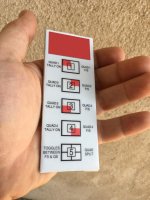
Just the latter two, they use a RJ45 (ethernet) jack for the GPI trigger while the others all use a D-SUB. This is the remote:
decimatorremote.jpg

This btw is how far back I go with the Decimator folks--I put together a pre-sale list of Steadicam operators interested in the Decimator when it first came out. Note the company name...when that initial product was so successful, they changed the name to reflect it. This was 2009 or so. I have not grinned that widely since. Think that was a misguided attempt to avoid the traditional "me so cool" cameraguy look.

decimatorad.jpg
 
Yes, apologies Paul. But sometimes some good comes out of the ADD/topic jumping that happens.

That remote looks pretty cool Charles. If that worked with the DMON 6S, I'd be all over that.

Cool on the ad, too. Don't feel bad about not wanting to smile. I don't and I was like that well before I was ever a "cool camera guy". Even when I try to smile now, I always still get a "Smile" and I say "I am". Maybe I have RBF and when I feel like I'm smiling, it really just gets me to most peoples "normal".
 
ahh, I'm old school, I use BRF, in honor of my largely unsung friends who made the video that I think started that all off:

 
Hey, this is actually almost on-topic!

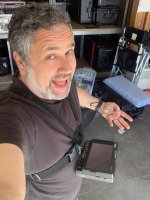
When it rains it pours...after Crank Yankers I was offered THREE unrelated pilots that all had puppet elements. One I couldn't do because of schedule conflict, the other went away and I did the third. We had an exterior day in the woods which took some thinking through. If you had seen my posts about Crank Yankers, I had talked about the myriad of monitors we provided for the puppeteers on stage. A walk and talk outside, through the undergrowth...that required a new approach. I spec'd Bolt 703 monitors so the puppeteers could work wirelessly and set about to build them an inexpensive bodymount. As seen here (with placeholder monitor), a $10 GoPro harness worked well enough, augmented with a hardware store plate at the bottom that helped with clearance on the monitor plus more stability as it braced against the body. We put an Anton Bauer battery in a fanny pack to power the monitor. Worked really nicely. A couple of our puppeteers are industry veterans from the Hensen world and they said they'd never seen such a good solution.

monitoronbody.jpg
 
Last edited:
Haha @Charles Papert,

Not an issue at all, totally agree that sometimes great convo's just happen. I'm reading all the comments and learning a lot along the way
 
Yes Rob, the 4-5 foot rule is recommended (or should be) for all the systems using the Amimon chipset (which includes Teradek) from what I have been told. It's rarely followed on set, I see a lot of receivers mounted next to each other in pics from other sets. The Connex system received the ability in the last upgrade to allow manual selection of channels which is cool, although it requires USB connection to a laptop to do so which would be unwieldy for many situations. Something I'd think about in a scenario where it was mission critical (live broadcast perhaps) and there was lots of RF at the venue, and someone had a frequency analyzer. Here's the setup I use to get the receivers far enough apart (cabling is terribly sloppy, how embarrasing! I have to get some shorter cables for the patch panels to the receiver).

View attachment 138707

View attachment 138708

There are times we experience interference and breakup, and we recycle the systems, making sure to do one at a time so they aren't fighting with each other over auto channel selection. But again, I've seen the same thing with Bolts. I used to own the 2000--when the 3000 came out I heard it was not always preferred, but that may have been early firmware. All I know is--I never want to own a $10K transmitter again! I'm queasily eying the 4K workflow--will cost me a ton to upgrade my whole signal path at this point.

I hadn't heard of boxx. I looked at their website, jeez they're not messing around with pricing. I'm sure the tech at the time justified the cost though.

I'm afraid I've gone deep down a wireless monitoring hole, only to have even more questions than before.

- Will you begin with the high gain antenna set up or do you add them once the Amimons start to struggle?

- Is the battery plate for the antenna too or only the receiver?

- Do transmitters require the same separation as receivers? I tried to RTFM on the amimon website but the downloads page is broken.

- When you refer to a 1:2 set up, is this number of cameras first then number of monitors? Can there be a 2:2 set up or is each camera spoken about individually so you know how many monitors each one has?

- With a total 4k upgrade, will you only make the switch once there's enough pressure from the industry (vs. actively seeking to replace ASAP)?

That Canters clip is so cool. At first I thought one of the antennae was the "Thank You" sign at 00:45. Boxx could just team up with Astera and make a titan tube that's an antenna, seeing as now they're the current kings of featuring blatantly in shot.

Thanks Charles!
 
I hadn't heard of boxx. I looked at their website, jeez they're not messing around with pricing. I'm sure the tech at the time justified the cost though.

Yes, not cheap. The first HD transmitter that made a serious dent was the IDX Camwave, around 2009. It was a little erratic--worked great sometimes, not so great other times. Internal antennaes didn't help. The Boxx Meridian was next and it quickly became the industry standard. And then Teradek made their name.

- Will you begin with the high gain antenna set up or do you add them once the Amimons start to struggle?

I always use the high gain setup with the long range receiver for the individual cameras. Stacking the deck for success!

- Is the battery plate for the antenna too or only the receiver?

Just for the receiver, the antenna is passive. When on the double header yoke, I have a custom setup where a single battery lives in the center, with an Anton Bauer Titan unit. If we are in one place for more than a few hours, we run AC to the Titan. If the AC is cut, the battery takes over. Both receivers are powered via this method. I grew frustrated with having individual batteries on each receiver and battery power in general...if the image went out, too many things to troubleshoot at once.

- Do transmitters require the same separation as receivers? I tried to RTFM on the amimon website but the downloads page is broken.

I believe they do.

- When you refer to a 1:2 set up, is this number of cameras first then number of monitors? Can there be a 2:2 set up or is each camera spoken about individually so you know how many monitors each one has?

The first number is always 1, for the single transmitter, and the second for the number of receivers. With the Amimon chip, the maximum setup is 1:4.

With a total 4k upgrade, will you only make the switch once there's enough pressure from the industry (vs. actively seeking to replace ASAP)?

Almost every job I do is cut to the bone on the camera budget, so the added costs of 4K monitoring are unlikely any time soon.

That Canters clip is so cool. At first I thought one of the antennae was the "Thank You" sign at 00:45.

I put the first antennae just to the right of the short staircase inbetween the dining rooms, and the second one I think was by the kitchen entrance.

I can't even begin to list off the different color temps existing at that location, it was a mixed-source extravaganza. We supplemented a little here and there as needed and did a fair amount of work in color to smooth things out.
 
I've only skimmed this thread but my impression of wireless anything is that it's one of those situations paying 10x for the pro solution doesn't make much if any practical difference, beyond the issues of robustness and convenience.

I have had many of the major brands on review and most of them do not work noticeably better than the domestic stuff. The Amimon-branded models mentioned in this thread are often, depending on the exact model, higher-powered than the Nyrius-branded on paper. Tests of this sort of thing are hugely dependent on where you are and what else is in the area, on a moment-to-moment basis. I mention this only because if I don't, in any discussion of wireless equipment someone will pop up with an anecdote about how item x was superior to item y at some point. The reality is that there are huge random factors involved. All of these things are subject to very similar legal restrictions on what they are permitted to emit. Overcoming these legal limits requires licensing in most jurisdictions which is not practical for this sort of work.

One thing you can do is to upgrade the antennae. Many of the boards in these (certainly the Nyrius Aries series) have U.FL (also called IPEX, AMC, UMCC, etc) connector on the PCB. It is possible to buy U.FL to SMA or RP-SMA cables (as appropriate) which make it possible to use higher-gain antennae; types designed for wifi routers operating in the same frequency range are generally suitable. This does make a significant difference to performance, even where the electronics may not have been set up to drive the antenna.

Bear in mind that while this is done all the time, it may cause the device to exceed legal EIRP limits; in some jurisdictions this could in theory lead to the seizure of the transmitter and all attached equipment, which would be your entire camera and monitoring package (these devices are all transceivers, so the receivers emit too.)

P
 
At the moment I've got a pair of smallhd 702s and would like to add a sumo plus a wireless system, which now looks like the amimon is locked in. Thanks for all of this information, it will literally save me thousands of (Aussie) dollars one day!

I always use the high gain setup with the long range receiver for the individual cameras. Stacking the deck for success!

If buying a high gain antenna today would you buy your current antenna again or is there a more preferable option (I'm assuming it's from your previous systems)?

With the double header set up who were the monitors for? Will you always do a double header then run cables to monitors even if they're a decent distance apart? Or would you go with a single stand/antenna per monitor if the distances are large enough?
I'm sure it's different in Episodic Television but for example on commercial shoots I've worked on, often the agency is several hundred feet away from the crew.

The first number is always 1, for the single transmitter, and the second for the number of receivers. With the Amimon chip, the maximum setup is 1:4.

This clears everything up!

Almost every job I do is cut to the bone on the camera budget, so the added costs of 4K monitoring are unlikely any time soon.

This makes me feel much better about upping my HD monitoring this "late". It also makes me feel worse that the camera budget is cut to the bone on shoots of your level.
 
I've only skimmed this thread but my impression of wireless anything is that it's one of those situations paying 10x for the pro solution doesn't make much if any practical difference, beyond the issues of robustness and convenience.

I have had many of the major brands on review and most of them do not work noticeably better than the domestic stuff. The Amimon-branded models mentioned in this thread are often, depending on the exact model, higher-powered than the Nyrius-branded on paper. Tests of this sort of thing are hugely dependent on where you are and what else is in the area, on a moment-to-moment basis. I mention this only because if I don't, in any discussion of wireless equipment someone will pop up with an anecdote about how item x was superior to item y at some point. The reality is that there are huge random factors involved. All of these things are subject to very similar legal restrictions on what they are permitted to emit. Overcoming these legal limits requires licensing in most jurisdictions which is not practical for this sort of work.

One thing you can do is to upgrade the antennae. Many of the boards in these (certainly the Nyrius Aries series) have U.FL (also called IPEX, AMC, UMCC, etc) connector on the PCB. It is possible to buy U.FL to SMA or RP-SMA cables (as appropriate) which make it possible to use higher-gain antennae; types designed for wifi routers operating in the same frequency range are generally suitable. This does make a significant difference to performance, even where the electronics may not have been set up to drive the antenna.

Bear in mind that while this is done all the time, it may cause the device to exceed legal EIRP limits; in some jurisdictions this could in theory lead to the seizure of the transmitter and all attached equipment, which would be your entire camera and monitoring package (these devices are all transceivers, so the receivers emit too.)

P

Thanks for the post Phil, great point about legal limits, something to look into for sure. A lot of this is beyond me at the moment but it'll be great to reference when the time comes.

If committed to a wireless workflow then at some point you still need to make a decision on an actual product. For me, it was between the teradek bolt xt 500 or amimon mini with or without fusion receiver.

I think where you get in trouble is when someone has obviously gone too cheap and ends up with a product that is built poorly and performs poorly. Personally with the amimons, the amazing range, size and price seem worth any babying on set.
 
If buying a high gain antenna today would you buy your current antenna again or is there a more preferable option (I'm assuming it's from your previous systems)?

I'm not sure what is out there at this point--I imagine the Teradek ones are much cleaner in terms of cabling to the receivers themselves. All of this stuff is a bit of a wonky science--as Phil points out, conditions can wildly change the efficiency of a given system (which is why it's important to always think longer-range/more power). RF is a beast.

With the double header set up who were the monitors for? Will you always do a double header then run cables to monitors even if they're a decent distance apart? Or would you go with a single stand/antenna per monitor if the distances are large enough?
I'm sure it's different in Episodic Television but for example on commercial shoots I've worked on, often the agency is several hundred feet away from the crew.

So my usual setup is that the receivers feed into my cart and I distro from there (the AC's have their own receivers at their monitors so they can be independent). For a typical narrative setup, we hardwire from my cart to video village, where there are another set of DA's for other departments to grab a feed (sound department, dimmer board op etc). As I think I mentioned in an earlier post above, I transmit a quad signal to various monitors around set as well. In terms of commercials, they generally hire a playback person who takes the feed from me and then distributes it everywhere needed including client monitors. I did do a low budget/non union commercial recently without such a person...the clients were sequestered in an upstairs bedroom at the house we shot at, and we ran a cable from their monitor to a receiver downstairs, and then moved it as needed to get good reception from a transmitter at my cart (which allowed me to move around without having to worry about that extra cable). Yuck!
 
As I mentioned earlier, used ones pop up on eBay all the time sometimes very cheaply. And also, check out Camera Motion Research as they have some good inexpensive solutions for power, cabling and mounting the Connex line. They have a rehouse of their own for the transmitter-- they went larger footprint but flatter than the route I went.

I just picked up a dirt cheap connex mini on ebay with CMR accessory kit. Thanks again for letting us know about the product.

Speaking of wireless systems, just like that the bolt xt 500 is discontinued - https://www.bhphotovideo.com/c/product/1403845-REG/teradek_10_1935_bolt_xt_500_sdi_hdmi.html?fromDisList=y
 
Great, Rob! Let us know how you get on with it. I'm still using mine in many configurations with plenty of success. How much did you snag the Mini for?
 
Yeah I'll post an update when I can.

Get ready for some numbers - I paid $1500 AUD ($1140 US) for the mini. With the CMR accessories it came to $2,000 AUD ($1500 US). If I bought locally/brand new with CMR kit it would have been $3,500 AUD, which is $2600 US so a massive savings.

I plan to add a fusion RX at some point and funnily enough, it's retailing for $726 USD right now, which is rare for Australian film equipment to be significantly cheaper.
 
Yeah I'll post an update when I can.

Get ready for some numbers - I paid $1500 AUD ($1140 US) for the mini. With the CMR accessories it came to $2,000 AUD ($1500 US). If I bought locally/brand new with CMR kit it would have been $3,500 AUD, which is $2600 US so a massive savings.

I plan to add a fusion RX at some point and funnily enough, it's retailing for $726 USD right now, which is rare for Australian film equipment to be significantly cheaper.

I see that deal at Adorama, good price. I recently picked up a used complete Connex (not mini) system for $950 and sold the receiver for $400--so got the Fusion receiver for $550, was happy with that deal. I'm up to four transmitters and 11 receivers at this point...!
 
I see that deal at Adorama, good price. I recently picked up a used complete Connex (not mini) system for $950 and sold the receiver for $400--so got the Fusion receiver for $550, was happy with that deal. I'm up to four transmitters and 11 receivers at this point...!

Jeez great deals all around. And woah.. here’s to 1080p monitoring.
 
Back
Top