FS7: Blue LED light flicker/stripes

Lucas Kao

Active member
Hi all,

I am filming a site specific children opera this week with FS7 and I noticed during filming that there are blue stripes all over the footage, possibly caused by the blue LED lights the lighting designer used, has anyone encounter this before or know a way round the problem?

Setting:
XAVC-I
1080/25p
1/60 (to counter projection flicker in another room)
ISO between 3000-5000
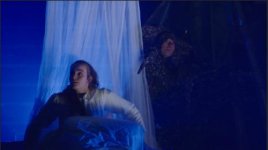
Screenshot 2015-03-17 00.39.34.jpg

Thanks!
 
Is it possibly a rolling shutter issue?

Some LED lights don't put out light constantly at consistent levels. This particularly happens for dimming units on some LED lights. Instead of actually dimming the level of output, the led rapidly flickers off an on, reducing total illumination proportional to the time flickered off.


Also: You say you're shooting 1080p25, but have shutter at 1/60. I'd ask, what was the hertz of the power your lights used? If you were shooting with 50hz mains, that could be a contributing factor.
 
Probably not flicker free LEDs. The cheap ones flicker.

There is no work around for footage captured. The work around is preproduction. Make sure flickering LEDs are no where near your production.
 
Last edited:
LOTS of LED lights flicker. I would bank on flicker from almost any LED light that isn't designed for film and video lighting.
 
The LED is probably designed for theatre use and is not designed for film and video in mind, unfortunately I am only hired to shoot the performance and behind the scene, and don't have any say at all.

To: Viddovation
I am in UK, so the light should be 50hkz, will try tomorrow with 1/50 to see if the problem will be solved or better...
 
Also...the closer to max output the light is, the better. So if you do talk to the light tech and they don't mind...its better. Also, avoid over cranking anything. It will be almost unusable.
 
If working with LED lights is unavoidable, best practice is to get them in advance of the real shoot, and do a test shoot with full monitoring and playback. Execute all forseeable frame rates and shutter speed combinations, and make notes on which ones are acceptable. Only use those settings during the actual shoot.

If you're in a 60hz power environment, try to shoot with frame rates and shutter speeds divisible by 30. For 50hz environments, frame rates and shutter speeds divisible by 25.
 
Back
Top