FS7: blotchy footage

joobny

Member
Hi all,

I have a clip that I shot from my FS7 that I'm not particularly happy with and I'm trying to work out what I did wrong. Kind of hard to describe what it is that looks crap about it other than it's quite 'blotchy' and just generally not particularly sharp so I've attached a graded and ungraded still as well as the graded and ungraded clip (exported with Vimeo HD settings). The grade is quite heavy and it's really obvious where the footage falls apart while looking at it like this.

Here are the specs:

Cine EI
Slog2
150fps conformed to 25fps
XAVC-I
Aperture approximately f10 or similar
Shutter 1/300
Canon 70-200 f2.8 lens on Metabones Speedbooster
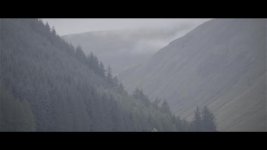
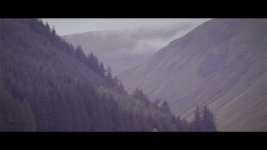
FS7 POST 1.jpgFS7 POST 2.jpg


The only thing I can think of putting this down to would be a combination of 3 things: 150fps reportedly being a touch soft, high apertures on the 70-200 being softer than when it's a bit wider open and the slog2 footage being a bit underexposed.

What do you think?

Cheers,
 
Insufficient exposure. Shutter speed too high and aperture not opened up suffiently. Simply, you are starving the sensor of light.
 
Last edited:
I think you've nailed the causes, also if you take the footage into FREE Sony Catalyst Browse and view the meta data, you can actually see how much extra gain was applied to the footage when shooting in these higher frame rates. more gain means more grain.
 
I think you've nailed the causes, also if you take the footage into FREE Sony Catalyst Browse and view the meta data, you can actually see how much extra gain was applied to the footage when shooting in these higher frame rates. more gain means more grain.

What do you mean by the last there, is theres extra gain applied when shooting high speed in CineEI, without the operator selecting it manually?
 
yes exactly.

For the camera to maintain some level of comparable exposure to non-S&Q mode it's applying internal gain which is maybe a but of a surprise, but actually makes perfect sense once you stop to think about it.

You might notice some small change in exposure when toggling in and out of S&Q mode, but in reality when your FPS is going from 24 to 150 there has to be something else to compensate for the light loss.

Each stop of light loss is going to be around 6db of gain to compensate for it. (when camera doing it for you)
 
Yeah, and that should be me as an operator opening up the aperture to compensate for the loss of light. Not the gain going up.

Is this automatic? Can it be turned off or overided? I kind of not want this to happen because when shooting in sunlight i most often than not have a couple of ND`s on that i can remove anyways.
 
I was surprised too when I saw 9db gain in my meta data. But I never went back to run more tests and validate it, so I thought I should just point it out incase anyone wants to play around with it.

As for being auto or not, I don't know that is a good question. I typically leave camera set to 180 degree shutter so my shutter speed is always double my frame rate.

Guess we should test this stuff and report findings.
 
When i think of it, i have indeed noticed how little the S&Q does with my exposure compared to the FS700. In the beginning on FS7 i even was fooled not to move my exposure enough so i shot underexposed. The screen went much darker when i switched modes on FS700. But then i also shot mostly cine4 and not s-log3 wink wink. Judging exposure is much harder in slog, than with MLUTs or cinegammas.

Testing indeed. I will see if i can get some closer look at this.

I have not noticed the exposure going "mellow" when in S&Q. Meaning, adjusting aperture have been regular behavior, and ive not seen any autogaining going on (or down) when overexposing in S&Q. But ive not looked for it either.
 
For the camera to maintain some level of comparable exposure to non-S&Q mode it's applying internal gain

Sorry Dennis, that is not how camera works at all. The camera does nothing to the gain when S&Q Motion is turned on, nor does it attempt to do anything to compensate for any loss of exposure that may occur if the frame-rate requires that the shutter speed be raised automatically. It is the operator's job to compensate for any changes to exposure that may or may not occur when S&Q is activated.
 
Last edited:
I believe you Doug, I don't shoot a lot of S&Q but I know I had gain reported in meta data which I found interesting, and I know I had exposure differences jumping in and out of S&Q once during a shoot.

I just thought I'd mention it but I'd have to go back and see if I can replicate it, maybe I had something somewhere else turned on - again, I don't know, so hence maybe people can test it themselves instead of believing internet. Then they can know 100%.
 
I shoot S&Q almost every day on my FS7 or F55 and I know very well how it works. There are no changes to gain.
 
To the OP. Hi Joobny,

Last February when we first received the FS7 we went out to shoot S&Q public footfall on a bright day and got the same results. As stated in my first post above you are starving the sensor of light. The exposure is sitting in all the mud and mire of noise - it shows as magenta and green blotches. The only way to achieve much lower noise floors (according to Sony) is to super-cool the sensor. This is not a solution here.

We have been shooting S&Q quite a lot and in bright to shadow and have found no issue since improving exposure. What works for us (if there is no fast motion in the frame) for 120-150fps is to set shutter to 1/150 - 1/200 for normalisation of 25fps and an f-stop of no less than f5.6. Clealry it depends upon your lighting and ambient conditions to adjust with ND but the rule-of-thumb must be to try and fill your WFM as much as possible - we do not follow the slog2/3 exposure rule in S&Q as the game has changed from normal exposures. With V3 FW you should now be able to monitor WFM in Slog CineEI.
 
I found at that the best result to suit my liking is to push exposure in HFR mode until the highlight warning comes on. In post I bring it down a bit thus lowering perceived noise. I'd be surprised if the camera auto adds gain when in HFR mode but the sensor and offloading has to be faster thus image quality will take a hit.

If I expose like in normal speed HFR will, sometimes, look like rubbish when the sensor aint getting enough light.
 
SpareWheel, I'm sure that works, but my technique is a little simpler and does not require any special considerations for S&Q. If I am shooting RAW, S-LOG2, or S-LOG3, I set Zebra 2 for 75% and allow just a little zebra in the brightest reflected whites. That gives me a nice healthy and very consistent exposure at all frame rates with S&Q and without S&Q.

And in S&Q Motion I make sure that my shutter speed exceed 2x the frame rate. Blindly using 180 degrees is too slow for S&Q, and so is whatever shutter speed the camera will choose for you. You must set your own shutter speed and go at at least one step faster than 2x the frame rate. That's my advice, anyway.

As for using the highlight warning as an exposure guide, that's not something I'd recommend because the camera has no idea what you are shooting. We have tools such as zebra, waveform, and light meters to measure exposure.
 
Last edited:
sorry guys if my post caused any confusion.

I did go back and find the clip I shot where I saw the gain applied. It was shot at 60p and sure enough meta data says 4.0db gain but I definitely didn't play with any gain settings. I agree this isn't normal however, because I have other 48fps clips shot the same day and they say 0db gain.

Sorry can't explain it and too long ago to try and remember the details.

Screen%20Shot%202016-03-03%20at%203.23.23%20PM_zpscfqf6z0n.png
 
SpareWheel, I'm sure that works, but my technique is a little simpler and does not require any special considerations for S&Q. If I am shooting RAW, S-LOG2, or S-LOG3, I set Zebra 2 for 75% and allow just a little zebra in the brightest reflected whites. That gives me a nice healthy and very consistent exposure at all frame rates with S&Q and without S&Q.

And in S&Q Motion I make sure that my shutter speed exceed 2x the frame rate. Blindly using 180 degrees is too slow for S&Q, and so is whatever shutter speed the camera will choose for you. You must set your own shutter speed and go at at least one step faster than 2x the frame rate. That's my advice, anyway.

Appreciated Doug. Thanks for the insight :)
 
Yeah, Doug's right on this. I'll add, when shooting at 150 fps you lose a little dynamic range. Also, f/10 with a highly detailed, low-key scene is never going to look great at 150fps.
 
SpareWheel, I'm sure that works, but my technique is a little simpler and does not require any special considerations for S&Q. If I am shooting RAW, S-LOG2, or S-LOG3, I set Zebra 2 for 75% and allow just a little zebra in the brightest reflected whites. That gives me a nice healthy and very consistent exposure at all frame rates with S&Q and without S&Q.

I take it you are then using a grading workflow? How many approximate stops of overexposure is 75%?
 
As I said above, 75% is the exposure level I use for S-LOG or RAW -- and S-LOG and RAW always require a grading workflow. However, when I'm shooting custom, the zebra level I use would depend on the gamma mode and other paint settings that are being used and would vary from Scene File to Scene File. But with that said, 75% would never be correct for a non-grading workflow.

How many stops overexposure is 75%? It depends on how you define "correct" exposure. In my book 75% S-LOG or RAW isn't overexposed at all and anything less than 75% is underexposed. :-)
 
Last edited:
How many stops overexposure is 75%? It depends on how you define "correct" exposure. In my book 75% S-LOG or RAW isn't overexposed at all and anything less than 75% is underexposed. :-)

How does that concurr with the 61% reflective white level you talk about in your FS7 video?
 
Back
Top