

abreu-canedo
Well-known member
Here is a link to a little Instagram post I made on a F65 workflow. Mostly for other film and video people who in my market, and as a type of marketing strategy. It is not meant to highlight the best workflow or to be a definitive guide, just a post about an experience and how the camera was configured for this specific shoot and what type of workflows were achievable. I imagine I'll just try to write a tid-bit about production, my experience, and perhaps tips and tricks. Of course, this forum is full of advanced folks, so You may find it redundant
https://www.instagram.com/p/BHLZS4egRPE/
here re is the text:
MONDAY PRO TIPS:
(Warning...serious geek talk for cinematographers, directors and producers)
SONY F65 PRODUCTION WORKFLOW:
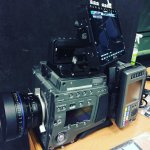
This is a Sony F65, with Zeiss CP.2 lenses and an Odyssey 7Q monitor. Simple lightweight tripod studio setup (sans matte-box). The Zeiss are really sharp and cool, which is good for product shots, certain types of portraiture and green-screen work...among other things.
The F65 can send an ACES or LUTed 10bit image to the monitor, which can help minimize exposure and lighting mistakes during production. The Odyssey 7Q monitor can also record, store and play files on-demand. So dailies can be reviewed at any time, without needing to offload camera memory card or occupying the camera operation with playback. The Odyssey 7Q monitor can be controlled like a playback device that outputs to the director/producer/client monitor. Instant dailies saves time and money on set.
The Sony F65 records onto SRMemory cards which boast the fastest read and write speed of any media...so you save time offloading media. By using the Sony SR-PC4 DIT unit to offload media, you can simultaneously generate and copy ACES/LUT-colored proxies to an editorial drive. The proxies are maximized for playback speed in NLEs and are colored to communicate to the editor a vision/direction for the emotional tone of the work and the color timing that lies ahead. This saves time and money on set and in the edit.
The camera can record 4K 16bit RAW files. Once offloaded, the are ready for D.I. without any additional work. The 16bit RAW files are incredibly deep and can be pushed and pulled till your heart is content. It is truly a wonderful experience to work with.
PRO TIP: have a junior editor/PA either offload the Odyssey 7Q ProRes dailies or do live capture of the output of the Odyssey onto a laptop on-set, to immediately be editing an assembly cut (according to story-board and/or Director feedback) of the scene being shot, so that performances and shots can be reviewed and evaluated as a whole scene, prior to leaving the location. Questions to ask: How do these shots fit together? Did we get it? This minimizes the need for costly pick-up shoots at a later date.
https://www.instagram.com/p/BHLZS4egRPE/
here re is the text:
MONDAY PRO TIPS:
(Warning...serious geek talk for cinematographers, directors and producers)
SONY F65 PRODUCTION WORKFLOW:
This is a Sony F65, with Zeiss CP.2 lenses and an Odyssey 7Q monitor. Simple lightweight tripod studio setup (sans matte-box). The Zeiss are really sharp and cool, which is good for product shots, certain types of portraiture and green-screen work...among other things.
The F65 can send an ACES or LUTed 10bit image to the monitor, which can help minimize exposure and lighting mistakes during production. The Odyssey 7Q monitor can also record, store and play files on-demand. So dailies can be reviewed at any time, without needing to offload camera memory card or occupying the camera operation with playback. The Odyssey 7Q monitor can be controlled like a playback device that outputs to the director/producer/client monitor. Instant dailies saves time and money on set.
The Sony F65 records onto SRMemory cards which boast the fastest read and write speed of any media...so you save time offloading media. By using the Sony SR-PC4 DIT unit to offload media, you can simultaneously generate and copy ACES/LUT-colored proxies to an editorial drive. The proxies are maximized for playback speed in NLEs and are colored to communicate to the editor a vision/direction for the emotional tone of the work and the color timing that lies ahead. This saves time and money on set and in the edit.
The camera can record 4K 16bit RAW files. Once offloaded, the are ready for D.I. without any additional work. The 16bit RAW files are incredibly deep and can be pushed and pulled till your heart is content. It is truly a wonderful experience to work with.
PRO TIP: have a junior editor/PA either offload the Odyssey 7Q ProRes dailies or do live capture of the output of the Odyssey onto a laptop on-set, to immediately be editing an assembly cut (according to story-board and/or Director feedback) of the scene being shot, so that performances and shots can be reviewed and evaluated as a whole scene, prior to leaving the location. Questions to ask: How do these shots fit together? Did we get it? This minimizes the need for costly pick-up shoots at a later date.
