Blackmagic audio problem

scorsesefan

Veteran
Stupidly, I recorded directly into my BMCC before they sorted out the audio issues (v 1.3). I am now editing the footage and I am having a hard time fixing the audio. I applied a low shelf filter and it mostly works but now the audio sounds a bit "muffled". I work in FCP 7 still :) and I was hoping someone more skilled than I in audio post could help me out with a fix in FCP.

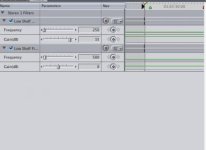
Here is the filter I applied: Screen Shot 2014-10-07 at 5.06.30 PM.jpg
A description of the problem: https://www.youtube.com/watch?v=cFKY03uljFM

and the files: http://we.tl/x89VwAelQ5

Thanks!
 
Working on sound with FCP is kind of like working on your car with a Handy Andy Toolkit.

Anyway... Low shelf is probably not what you want. What they describe in that video is a low pass or maybe a couple of parametric filter and you would want the gain at about 6dB/ octave. Also the BM roll off starts much hight I believe.

All of this though is not going to help a huge amount. The camera tossed out info when it filtered so that is gone. You can boost what is left but you are not going to get back what was lost. Boosting, especially the rather huge amount they are talking about is going to cause it's own problems. You are going to crank up room tone and hum and low noise along with the weak signal. I would not try to reverse the damage because that really isn't possible. I would just eq it till it sounded better. So for instance you probably don't have any dialog really low so I would not boost very low.

My other recommendation is to at least do this in Sound Track Pro. It should have been bundled in the FCS. It's not a great sound program but it's OK and it integrates with FCP. The big reason is FCP for some insane reason has no GUI for the sound filters. In STP you will have a pretty nice GUI for the filters and that will make life a LOT easier. At the very minimum open a clip in STP and figure out what works, write those settings down and use them to set the filter in FCP. It's the same filter you just don't get any graphics in FCP.
 
Thanks, Scott... I tried raising the gain in the low and mid frequencies (200 and 500mhz) in Soundtrack Pro which helps with the bass but now the audio sounds "muffled". Ugh, very frustrating...
 
May not be a usable solution for you but RX 4 Advanced's Declip actually did a pretty nice job on your sample file. All I did was declip it, then use denoise (feeding it a sample area) and then normalized it. The result at least sounds usable.

https://drive.google.com/folderview?id=0B6PJ_vzx_2PaWEo2RmFPZFhzVms&usp=sharing

I suspect with some EQ work you might even be able to get it to sound even better. Or someone that knows how to use RX4, I'm still learning how to make it work. For example I would have thought denoising it first would work better with the declip, but no, that made it actually worse.
 
Oh I should also mention that your real problem with that audio clip isn't the bad frequency response, it's the fact it was clipping way too soon. That video (which I finally got around to watching) talks briefly in the beginning about the clipping problem when they recommend you set the camera at 80%, because below that you would get early clipping. The rest of that video, setting up the eq filters only really works if you recorded above 80%.
 
Ah, thanks, Matt. I recorded this stuff so long ago I don't remember clipping but I suspected so... Your sample sounds MUCH better. I downloaded RX4 and will give it a try...
 
I used your sample to play with RX4 some more (I bought it last month during their buy RX3 cheap and get RX4 for free sale but I haven't actually used it for anything real). A few things I noticed:

Defintely Declip first. The suggest button on the Declip dialog does a great job of picking the points (select all the audio and press suggest). Make sure you use the high quality mode.

The noise remover is very powerful but the presets are kind of junk. That sample I put up the noise reduction isn't near as good as it can be if you tweak the settings. I used the default/fast mode and didn't touch any of the other settings. Changing those to a higher quality level can really help. Also running it twice can be a good idea. Select an area of clean noise to learn, apply at a lower level of noise reduction. Then reselect that clean noise and learn again and apply again, instead of one large noise reduction.

There is a lot of garbage under 50hz in the sample after normalizing. I'd recommend removing that large band of noise that lives down there. You can see it very clearly in the spectral display.
In that sample there is some extra noise towards the end of the clip that didn't seem to get taken out with the denoiser. I ended up removing it by selecting it and using the spectral repair. Kind of a mic hissing noise.

I think you may need to Declip, then normalize, then remove anything below 50hz, then noise reduce.

I found the deconstruct feature seemed to help a lot, it's only available in the advanced version of RX4. Running it on the whole thing with the noise gain set to -6 and the tonal at 0 was very effective. After the decliping and denoising.

I tried reproducing the frequency adjustment they did in that video after the declip but that really didn't seem to work well. Perhaps those adjustments only work if the sample was artificially adjusted downward. I don't think your audio has that problem, the early clipping masked that out almost entirely. But you can do that increase on the low frequencies right inside RX.
 
Thanks again, Matt. I will try everything you suggested in the last post. Not being a sound guy I have been banging my head with this one for a few weeks...
 
That seems really lame, not sure what value a 10 day trial that you can't use the export function is. But now that you know your problem is more clipping than anything else perhaps you can find another solution for the clipping. While RX4 was expensive I have no doubt it will be useful for me and don't regret picking it up.
 
That seems really lame, not sure what value a 10 day trial that you can't use the export function is. But now that you know your problem is more clipping than anything else perhaps you can find another solution for the clipping. While RX4 was expensive I have no doubt it will be useful for me and don't regret picking it up.
Yeah, I already have Audition so maybe I'll try that - thanks!
 
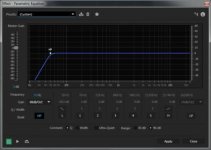
I couldn't get Audition's declipper to work on the early clipping your sample has. But interestingly enough I found that if I just applied a high-shelf filter at 50hz (so dropping all that noise under 50hz) the clipping pretty much vanished. I was then able to normalize the clip and then do a noise removal. The final result from that was pretty decent.

eq.jpg
 
Earlier in the thread was some talk of lost high frequencies - I had a situation where a so-so lav mic had been hidden so well that the talent sounded pretty muddy. Boosting highs also boosted the wireless hiss.

I got decent results in ProTools, using EQ, noise reduction and... the exciter. You can get some sparkle back with an exciter, since it's generating frequencies v. boosting.

I sold my rack mounted Aphex some time ago, but the exciter that ships with protools is serviceable (but the interface is nuts and when first dropped on a track it sounds like "s*%t with a treble boost"), and Aphex & BBE plugins are usually in the sub-$100 range. If you have izotope's ozone, it includes an exciter module, but I've only used that for final sweetening on a master, it's a good sounding emulation in that use anyway. Handy tool to have sometimes.

Sometimes a "vintage" emulated EQ can be more "sparkly" as well, I assume since exciters work by distortion and the vintage stuff can add some subtle harmonics.
 
Thanks, guys... I was able to declip in Audition and it sounds OK. The main issue, as Matt pointed out was clipping. Apparently, I just lowered the gain on the clips at some point and forgot about declipping... Ugh, I need to take an audio class or something :(...
 
Hi Dave... What did I learn about the problem or this community?

About the problem. Basically, even though something has gone wrong, there is always a positive...that being you have learned something. To me, I see this and I think "next time it might be a good idea to only use camera audio as reference and use a dedicated audio recorder of some sort and monitor it closely".
 
Back
Top