
Navigation
Install the app
How to install the app on iOS
Follow along with the video below to see how to install our site as a web app on your home screen.
Note: This feature may not be available in some browsers.
More options
You are using an out of date browser. It may not display this or other websites correctly.
You should upgrade or use an alternative browser.
You should upgrade or use an alternative browser.
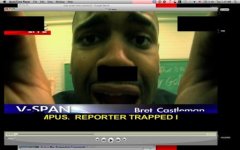
Black Squares DVCPRO HD Quicktime
- Thread starter pcar773
- Start date
Andy Olson
Well-known member
I know that FCP has the dvcpro hd codec built in, but I'm not sure about Avid MC though it should. Do you know if the footage has the black squares burned in or is it just when viewed on your machine? You might have to view it on another computer if you can.
Are the black squares in the same 5 spots all the time?
Best,
Andy
Are the black squares in the same 5 spots all the time?
Best,
Andy
Andy Olson
Well-known member
How were this DVCPRO HD quicktimes created?
I know that FCP has the dvcpro hd codec built in, but I'm not sure about Avid MC though it should. Do you know if the footage has the black squares burned in or is it just when viewed on your machine? You might have to view it on another computer if you can.
Are the black squares in the same 5 spots all the time?
Best,
Andy
Also, they aren't burned in. Just my machine, but that's a huge problem, because I can't use another machine as this is my only editing system.
Update: Black squares are an older free version of a DVCProHD codec I purchased. Installed the full copy and black squares are gone. Used this company:
http://www.calibratedsoftware.com/QDVCProHD.asp
It works beautifully. Damn you Apple and Panasonic for not licensing out DVCProHD to the public. Avid's are available for download.
http://www.calibratedsoftware.com/QDVCProHD.asp
It works beautifully. Damn you Apple and Panasonic for not licensing out DVCProHD to the public. Avid's are available for download.