A friend of mine told me he shot with a DP who uses a tiffen black promist on a music video shoot and he said the footage looked amazing once the filter was slid in. I haven’t been able to find much footage of the filter in use. Any observations from anyone on this forum in regards to this filter?

Navigation
Install the app
How to install the app on iOS
Follow along with the video below to see how to install our site as a web app on your home screen.
Note: This feature may not be available in some browsers.
More options
You are using an out of date browser. It may not display this or other websites correctly.
You should upgrade or use an alternative browser.
You should upgrade or use an alternative browser.
Black glimmer glass:
- Thread starter PIMP
- Start date

JPNola
Veteran
A friend of mine told me he shot with a DP who uses a tiffen black promist on a music video shoot and he said the footage looked amazing once the filter was slid in. I haven’t been able to find much footage of the filter in use. Any observations from anyone on this forum in regards to this filter?
fyi- A black pro mist and glimmer glass are two different types of filtration. Both are "mist" type filters, but Tiffen GlimmerGlass has silver specks where as a Pro Mist has black specks.

cpreston
Veteran
This is pretty useful for Tiffen filters.
http://tiffen.com/diffusion/
A "black glimmer glass" filter actually exists now, although I haven't used it. It is safe to say that it is far more subtle than pretty much any strength of black pro mist.
http://tiffen.com/diffusion/
A "black glimmer glass" filter actually exists now, although I haven't used it. It is safe to say that it is far more subtle than pretty much any strength of black pro mist.

cyvideo
Veteran
Love the Black Promists. They have been an industry favorite for thirty years. The "Glimmer Glass" ones are more recent, very subtle, more film halation look. Probably the best thing to do is have a look at Tiffen's controlled shoot with a whole range of their filters. Gives you a pretty good idea of what each one does.
https://www.youtube.com/watch?v=rJacZa6QpJ8
Also have a look at this video. Tiffen came out with a software plugin/standalone pack that incorporates nearly all their glass filter effects. Quite often I now use this plugin suite in place of actual filtration on the job when budgets are squeezed and shoot time is short. Mention of the diffusion filters starts at around 52.30 mins and on.
https://www.youtube.com/watch?v=C2CEjJsTTtE&t=5s
Tiffen sold out to Digital Film Tools so the suite is still available. Needles to say I use it fairly often. If you want a pretty quick overview of what it can provide have a look here at their video clip.
http://www.digitalfilmtools.com/dft/
Chris Young
https://www.youtube.com/watch?v=rJacZa6QpJ8
Also have a look at this video. Tiffen came out with a software plugin/standalone pack that incorporates nearly all their glass filter effects. Quite often I now use this plugin suite in place of actual filtration on the job when budgets are squeezed and shoot time is short. Mention of the diffusion filters starts at around 52.30 mins and on.
https://www.youtube.com/watch?v=C2CEjJsTTtE&t=5s
Tiffen sold out to Digital Film Tools so the suite is still available. Needles to say I use it fairly often. If you want a pretty quick overview of what it can provide have a look here at their video clip.
http://www.digitalfilmtools.com/dft/
Chris Young
Last edited:

CharlesPapert
Director of Photography
I haven’t been able to find much footage of the filter in use. Any observations from anyone on this forum in regards to this filter?
I use a standard Glimmerglass set on many of my projects...this particular sizzle reel (assembled for a movie musical gig) shows them in use for the first :60 seconds, then again at 2:00 for rest of the reel.
https://vimeo.com/198946641

sleekmedia
Well-known member
impressive. Definitely got me interested on this diffusion glass now!
doubledark
Well-known member
I use a standard Glimmerglass set on many of my projects...this particular sizzle reel (assembled for a movie musical gig) shows them in use for the first :60 seconds, then again at 2:00 for rest of the reel.
https://vimeo.com/198946641
Charles, so you prefer the filter on the glass rather than the software version that Chris Young prefers?
Andrew Stone
Veteran
Many of the Tiffen and Schneidler filters are available at a most lower cost as screw on lens filters. This is a good way to see if the filters are what you really want before plonking down $400+ for a panavision sized mattebox filter. Black Glimmerglass is not available in this screw on format at the moment but they may issue them down the road.
This is what I am talking about...
https://www.bhphotovideo.com/c/sear...&N=0&InitialSearch=yes&sts=ma&Top+Nav-Search=
If you do go down this route, pick yourself up some of the magnetic XUME adapters as well. They are great if you are shooting with a mirrorless camera or using still lenses on the bigger video cameras.
https://www.bhphotovideo.com/c/search?Ntt=xume adapters&N=0&InitialSearch=yes&sts=ma&Top+Nav-Search=
This is what I am talking about...
https://www.bhphotovideo.com/c/sear...&N=0&InitialSearch=yes&sts=ma&Top+Nav-Search=
If you do go down this route, pick yourself up some of the magnetic XUME adapters as well. They are great if you are shooting with a mirrorless camera or using still lenses on the bigger video cameras.
https://www.bhphotovideo.com/c/search?Ntt=xume adapters&N=0&InitialSearch=yes&sts=ma&Top+Nav-Search=

cyvideo
Veteran
Charles, so you prefer the filter on the glass rather than the software version that Chris Young prefers?
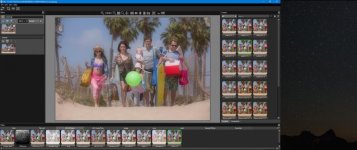
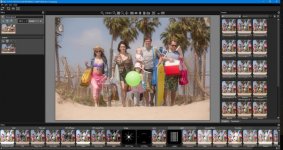
It's not that I prefer the software version. I didn't actually say that. There is a subtle difference between the two. In post when you apply the DFX versions of the filters you do have some fine tuning tools you use. Most of the filters in DFX have around ten different strengths you can use plus warm and cool versions along with the standard versions. I do use the glass versions but sometimes having the time in post to experiment with what strength of a filter might be best is a nice option to have. Have a look at the screen shots from the standalone version to give you an idea as to why I sometimes prefer the software options. There are literally dozens and dozens of filter options you can try out. In the real world I would need to spent thousands of dollars on glass filters to have but a fraction of the choice offered by DFX. For my work the software version just offers me an added tool that thankfully not a lot of my competitors are awake to. DFX come as an OFX plugin set that works with any host NLE that supports OFX such as Resolve. In Resolve it is an almighty powerful addition to further extend Resolve's already powerful capabilities. DFX also comes with a standalone component which allows you to work outside of your NLE with video or to work with stills. Having all the filtration that DFX is equipped with and to be able to rapidly apply any of these FX and then adjust almost any parameter of those FX whether it is to video or stills makes it a great tool set. I would feel I've lost a valuable tool if I didn't have access to it.
Chris Young
EDIT: A few quick DFX filter FX can be seen here.
https://youtu.be/AIh0i7EIMC0
Last edited:
Polaroid22
Well-known member
I shot this video with the black-pro mists.
https://vimeo.com/278016274
And this one
https://vimeo.com/205760773
https://vimeo.com/278016274
And this one
https://vimeo.com/205760773
sleekmedia
Well-known member
Chris,
You have me very intrigued on this software...
I run Davinci and FCPX. For most work I use FCPX mostly for quick edits and a faster workflow to cut down on production time and increase my overall revenue for my ads / less cinematic projects as most of my mainstream business clients don't require and would not even notice the benefits of the extra cost of really throwing around grades in resolve.
So I am leaning towards the plugin for FCPX... However, rather than choosing between the two (Davinci / FCPX) and limiting which NLE I can use with the software down the road as my business progresses, would you recommend the standalone version as it is MUCH CHEAPER and ultimately produces the same results as the NLE Plugins?
I could use it as a post production "finisher" to clean up a final look once I have my main base grades and edits complete.
You have me very intrigued on this software...
I run Davinci and FCPX. For most work I use FCPX mostly for quick edits and a faster workflow to cut down on production time and increase my overall revenue for my ads / less cinematic projects as most of my mainstream business clients don't require and would not even notice the benefits of the extra cost of really throwing around grades in resolve.
So I am leaning towards the plugin for FCPX... However, rather than choosing between the two (Davinci / FCPX) and limiting which NLE I can use with the software down the road as my business progresses, would you recommend the standalone version as it is MUCH CHEAPER and ultimately produces the same results as the NLE Plugins?
I could use it as a post production "finisher" to clean up a final look once I have my main base grades and edits complete.
cyvideo
Veteran
...would you recommend the standalone version as it is MUCH CHEAPER and ultimately produces the same results as the NLE Plugins?
Sleek, the Standalone DFX is only for stills to the best of my knowledge. If you want DFX for video you need the plugin versions I'm fairly sure of that. I'm on Windows where almost any software that can run OFX architecture can run DFX. As soon as you install it it is seen by Resolve, Vegas etc. The DFX plugin pack comes with the standalone version for stills. I've had a play with it and all the filters that are in the video plugin are there. A quick way to modify stills no doubt. There was a rumor around that Tiffen needed to get into some FX software because of competition from other FX software vendors that were offering "glass filter FX'" looks. The rumor I heard was that Tiffen DFX was so good that it affected sales of Tiffen's core business, glass filters. So much so they bailed out of DFX back to Digital Film Tools who originally wrote the software for Tiffen. DFT are an offshoot of Digital Tool Farm who are well known for high end effects.
https://www.toolfarm.com/buy/digital_film_tools_dft_for_video_film
Host Applications
Adobe After Effects CS5 and up
Adobe Premiere Pro CS5 and up
Apple Final Cut Pro X
Apple Motion 5
Avid Editing Systems (64 Bit versions only)
OFX
Assimilate Scratch v8 and up
Black Magic Resolve v11 and up
Sony Catalyst Edit 2015 and up
The Foundry's Nuke v8 and up
Vegas Pro v13 and up
Chris Young
CharlesPapert
Director of Photography
Fun to think about the black promist. Shot tons of stuff with those back in the day especially on pre-S35 chip video cameras (analog and digital) but haven't used much in recent times.
One exception would be the Key & Peele sketch below where we were emulating the look of the pencil stabbing scene in Casino. I used Richardson's formula of super-hot, centered backlights for every shot coupled with a 1/2 Black Promist.
https://vimeo.com/channels/keypeele/123479988
One exception would be the Key & Peele sketch below where we were emulating the look of the pencil stabbing scene in Casino. I used Richardson's formula of super-hot, centered backlights for every shot coupled with a 1/2 Black Promist.
https://vimeo.com/channels/keypeele/123479988
cpreston
Veteran
The aspect that software can't quite emulate, and the reason I like to use glass filters, is the halation that occurs around light sources. The brighter the light source, the more halation is created on the filter. It lets the viewer know that an open bulb is brighter than a piece of white paper under the bulb even if both are saturating the sensor. Streak filters are also useful for this. Of course, you also need a decent mattebox to keep incidental light from hitting the filter and decreasing contrast, and you have to watch out for reflections off the filter. Therefore, if you are just trying to decrease sharpness, it is probably better to do it in post.
Andrew Stone
Veteran
One exception would be the Key & Peele sketch below where we were emulating the look of the pencil stabbing scene in Casino. I used Richardson's formula of super-hot, centered backlights for every shot coupled with a 1/2 Black Promist.
https://vimeo.com/channels/keypeele/123479988
Oh my that was funny, tears streaming down my cheek kind of funny.
Sure got the halation and the dandruff going.
Thanks for that.