better to leave 1DC sharpness at default (mid-way) or add in post???

I've heard it said that it's best to dial down the sharpness of the 1DC to the minimum and then add 15% sharpness in post. But after doing that in Premiere Pro, I'm seeing some artefacting in the image here and there.

Is it not safer therefore to leave the 1DC sharpness setting at the midway point and add perhaps 15% blur in post instead for a cleaner image if it looked too sharp?

Interested to hear anyone thoughts on this. Thank you in advance.
 
I've heard it said that it's best to dial down the sharpness of the 1DC to the minimum and then add 15% sharpness in post. But after doing that in Premiere Pro, I'm seeing some artefacting in the image here and there.

Is it not safer therefore to leave the 1DC sharpness setting at the midway point and add perhaps 15% blur in post instead for a cleaner image if it looked too sharp?

Interested to hear anyone thoughts on this. Thank you in advance.

I will do some comparison. I like the way 0 sharpness extends the highlights and soften facial features, and 1 sharpness for more defined shapes. Logic would dictate I shoot with 0 sharpness and make the decision later, but I have been meaning to test things out. Will be good information.

What video setting are you shooting in ff35, ff35overcrank, s35, or 4k?
 
Hi James0b57. Thank you for your feedback. I'm shooting 4K.

On his 1DC 4K films Bitten by the Frost and 4 Inches of Ice, I believe Philip Bloom had his 1DC's sharpness dialed to minimum and he added 15% sharpening in post. But his images seem perfectly clean whereas I myself seem to be getting this noise or artefacting whenever I add sharpening in post.

That's why I'm wondering whether I shouldn't go back to shooting with sharpness at the midway point and soften in post.
 
always leave sharpness at 0

Canon's internal sharpening algorithm uses a very large radius (a value of 2 at least), even if you just turn it one notch you will see some halo around edges.

Sharpening in post gives much superior results, i usually use "Unsharp Mask" with radius set to 0.3-0.5 and amount 150-250
 
always leave sharpness at 0

Canon's internal sharpening algorithm uses a very large radius (a value of 2 at least), even if you just turn it one notch you will see some halo around edges.

Sharpening in post gives much superior results, i usually use "Unsharp Mask" with radius set to 0.3-0.5 and amount 150-250

Hi Marvinhello. What program are you using to do this? Premiere Pro? After Effects? FCP X?
 
Hi James0b57. Thank you for your feedback. I'm shooting 4K.

Great, I just got the 25p 4K update. I'll be testing around between shooting 24p and 25p to see which frame rate works better for me.


marvinhello is right, imho. The in camera Canon sharpening at 1, is not too bad, but is not as organic as doing it in post. Highlights and skin start to appear to peak too early with in-camera sharp. Excenttuates skin defects earlier, and you will feel the fight between shadows and highlights earlier too. For a more organic look go with 0 sharp, and unsharp mask in post will add the 3d snap back to it.

Depends on the look, your time, etc, as always, but Marvin's settings are very nice.


I use Adobe PP, and "unsharp mask" filter. Settings radius .3 and amount to 100%+. You can go high with the amount, it is the radius that will really start breaking the image first.

There are many occasions where I wouldn't mind using in-camera sharp set to 1, but any higher than that and I really don't have any use for it.
 
Here's a relatively soft yet high contrast scene shot in Neutral (contrast -2, sat -1) with different sharpness settings.

4k crops (guesstimated at 1/5th the original crop)

Look for the watch on her wrist and the hair strands on her neck for sharpness. Then in the highlights, look at her cheek bone, the in camera sharp shows some 'shine', whereas the post unsharp mask does not. I chose this scene because there are reflective surfaces and low contrast murky ones, there is shadow detail in dark hair and clothing, and the subject is only taking up 1/6th of the frame (I cropped in to approx 1/5th crop), so it is pushing the detail limits of 1dc 4k.

Progression of sharpest to least sharp:

In-camera sharp 2 (No unsharp mask):


In-camera sharp 1 (No unsharp mask):


In-camera sharp 0, unsharp mask - 0.3, 100%:


In-camera sharp 0 (No unsharp mask):


The sharpness difference in the watch between using the unsharp mask and not, is what most obviously sells the unsharp mask in this shot.

The sharp 1 and sharp 2 are not awful, but are not as organic in the watch, they make some shadows appear darker, and tend to show blemish and shine earlier than needed, as they are more sharp than is actually vital. Sharp 2 begins to be too aggressive on the wall paper design in the back, making it look digital. Never the less, I will still shoot with sharpness set to 1 from time to time.

The shiny little blow out on her nostril looks best with 0 sharp and NO Unsharp Mask. But it is small enough in the actual whole frame as to be alright with some USM.
 
Last edited:
I use Adobe PP, and "unsharp mask" filter. Settings radius .3 and amount to 100%+. You can go high with the amount, it is the radius that will really start breaking the image first.

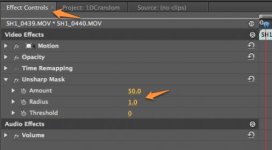
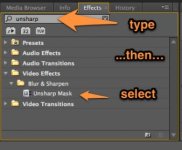
Hi James0b57, I'm also using Adobe PP, but I'm not seeing the same settings you mentioned. I only have a 100% slider to play with. And I generally select 15%. I don't see any slider for "radius". Can you elaborate on this? Thank you in advance, :)
 
no problem.

(hopefully you can see the attachments.)

Typically up to a 'radius' of 1, you are 'safe', and then after that it is to your taste or style. The 'amount' does not seem as drastic at first, but the two settings are interdependent. It's like shipping: How far and how much? If you send nothing it doesn't matter how far you go, and if you have a lot to ship, but it doesn't go anywhere, it doesn't do anything either.

'Radius' distinguishes how far from one pixel you want to sharpen, and the 'amount' is the degree of how sharp. Anything over "1 radius" is aggressive sharpening because you are sharpening beyond the inherent resolution of the image.

That is why Canon sharpening is so confusing. They are going from 0 to (~2?) aggressive in the first step. This kind of aggressive sharpening seems consumer based, because one cannot see the difference at a glance between 0 and moderate sharpening, they may have considered there to be no perceivable advantage to the consumer. But I dislike having to choose between smooth and harsh, especially on a "CINEMA" product!!!!! =)

My description may be flawed, but find it easier to understand that way.
 

Attachments

  • Screenshot_6_29_13_11_50_AM.jpg
    Screenshot_6_29_13_11_50_AM.jpg
    16 KB · Views: 0
  • Screenshot_6_29_13_11_49_AM.jpg
    Screenshot_6_29_13_11_49_AM.jpg
    15.5 KB · Views: 0
Last edited:
Back
Top