F5: Best workflow for quick work with the F5

stokstad

Well-known member
Hi!

Im gonna shoot a short musicvideo in early august and looking for an appropriate camera for the job. Its gonna be finished in 1080p for web.

I can rent good kits with either the Sony F5 or Red Epic for around the same price. We need around 200fps for some smoke grenades and running in slowmo that the producer wants. I think the F5 seems easier to work with because of internal 1080p with no crop but I haven't worked with the sonys before and cannot find good info on quality of XAVC and slowmo.

But assuming the codec is good: What would you recommend concerning colour and sgamut for this work? I will grade the footage myself in Speedgrade and I have not worked too much with log footage before. For this shoot DR is not going to be critical, I feel that I can sacrfice some for a faster image to work with. Is there any setting that you can recommend?

Thank you!
 
The 180fps via XAVC (in full frame) aliases a little. Sometimes you'll have things in front of the lens where you'll notice it a lot, other times you won't notice it at all. It's a little worse than how bad the Canon 7D aliases at 60fps.

If you're running with Speedgrade, I'd just shoot Slog3 and apply the Slog3 LC709A LUT, and grade from that starting point. This would be easy in Premiere & Speedgrade both.

If you REALLY gotta turn it around fast and decide not to mess, just burn the LC709A LUT to SxS/XAVC.

LC709/A gives the most filmic highlights out of the bunch.
 
Thanks!
I think I will go with Slog3 and apply LUT.
What framerates are considered best in terms of compromise between HFR and aliasing? Is it better in cropmode? Maybe the Epic would be a better choice for this purpose.
 
Anything above 60 is a "HFR Mode" on the 5 or 55

So the choices are:

1-Slightly aliased full frame. Sometimes you never see it. Other times it's a disaster.

2-Crop mode to S16-ish size, no aliasing but pic gets a little softer for 1080p finish, plus noise gets bigger/ slightly more noticeable if you put yourself in a situation where you'll see noise in the blacks (night, etc). Don't underexpose crop mode, you'll be bummed in post.


Epic is the better high speed cam (above 60)
 
I second Nate's reply. i shot a music video recently and it was slog3.cine.gamut underneath and LC709A LUT in post for quick "look" applied for editing. But to be honest, that LUT will probably make it right through to the final version with only a minor minor amount of tweaking.

It's so good it hurts.

Just make sure of one thing, if you use that LUT applied (the LC709A one) to monitor and see the look while you are shooting - pay attention to the actual levels being recorded underneath. Particularly try to set your middle grey down to where it should be ie. 41% for slog3.

ScreenShot2014-02-15at65331PM_zps438a4526.jpg
 
Thanks!

Im having a hard time making the choice between f5 and epic but I think I will go with the F5 just because it seems so much faster to work with and the time in post will be easier. I will shoot slog3 as your suggestion if I do go with the f5.
 
Funnies aside, one thing to consider is there is heavy debate on slog3 being noisier than slog2.

Technically if you shot the same scene in both and graded the final images to the same grade you would not see a difference.

One thing that will make both noisier is if you shoot in CineEI mode where the camera's Noise Reduction processing is disabled. So you need to shoot above your noise floor, and you might even want to consider rating your camera lower than you shoot in order to increase the effective signal-to-noise ratio.

Cheers
 
Ok, so the shoot is coming up this friday and Im renting a f5 to do the job. Im going for the slog3.cine.gamut while applying the 709A LUT in post. I will expose an 18% greycard for 41% in camera. It will be some dark scenes so im considering to not shoot cineEI and use in camera NR. Any idea of a good level for NR? Also, is the 709A LUT natively installed in the camera or do I need to install it before the shoot?

Any other important settings to keep in mind? (Im reading up on it atm but could use a helping hand)

thanks again for all the great information!
 
If you don't use the Cine EI mode, then you aren't going to be able to use any of the LUTs onboard the camera. So you really need to decide whether you want to use a LUT onboard the camera or use in-camera Noise Reduction -- because you can't have both at the same time.

And if it was my shoot, I'd be using S-LOG2 and not S-LOG3. But that's just my opinion, others will disagree.

http://www.vortexmedia.com/FIELD_GUIDES.html

Doug
 
Last edited:
Ok, but for HFR Onboard LUTs dont work anyway right? And for lowlight slog3 allcolates a bit more to shadows and NR might be more important. So I might have to do without onboard LUTs and shooting slog3 since it works better with slog3.cine.gamut?
 
The LC709A is already in the camera under LOOKS.

As for CineEI mode yes you will have to decide if you want LUT in camera or not and then can figure out NR options.

You might want NR plug-in in post if you go CineEI slog3.

If you can keep you blacks within a decent range below middle grey the noise won't be as bad.

But I just did a low key lighting shoot with shadows and colored lower tones and they were noisy and ugly. I was in CineEI mode. A large part of making it better or worse is going to depend on the grading in post of course.
 
Last edited:
yes slog3 allocates more data to the lower tones but thats where noise lives and if you plan on pulling thoae tones in post anyway you will be improving the effective signal-to-noise ratio so that extra data really might not come into use.
 
Ok so what about shooting non CineEI and having a bit of NR in camera, then rerating midgray around 45-50 and pull down the whole range a tad in post after applying LUT? I also have neat video but its not too fast to use on the while edit i rather shoot without much noise. Sine alot of HFR will be used CineEI seems like its not the best choice.
 
Or better two expose midgray at 41% and then give the sensor one more stop of light. This way Im overexposed by one stop and can adjust that in post.
 
rating the camera lower is always a good way to deal with improved signal-to-noise ratios in post and you definitely don't need CineEI to help you rate the camera lower. But remember the combination of rating the camera and having NR available would produce even better results... unfortunately I have not made a lot of time to test the differences to really see the difference with NR on and off but I suggest you try and see.

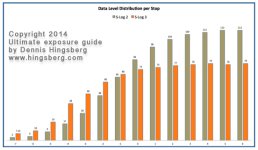
Regarding distribution of data per stop differences between slog3 and slog2, I've attached a diagram from the Ultimate Exposure Guide to F5/F5 I'm publishing which is coming out towards the end of this week (hopefully on time).

You can see that slog3 has a little more even data amounts allocated towards the highlights whereas slog2 is a little more biased towards highlights. In the shadows as I mentioned earlier, slog3 attempts to provide a little more data there which is good to have but again it will depend on the scene itself which really needs to be factored in when making decisions around "Good Exposure".

dataleveldistributionslog.jpg
 
Last edited:
Ok so what about shooting non CineEI and having a bit of NR in camera, then rerating midgray around 45-50 and pull down the whole range a tad in post after applying LUT? I also have neat video but its not too fast to use on the while edit i rather shoot without much noise. Sine alot of HFR will be used CineEI seems like its not the best choice.

Shooting in "Custom" as opposed to "CineEI" means no SLog.

You want SLog. Skin tones, highlight roll-off in the Hypergamma and standard gammas are not going to look like what you want, I'm guessing.

In other words, don't forgo CineEI for in-camera noise reduction. Exposed properly and treated in post properly, the camera is NOT noisy.

Shoot SLog3, push the toe of the image back down where it's supposed to be in color correction with a LUT or by hand, and you'll be fine.
 
Nate, whatever do you mean? Of course you can shoot slog when not in CineEI mode?

Also regarding noise, I have seen some bad stuff after working with with CineEI slog3 on my last few shoots. It might not be the slog curve itself (as I said I didn't do a scientific test between NR on and off) so it could be something related to the nature of the scene itself, or perhaps codec limitation (I am using XAVC) but do remember that since slog3 does provide almost double the amount of data towards the darker tones wouldn't you expect better results than slog2 in post if you did need to push the grade in post? After all why allocate more data there if it can't be used?

Here's a 1:1 crop of 2K frame from a frame grab off the timeline. Yes its been graded, pushed around a bit, etc.. but noticely I see horizontal streaks in the image. The dithering is the "noise" and dances around a bit on the actual footage. That background was far away and was out of focus and lit for 3-4 stops below middle grey. I used 41% for my grey on this shoot.

I have no idea how to get my attachment to appear 1:1 in my post. It looks like a thumbnail to me?

Screen Shot 2014-07-28 at 11.00.29 AM.jpg
 
Last edited:
Shooting in "Custom" as opposed to "CineEI" means no SLog.

With all due respect Nate, that is not true. I shoot S-LOG2 in the "Custom" mode every day. And the advantage of NOT using Cine EI is that I still have control over matrix, black levels, detail, gain, noise reduction, and other settings that are disabled in Cine EI. "Custom" gives me the best of both worlds -- S-LOG gamma and all the other paint settings at the same time that allow me to create a very nice picture 90% in-camera (before compression and data loss) and then the final 10% can be done in post.

I'm not saying that great results can't be achieved with Cine EI, but in my opinion, "Custom" is a hell of a lot easier to work with and provides an easier and better workflow for my own stuff and most of my clients.

http://www.vortexmedia.com/Guide-to-Sony-F55.html

Doug
 
Last edited:
So, if I shoot cineEI and for the low-key stuff I overexpose by one stop, then applying 709A LUT and bring the image down one additional stop in post, I should be fine? I have neat video and its gonna be web HD delivery so Im thinking it should be enough. The alternative is to shoot custom with NR instead, but then I cant use mluts for the non hfr.
 
Back
Top