rjcam
Active member
See Below post for best settings in Compressor. Figured it all out.
Trying to figure out and post best way to convert 60i from dvx to 24p.*
Compressor is awesome for results and very slow. Using Compressor 3 had to select Custom in mov settings and type
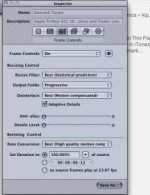
In 23.976 manually. There was no 23.98 or 24 setting. In inspector of compressor settings I selected Video encoder tab. *I used best adaptive optical setting and best for the previous setting.*
I clicked pass through for audio as I don't want to transcode or change the audio but as I just read this apparently disables the re timing of the audio to stay in sync. In compressor manual about page 275 it states that he lower options for re timing won't be active even though it appears like it would be.*
SO I am wondering how to do this right. Normal speed not tryin to slow it down. SD dvx100b cam at 60i original footage (not 24p setting while shooting).*
Should these new files be made to ProRes 422? And I am not clicking on deinterlace as I know that makes the resolution worse. Thanks for any help at all! Looking to fix this footage or at least start correct settings tonight!!
Trying to figure out and post best way to convert 60i from dvx to 24p.*
Compressor is awesome for results and very slow. Using Compressor 3 had to select Custom in mov settings and type
In 23.976 manually. There was no 23.98 or 24 setting. In inspector of compressor settings I selected Video encoder tab. *I used best adaptive optical setting and best for the previous setting.*
I clicked pass through for audio as I don't want to transcode or change the audio but as I just read this apparently disables the re timing of the audio to stay in sync. In compressor manual about page 275 it states that he lower options for re timing won't be active even though it appears like it would be.*
SO I am wondering how to do this right. Normal speed not tryin to slow it down. SD dvx100b cam at 60i original footage (not 24p setting while shooting).*
Should these new files be made to ProRes 422? And I am not clicking on deinterlace as I know that makes the resolution worse. Thanks for any help at all! Looking to fix this footage or at least start correct settings tonight!!
Last edited: