Best settings for night time shoot

majormorgan

Well-known member
Hiya,

We're going to be shotting with the HVX200 outdoors in a number of situations at night. We will be shooting with lights and a DP so I hope to get great images and fantastic exposures.

What I'd love to know is your best settings for great clear footage at night [with plenty of light of course] so that the blacks are less noisy.

Is there a magic F-Stop to be at to reduce noise in the blacks? Anything else to the settings? Remember this is for a night shoot.

Also do you have any images to show?

Many thanks
I look forward to your responses !

Thanks,
Richard
The Major
 
I think what The Major was asking is: Where does the noise start appearing -- at what f-stop/IRE?

In other words, what should the background illumination be to eliminate noise in the dark regions (which would then be crushed back to black in post)?

I'm trying to figure this out myself.
 
We fight against different kinds of noise, but I think the one most people usually end up complaining about comes from the codec, or the codec combined with insufficient lighting.

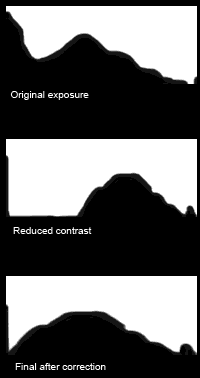
The last stop of the cam seems to be noisy no matter my settings, as expected, since data is allocated more favorably to the brighter stops. If I'm trying to avoid this, I limit contrast and use zebras to make sure the image is exposed as bright as possible, then fix the levels and gamma when I get back (the classic "expose to the right" concept). Plus, in night work, you will have some true black, and if you can get all your shadow data bright enough to be separate from what absolute camera black, then the electronic noise added to absolute black can be completely eliminated without problems.

I got bored... I made a drawing to help illustrate...
expose-to-the-right.png
 
Great visualization. Thanks.

From my experience with the HVX, eye-balling the lower exposure doesn't work that well because the LCD is too small, and production monitors are either too inaccurate or too expensive.

It would be nice to know that "using Gamma X, at Y f-stop noise appears below IRE Z"*. With this information you would be able to more quickly and easily light a shot because you could calculate the lighting ratio you want to get the best exposure for the subject and lowest noise in the shadows.

Is there no information like this out there -- or can this be calculated (and turned into a chart) somehow?


* I know there are a lot of other variables such as master-ped, etc., but assuming that you keep everything flat for simplicity -- or better yet, come up with a setting that optimize extracting noise-free blacks from post.
 
I use OnLocation as my field monitor to help me properly expose (when I have time) or I use zebras and try to reduce contrast as much as possible. Basically if you light a scene with three or four stops of contrast between key and fill, and use zebras to make sure that something is always approaching 100 IRE, everything else should fall into place (at least if everybody is wearing 18% gray lol). If you want a more contrasty scene, shoot the same but "crush the blacks" in post.
I wish there was a built-in histogram like some dSLRs have, but we can't have everything, right? The spot meter can help in a pinch, though.
What I'm saying is gamma, f-stop, and shutter are all supplemental to IRE, so if you can keep your IRE above some arbitrary number (let's say 20) then you can keep your image data the cleanest and also pull out all the noise in the unlit areas of the background.
 
Cool.

Right now I'm looking at a system of exposure where I measure off a face or gray-card at 70 IRE while keeping the iris as open as possible, then adjust the highlights so they're at 100 IRE (sometimes adjusting the iris if necessary), then raising or lowering the fill to get the desired key/fill ratio, THEN increasing background levels (with another soft-light) to fill-in the shadows (which is then crushed back down in post).

It's a work in progress, but so far gets some nice shots. What I would like to do is start at the bottom and work up -- hence the interest in where noise appears. The closest you can get the blacks to the noise, the lower the overall illumination you'll need (and save yourself a lot of time/work dicking around with lights on the shoot.)
 
With a night shoot, some of your background will probably always be unlit. That's okay, as long as you don't mind it going completely to black. Once you crush the blacks in post all that noise will go away.
 
I try to keep an IRE of between 30 and 40, never going below 20. Just turn on your spot meter and thats all you really need.
 
pmark23,

I see what you are saying, but I read a post by Cardmaverick and if I remember correctly he works from the top (highlights) down. Apparently the Highlights are the best thing we have to really give us a starting point. if you find what your high lights are and set them to ire 100, then you can light down from there.

The problem about lighting form grey or a face is that the different gama curves affect the exposure differently. so you might still be blowing out the higlights in one curve, but not in another.

Anyway, that is what I understood. You can probably send him a PM he really seems to have a system that works figured out.
 
I create a custom shutter angle in FILM CAM mode, usually at 200 degrees or 210. This lets in a bit more light so I don't become tempted at opening up the iris too far. This change of degree isn't enough to smooth out your filmic judder, which is good too. In VIDEO CAM mode, i might make a 1/36 th shutter speed.

peace,
andrew
 
For outside night shooting, if the story allows you to have lights in the back ground, just be carefull with the wide shots not to have a large section of the frame black (sky..) and use quite strong lights on different part of the backgroung ( i very often use stripes of over exposed ligth to fake an out of focus background..); actors will be in a more diffuse ligth and the closer they come to the camera the softer is the ligth, i also manage to have it lower(1/2 of a stop ..). For close-up i manage to use longer lens and take advantage of the out-of-focus effect of this faraway lamps...
But, if the story permits and the director agrees... or i look for an other solution.
Happy new year.colin.
 
I probably already know what this is, but am unfamiiar with the phrase "crush the blacks in post" ....anyone care to comment?
 
You're taking dark gray and making it black, and sliding middle gray toward darker gray. It cuts down on noise, usually looks more filmic, and it makes you sound cooler when the director asks why the footage on the monitor looks so bad.
 
So Professor, are we talking about adjusting the contrast in the NLE? I'm just wondering how this is accomplished.
 
Back
Top