Best setting for shooting Black & White with ex 3

abv

New member
Hello all,
I am in the planning stages of a feature to be shot with a newly acquired ex 3. Can someone recommend the best settings in camera for shooting Black & White? If it is better done in post;

1. What's the best settings to shoot for finishing in black and white?
2. What's the best way to convert to black and white in Premiere Pro CS5?

Hope someone can help me out.
 
Last edited:
As a general rule cameras don't have any one set of settings that is 'best', otherwise there would only be one setting. Its going to depend on what you are after, the amount of light, the amount of motion, the detail desired, and the effect you are after.

You might want a grainy sepia look if you're want it to look like vintage footage. You might want stark black and white in a film noir. You might be wanting to shoot day for night. You might want a bleach by-pass look for a dream sequence and don't want stark details, etc.

Set forth your goals in more detail and then re-ask your question.
 
Last edited:
Image control - Black and White. However, you might want to experiment with putting some colour tints on, then maybe contrast and brightness and then doing the monochrome. Tinting the picture red, for instance, then converting to monochrome produces very different results than when you just go mono. Really interesting experiments.
 
Hi Duke and Paulears, thanks for the quick response.

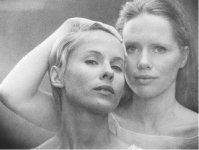
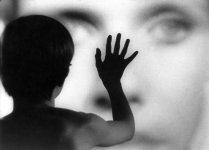
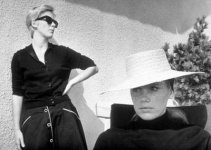
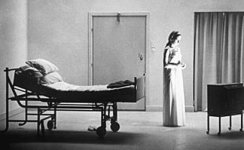
Trying to achieve a 'Persona' kind of black and white. (see ref image attached). Soft and grainy indoors, rich and contrasty outdoors. Any pointers in getting this 16mm type look will be greatly appreciated.
 

Attachments

  • bergman-persona.jpg
    bergman-persona.jpg
    24.3 KB · Views: 0
  • persona.jpg
    persona.jpg
    29.3 KB · Views: 0
  • persona_2.jpg
    persona_2.jpg
    25.6 KB · Views: 0
  • persona6.jpg
    persona6.jpg
    20.4 KB · Views: 0
The problem with what you want is that if you do it in camera, and it looks different when you put it on screen and you want to change it, you're toast. Better to shoot as sharp as you can and reduce contrast then add grain for the soft grainy images.
 
Using your examples above, no "one" PP is going to provide you with those four different looks.

And remember, lighting alone can/will have a major impact!

I agree with Duke 110%. Capture the best image you can (most latitude), then, in post, you can adjust it any way you want.

P.S. Persona (1966) was shot on 35mm. Scenes From a Marriage (1973) was Bergman's first major film shot on 16mm.

OR

If you're referrring to the print, remember a 16mm print will look vastly different from a 35mm print!
 
Last edited:
Thanks guys. Looks like I will have to work hard on the lighting to get the desired look.

I will be editing on a PC based system with Premiere Pro CS5. There is the basic black & white filter, the channel mixer to convert to monochrome and there is the colour corrector (HLS) where you can desaturate to get a gray scale image.

Which process would you suggest to achieve a B&W look closer to real B&W film with HD footage in Premiere Pro CS5? Or are there any other new plug-ins for convertion to Black & White?
 
Thanks guys. Looks like I will have to work hard on the lighting to get the desired look.

I will be editing on a PC based system with Premiere Pro CS5. There is the basic black & white filter, the channel mixer to convert to monochrome and there is the colour corrector (HLS) where you can desaturate to get a gray scale image.

Which process would you suggest to achieve a B&W look closer to real B&W film with HD footage in Premiere Pro CS5? Or are there any other new plug-ins for convertion to Black & White?

We did this commercial on an EX1 specifically for black and white.

http://vimeo.com/10491079

The DOP Tony Brennan set the camera slightly different to make it more contrastry. The B&W effect was created in FCP Colour Corrector and Magic Bullet Looks.
 
Back
Top