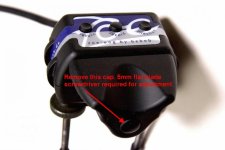
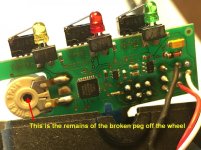
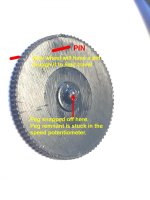
I recently purchased a used Bebob Zoe DVXL remote control on Ebay. It was said to be in 'good working condition' but when I tested it with my Canon HF-G30 I found that the zoom control was creeping i.e. after zooming in it slowly zoomed out again without touching the rocker. Also the MSR (Maximum Speed Reduction) control wheel on the side was not working - turning it had no effect on the zoom speed and it didn't come to a stop in either direction. Whether these issues were pre-existing or the DVXL got damaged in transit, I'm not sure (it was shipped in a 'bubble mailer' envelope !), but I decided to return it. To his credit, the seller gave me a full refund without question or requiring that the remote be returned.
I was thinking to maybe sell it 'For Parts Or Not Working' but came across this post in old forum thread (dating back to 2008) which suggested that the 'zoom creep' might be fixable:
http://www.dvxuser.com/V6/showthread.php?131484-HVX200-Bebob-Zoe-problem
As I learn, the Varizoom VZ-Rock remotes have an access hole for adjusting (re-calibrating) the potentiometer with a small screw driver. Can't see anything like that on the DVXL so I assume it requires opening up the casing to access the potentiometer. Probably the 'strip of paper' mentioned in that post refers to the control panel plaque that extends as a strip around each side of the remote, which you need to cut in order to separate the casing. I haven't tried to open it up, as yet.
Could anyone who has done this instruct on me how to make the repair or point to a reference? If it is indeed 'not difficult' I might give it a go.
As for the broken MSR wheel. As I learn, this is a very common issue. Although the wheel is protected by two ridges, it doesn't take much to break the fragile coupling between the wheel and potentiometer if it is rotated roughly or knocked. Usually it gets stuck at the maximum or minimum zoom speed and the only 'make do' fix is to open the remote, rotate the potentiometer to a mid-point position and call it good. That's all I know. Again, I haven't actually tried it.
So, just posting on the off chance that someone knows how to do these repairs.
I should mention also that before I tested the DVXL I downloaded the Operating Instructions which warned that after connecting the remote and powering on the camcorder, the zoom rocker must not be moved while it is calibrating, so I took that precaution. Also I made sure that I did not touch the zoom rocker on the HF-G30 while the DVXL was connected. I'd read that using the on-camera controls while a LANC remote is connected can also send the camera LANC controller into a tissy. Needless to say the creeping only occurred when the DVXL was connected, so it's not the camcorder.
Meanwhile, I've purchased a Libec ZC-LP remote as I have a commitment to shoot a sporting event next week. It does the job I guess, but the zoom rocker is not as responsive as the DVXL. No Power control either, although when I tested the Power button on the DVXL it would only 'wake' the HF-G30 after it had 'Auto Powered Off' - it wouldn't actually power the camcorder OFF and ON again. Also I've noticed that the ZC-LP makes a rather annoying click when the rocker is turned fully clockwise (to Telephoto), which surprised me as the Libec remotes are reputed to be 'silent'. I'll post about this separately.
I was thinking to maybe sell it 'For Parts Or Not Working' but came across this post in old forum thread (dating back to 2008) which suggested that the 'zoom creep' might be fixable:
http://www.dvxuser.com/V6/showthread.php?131484-HVX200-Bebob-Zoe-problem
Yes, I have the same problem with my Zoe. I understand it is not difficult to repair. It requires removing a strip of paper and invalidating your warranty. It is a common problem with them.
As I learn, the Varizoom VZ-Rock remotes have an access hole for adjusting (re-calibrating) the potentiometer with a small screw driver. Can't see anything like that on the DVXL so I assume it requires opening up the casing to access the potentiometer. Probably the 'strip of paper' mentioned in that post refers to the control panel plaque that extends as a strip around each side of the remote, which you need to cut in order to separate the casing. I haven't tried to open it up, as yet.
Could anyone who has done this instruct on me how to make the repair or point to a reference? If it is indeed 'not difficult' I might give it a go.
As for the broken MSR wheel. As I learn, this is a very common issue. Although the wheel is protected by two ridges, it doesn't take much to break the fragile coupling between the wheel and potentiometer if it is rotated roughly or knocked. Usually it gets stuck at the maximum or minimum zoom speed and the only 'make do' fix is to open the remote, rotate the potentiometer to a mid-point position and call it good. That's all I know. Again, I haven't actually tried it.
So, just posting on the off chance that someone knows how to do these repairs.
I should mention also that before I tested the DVXL I downloaded the Operating Instructions which warned that after connecting the remote and powering on the camcorder, the zoom rocker must not be moved while it is calibrating, so I took that precaution. Also I made sure that I did not touch the zoom rocker on the HF-G30 while the DVXL was connected. I'd read that using the on-camera controls while a LANC remote is connected can also send the camera LANC controller into a tissy. Needless to say the creeping only occurred when the DVXL was connected, so it's not the camcorder.
Meanwhile, I've purchased a Libec ZC-LP remote as I have a commitment to shoot a sporting event next week. It does the job I guess, but the zoom rocker is not as responsive as the DVXL. No Power control either, although when I tested the Power button on the DVXL it would only 'wake' the HF-G30 after it had 'Auto Powered Off' - it wouldn't actually power the camcorder OFF and ON again. Also I've noticed that the ZC-LP makes a rather annoying click when the rocker is turned fully clockwise (to Telephoto), which surprised me as the Libec remotes are reputed to be 'silent'. I'll post about this separately.
Last edited: