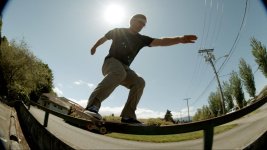
F3: Banding/Noise In Blue Sky When Using Fisheye Lens

Ben_Ericson

Well-known member
I will most likely runs some tests this weekend, but does anyone have any advice? I am shooting S-LOG, 0db (Native ISO,) Usually keeping the lens between F8 and F11.

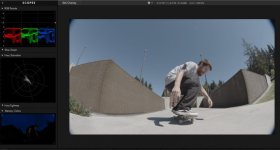
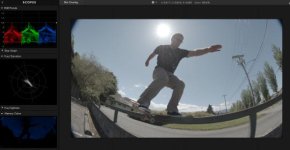
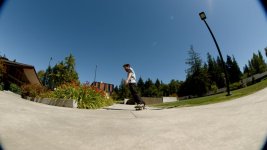
I am wondering, should I shoot at F5.6, to make the sky essentially out of focus to solve this problem? I have included a few frames, once frame where it didn't seem to be a problem for whatever reason. I realize blue skies are always tough, but this is Pro Res HQ 422.

I am shooting in the northwest, so this isn't always a problem with clouds overhead. Also, shooting in shaded areas where I am really pushing the image in the sky, seems to remove the banding as well... Maybe I could try shooting at +3db to create some texture in the sky? I'll probably end up adding some grain overlays if I keep having problems.
James.jpg

James.jpg

Sky_Noise.jpg

Frame_Graded.jpg

James_Scopes.jpg

Kyle_Scopes.jpg

Edit: The compression here really exaggerates the amount of banding, but it is there in pretty much every fisheye file with a clean blue sky.
 
Last edited:
I'm looking at your images, see no banding of any kind. Could it be your monitor? What is the significance of whether the sky is in focus or not?
 
That's not banding but compression noise, here an example with the noise exaggerated:

COMPRESSION_1.1.1.jpg

Could you dropbox some of the out of camera original s-log footage?
 
I'm looking at your images, see no banding of any kind. Could it be your monitor? What is the significance of whether the sky is in focus or not?

As Cary brought up, it is compression noise, not banding. Noise like this will turn into banding when recompressed for youtube or vimeo.

From experience with the black magic pocket, the more shallow footage always seemed to be a lot smoother. You can avoid a lot of artifacts by shooting shallow.
 
You can avoid a lot of artifacts by shooting shallow.
How can this be true when it comes to video noise?? Even if details were somehow contributing to the noise level (which they don't), how could this be true in case of a blue sky which has very little detail no matter if it's in focus or not? And what are your chances of throwing the sky out of focus if you're shooting with a fisheye anyway?
 
Last edited:
I downloaded your footage. I don't see anything unusual about it. Yes, as expected there's some noise in the sky (blue channel is usually the noisiest) and maybe some compression artifacts (not unusual considering that the sky is a fairly uniform surface in color, saturation and luminance). You'd have to go out of your way to make this a problem, like crop-in significantly or apply some heavy grade. With normal viewing there's no issue. Here are some TIFF grabs from Davinci. Note that I did not have an appropriate LUT for SLOG 1 footage, I just applied a curve and added saturation. https://www.dropbox.com/sh/lnknsz27xibnpbr/AAATCUC3yCFNjbHSr7umqiXia?dl=0
 
I downloaded your footage. I don't see anything unusual about it. Yes, as expected there's some noise in the sky (blue channel is usually the noisiest) and maybe some compression artifacts (not unusual considering that the sky is a fairly uniform surface in color, saturation and luminance). You'd have to go out of your way to make this a problem, like crop-in significantly or apply some heavy grade. With normal viewing there's no issue. Here are some TIFF grabs from Davinci. Note that I did not have an appropriate LUT for SLOG 1 footage, I just applied a curve and added saturation. https://www.dropbox.com/sh/lnknsz27xibnpbr/AAATCUC3yCFNjbHSr7umqiXia?dl=0

Cool, thanks for taking a look. I wonder if a higher or lower gain setting would help me? Maybe the lack of noise is the black when outputting to a recorder. I am shooting at native ISO 800.
 
DaVinci has built-in S-Log (x) color space transforms, I would recommend to use that instead of a LUT.
Also I would make sure your code values are correct otherwise your transforms will be incorrect for transforms as well as for LUTs.
S-Log expects data values, the ProRes file you provided is read as video levels when you use the auto setting in DaVinci.

The video looks a bit soft to me.
 
How are you setting exposure? What software are you using for grading? What LUT are you applying in post?

Using a preview LUT to get basic exposure. Histograms/Zebras. I am using Magic Bullet Looks just for scratch edits. I'm having a colorist do the grading when the time comes.

DaVinci has built-in S-Log (x) color space transforms, I would recommend to use that instead of a LUT.
Also I would make sure your code values are correct otherwise your transforms will be incorrect for transforms as well as for LUTs.
S-Log expects data values, the ProRes file you provided is read as video levels when you use the auto setting in DaVinci.

The video looks a bit soft to me.

Okay. I am perhaps a bit in over my head here. I am getting tones I like when using the Canon LUTs just to get scratch edits to look at. I can get the images to look good, but perhaps I am being too rough on the image with my post workflow.

Softness could be the Canon 8-15. My Sigma 18-35 in comparison is a lot sharper. The F3 isn't known to be a super sharp image though.
 
Ben, you'd get much better results if you graded in Resolve, used the correct LUTs, and followed a proper workflow for S-LOG. You're just wasting your time floundering around in post without having a clear picture of how to deal with the footage properly. I also think there's a good chance you're under-exposing, too, but I can't say for sure without seeing original clips. The F3 is one of the best looking HD cameras there is and you're making it look worse than a GoPro. Go back to step one and make sure you're exposing correctly for S-LOG and then bring it into Resolve and learn the workflow. Anything else is a waste of your time -- as you are learning or you wouldn't have started the thread.
 
Last edited:
Back
Top