Bad card or faulty AF100?

gkantziper

Esteemed Member
Did a 2 camera shoot a few weeks ago and the (rented) "B" camera had an issue resulting in some unusable footage. Most of the footage was fine and I think the problem was just one of 2 cards used in that camera, but I am working on finding out if the problem was just ONE of the 2 cards used in the rental camera that day.

Is there a way to know if it was the card at fault or the camera? (I still have the card with the bad footage.)

Is there a way to do some kind of check to the card to verify it has bad sectors or something?

It is unfortunate for the client that they lost some footage, but I'd like to know if the problem is with that specific card so I don't have to throw a bunch of cards away, etc....

Sandisk Ultra 20MB/s Class 6 SDHC 32GB

Thoughts anyone?
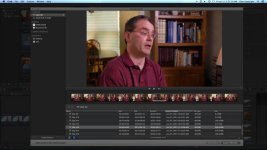
bad card.jpgnot bad.jpg
 
If you still have the card with the footage on it, try playing that footage from a camera or Blu-ray player. That will let you know whether the footage on the card is bad, or if it was the transfer from the card to the computer that's bad -- and frankly that's what I suspect. I suspect your card is fine, your footage is fine, but when transferring it to the computer there was a glitch and that's what you're seeing. But that's just a guess. If you still have the card with the footage, you can verify that for certain.
 
The screen caps are from FCPX and the footage displayed is directly from the card, not ingested. Nevertheless, I put the card in my camera, not the rental camera the card was originally used in, and it skips the bad sections/frames like a jump cut.
 
Okay, if the playback from the card fails, then it is almost certainly the card that is at fault. If the camera was at fault you'd expect it to screw up every card...
 
I never got an answer about a second card with bad video so I will go on the assumption that the problem was with the card and not the camera. This is the first time I've lost video to a bad card and it makes me look at getting another large sensor camera i.e. C100 that can record to 2 SD cards at the same time. Yes, an external recorder is another option, but this is 2013 and I'm not going down that road again. Been there done that since the beginning of my career with 3/4" to HVX with Firestore. Never again. Cumbersome and ridiculous in this day and age.
 
Just sent this to Panasonic:

I just lost video on an important project (shooting with an AF100) using a Pro Grade Sandisk SD card and have been researching other brands. So, I found the card checker software at

http://panasonic.jp/support/global/cs/sd/tool/card_checker.html

but I can't find the "SDB" cards

http://www.panasonic.com/business/provideo/RPSDB32GB1K.asp

at B&H? Have they been discontinued?

The bottom line is I want some way to verify the cards are "sound" and as reliable as they can be and some kind of software checker seems to be the answer. I see I need the

http://panasonic.net/avc/sdcard/usbrw/

adapter to use the software and that is available at B&H.

Can I use http://www.bhphotovideo.com/c/produ...rp_sdub64gak_64gb_sdhc_uhs_1_memory_card.html with the Panasonic adapter and software?

Thanks.
 
I would be hugely surprised if it's the AF100. I stick to class 10 cards and never have an issue with them <knock wood>. There's lots of good reasons to switch cameras but I wouldn't move from the AF100 because I had a card crap out. With that, the guys who have the C100 love it. It's more limited framerate-wise than the AF100, still 8bit, and like all Canons, it likes Canon lenses. If you have Canon lenses you may like it. Check Erik Naso's review for good information on it. What I've seen from it looks really good, as does the AF100. I find the C100 a little pricey for the feature set but still a good value.

It's traumatizing to lose footage but in this case, it sounds like the media failed. The best cards are still so reasonably priced and you can get a full day on one. That's the last place I would skimp. One of my favorite features of the AF100 is that it is tremendously reliable. It just chugs.
 
Last edited:
Me neither, but I'd sure like to know for sure. I'll bet you have the email of a person who can answer that question!?!
 
According to Panasonic, you cannot use microP2 cards in an AF100 as they only read in any SD card device other than a P2 compatible devices. Panasonic recommended I use Sandisk cards (like the one that failed me) and use the Panasonic UHS-1 Compliant USB 3.0 Reader / Writer ( http://www.bhphotovideo.com/c/product/805158-REG/Panasonic_BNSDCMAB_UHS_1_Compliant_USB_3_0.html ) along with the Panasonic SD Card Checker software ( http://panasonic.jp/support/global/cs/sd/tool/card_checker.html ) to verify the cards are good before recording. According to Panasonic's site, you have to use their reader to use their software. I ordered a Panasonic UHS-1 Compliant USB 3.0 Reader / Writer today (less than $50 at B&H) and will post a conclusion to all this next week.
 
thanks for the update. I hope everything worked out well with your client.

I have a San Disk Micro SDHC USB Reader. It works in some computers and not on my desktop. I wonder if I would need to get that Panasonic one they recommended to you. I'd be curious about what you find out.
 
Saga continues. Sandisk cards aren't supported with Panasonic UHS-1 Compliant USB 3.0 Reader / Writer and Panasonic SD Card Checker software like I was told by rep. from Panasonic. So, I'm trying to find out what cards (that are currently available) ARE supported.
 
I use SanDisk Extreme III and Extreme Pro cards in a Panasonic UHS-1 card reader all the time. Never used the card checker software.
 
I guess the end to the story is I bought the http://panasonic.net/avc/sdcard/usbrw/ and found a http://www.panasonic.com/business/pr...PSDB32GB1K.asp through Amazon and the http://panasonic.jp/support/global/c...d_checker.html works. The cards are from Panasonic's Pro division and the reader is from both the consumer and Pro division and the software is from the consumer division so neither division would give me all the info I needed to proceed. Bottom line is it all seems to work and you have to use those specific Pro cards. No other cards from Panasonic or any other manufacturers work. The cards are around $130 for 32s which is a lot but well worth it in my opinion.
 
Back
Top