
Navigation
Install the app
How to install the app on iOS
Follow along with the video below to see how to install our site as a web app on your home screen.
Note: This feature may not be available in some browsers.
More options
You are using an out of date browser. It may not display this or other websites correctly.
You should upgrade or use an alternative browser.
You should upgrade or use an alternative browser.
Awakenings
- Thread starter John Foundas
- Start date


Ed Kishel
Veteran
Yes I did see it, which is why I think it's a stretch to say it blew everything else away. And to also say it may even look better? Wow- to your eyes perhaps.
I also own a GH2 and AF100. Resolution wise it was the best DSLR, however the C300 looked like it wrapped that one up overall. Grading and lowlight-wise the FS100 impressed me the most. For a $600 camera the GH2 is a no-brainier (it is the camera I will be using in the jr-college dig cinematography class I teach). Also remember that this shootout only looked at static scenes with no movement and also doesn't factor in the features of each cam outside of their images (the tools needed in pro level gear). But if all one is looking for is price/resolution via this limited shootout- yes the GH blows.
I also own a GH2 and AF100. Resolution wise it was the best DSLR, however the C300 looked like it wrapped that one up overall. Grading and lowlight-wise the FS100 impressed me the most. For a $600 camera the GH2 is a no-brainier (it is the camera I will be using in the jr-college dig cinematography class I teach). Also remember that this shootout only looked at static scenes with no movement and also doesn't factor in the features of each cam outside of their images (the tools needed in pro level gear). But if all one is looking for is price/resolution via this limited shootout- yes the GH blows.
Last edited:

John Foundas
Well-known member
At work I use Magic Bullet looks all the time for sweeps promos. That’s about it. Even FCP’s color correct three way can work very well for grading. Put the waveform scope up and adjust the blacks so they touch the bottom. Kinda crush them a little then mess around with saturation and such. It takes time and practice. A good external monitor is required to get it right but the scopes help a bunch.
Red Giant has some very good tutorials for Colorista on Vimeo. Colorista II is a great tool and I use that primarily when I have the time to spend on grading. Very powerful masks. Check em out. This is where you make good shots great. I never use a frame of video that hasn’t been CC. Its just part of the process for me and I enjoy grading.
Thanks E,
I fiddled with that on 516 clip I did.
http://vimeo.com/34702930
The results of that using the GH2 is what got my dander up. My raw AF clips look washed out and cruddy next to the raw Gh2 clips. Frustrating. Perhaps I'm just a 2/3 sensor guy
 LMAO
LMAO
Erik Naso
Veteran
Take those washed out clips and grade them. Bring the black levels down, boost the mids, add some saturation and they will look very different.
I went to the set of The Voice a couple weeks ago for a promo shoot with a HPX370. That camera isn’t nearly as good image wise as the AF-100. The set looks amazing with the lighting setup. I balanced my camera and shot my promo. When I got back to San Diego I imported the footage and was surprised how much blue cast I had in all the shots. I didn’t get all freaked out because with a few clicks and adjustments the stuff looked really good. All done only with FCP 3-Way CC. I showed one my colleagues and they couldn’t believe the difference. This happens all the time. Those stage lights played havoc on the lens/sensor. Light was bouncing around and even flaring the lens. No big deal. Fix it in post.
Can’t post any images from the shot until after the Super Bowl. Sorry.
It’s not the camera John. Take the bull by the horns and don’t let the camera tell you how it will look. Now get out their and grade some footage!
Watch some of Stu Maschwitz’s tutorials on Colrista II. Even if you don’t use Colorista its a great lesson in grading. Grab a beer and enjoy.
http://vimeo.com/channels/coloristaii
I went to the set of The Voice a couple weeks ago for a promo shoot with a HPX370. That camera isn’t nearly as good image wise as the AF-100. The set looks amazing with the lighting setup. I balanced my camera and shot my promo. When I got back to San Diego I imported the footage and was surprised how much blue cast I had in all the shots. I didn’t get all freaked out because with a few clicks and adjustments the stuff looked really good. All done only with FCP 3-Way CC. I showed one my colleagues and they couldn’t believe the difference. This happens all the time. Those stage lights played havoc on the lens/sensor. Light was bouncing around and even flaring the lens. No big deal. Fix it in post.
Can’t post any images from the shot until after the Super Bowl. Sorry.
It’s not the camera John. Take the bull by the horns and don’t let the camera tell you how it will look. Now get out their and grade some footage!
Watch some of Stu Maschwitz’s tutorials on Colrista II. Even if you don’t use Colorista its a great lesson in grading. Grab a beer and enjoy.
http://vimeo.com/channels/coloristaii
Last edited:
OK Ed, fair point. It's perfectly possible your eyes are more educated than mine. But to me it looked great, and the point is that pound for pound I think it's an incredible camera. Of course, I'd use a C300 over it every time for real work, but for something to have in your lens bag for occasional shots it's extraordinary. I do have to say though, can we all stop dropping in patronising comments like "(the tools needed in pro level gear)," like only a select few of us earn a living from this, and just make an assumption that almost every Af100/1/2 owner is a professional. I don't claim to be the best by any means, but I've been doing this for 20 years at the BBC and other places and I do get pissed when we all try and flop our d*cks out in these comments.
Erik Naso
Veteran
I have a GH2 and I like the camera a lot. I always take it with me on shoots as my backup. It’s a great stills camera as well as a video camera. I hacked it with the Driftwood V5 hack and its pretty darn good. Eats up my 16GB cards with only 16min of TRT.
Would I use it professionally. Sure. In the right conditions I sure would but that situation hasn’t happened yet. (oops did I say professionally )
Would I use it professionally. Sure. In the right conditions I sure would but that situation hasn’t happened yet. (oops did I say professionally
)
mainstreetprod
Veteran
Take those washed out clips and grade them. Bring the black levels down, boost the mids, add some saturation and they will look very different.
I actually did that yesterday with my AF, which I've owned for all of three days. I was concerned with the talk I've seen about the codec not being up to color correction like P2 is due to the lower data rate. So I took the camera out and shot a couple of scenes (at 30fps for the normal data rate and overcranked to 60 for the higher rate), then came home and applied a Magic Bullet Look (Mishandled Negative) that would be classified as heavy grading. Here are the results (beginning is all graded footage at two different data rates, end is ungraded clip VS graded clip).
http://exposureroom.com/members/mainstreetprod/0eb34108fb5d4454a05e4c5575fcce32/
I was very pleased at how well the codec handled the heavy grading. I saw absolutely no difference in the graded clips between the two data rates. I'm a firm believer now in the "shoot flat and grade later" philosophy. All footage shot with Abelcine scene file "Range".
Last edited:

John Foundas
Well-known member
Take those washed out clips and grade them. Bring the black levels down, boost the mids, add some saturation and they will look very different.
I went to the set of The Voice a couple weeks ago for a promo shoot with a HPX370. That camera isn’t nearly as good image wise as the AF-100. The set looks amazing with the lighting setup. I balanced my camera and shot my promo. When I got back to San Diego I imported the footage and was surprised how much blue cast I had in all the shots. I didn’t get all freaked out because with a few clicks and adjustments the stuff looked really good. All done only with FCP 3-Way CC. I showed one my colleagues and they couldn’t believe the difference. This happens all the time. Those stage lights played havoc on the lens/sensor. Light was bouncing around and even flaring the lens. No big deal. Fix it in post.
Can’t post any images from the shot until after the Super Bowl. Sorry.
It’s not the camera John. Take the bull by the horns and don’t let the camera tell you how it will look. Now get out their and grade some footage!
Watch some of Stu Maschwitz’s tutorials on Colrista II. Even if you don’t use Colorista its a great lesson in grading. Grab a beer and enjoy.
http://vimeo.com/channels/coloristaii
Gracias señor!!!!!!!!
Ed Kishel
Veteran
Wasn't my intention to be patronizing- but I can understand how it might sound that way so maybe poor phrasing on my part. Of course there are GH2/DSLR users who are no less professional than AF or any other camera user. No- gear doesn't define one's abilities.
Although these shootouts are a great resource and very informative- they do lack any details of the gear outside of their sensors. This info would give a well rounded evaluation for each camera (to PB's credit he has said as much in his introductions). Sure, it's not his responsibility to cover everthing, but a little blurb during his wrap up would remind potential buyers (and owners) not to get tunnel vision. After it's all said and done- you might end up with a franken-rig for close to what an FS or AF costs. And all in the quest for the sharper sensor.
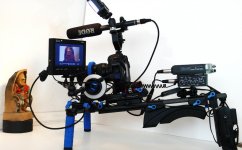
Although these shootouts are a great resource and very informative- they do lack any details of the gear outside of their sensors. This info would give a well rounded evaluation for each camera (to PB's credit he has said as much in his introductions). Sure, it's not his responsibility to cover everthing, but a little blurb during his wrap up would remind potential buyers (and owners) not to get tunnel vision. After it's all said and done- you might end up with a franken-rig for close to what an FS or AF costs. And all in the quest for the sharper sensor.
Last edited:
John Foundas
Well-known member
Wasn't my intention to be patronizing- but I can understand how it might sound that way so maybe poor phrasing on my part. Of course there are GH2/DSLR users who are no less professional than AF or any other camera user. No- gear doesn't define one's abilities.
Although these shootouts are a great resource and very informative- they do lack any details of the gear outside of their sensors. This info would give a well rounded evaluation for each camera (to PB's credit he has said as much in his introductions). Sure, it's not his responsibility to cover everthing, but a little blurb during his wrap up would remind potential buyers (and owners) not to get tunnel vision. After it's all said and done- you might end up with a franken-rig for close to what an FS or AF costs. And all in the quest for the sharper sensor.
View attachment 45900
Ooooo Frankenrig!
John Foundas
Well-known member
Take those washed out clips and grade them. Bring the black levels down, boost the mids, add some saturation and they will look very different.
I went to the set of The Voice a couple weeks ago for a promo shoot with a HPX370. That camera isn’t nearly as good image wise as the AF-100. The set looks amazing with the lighting setup. I balanced my camera and shot my promo. When I got back to San Diego I imported the footage and was surprised how much blue cast I had in all the shots. I didn’t get all freaked out because with a few clicks and adjustments the stuff looked really good. All done only with FCP 3-Way CC. I showed one my colleagues and they couldn’t believe the difference. This happens all the time. Those stage lights played havoc on the lens/sensor. Light was bouncing around and even flaring the lens. No big deal. Fix it in post.
Can’t post any images from the shot until after the Super Bowl. Sorry.
It’s not the camera John. Take the bull by the horns and don’t let the camera tell you how it will look. Now get out their and grade some footage!
Watch some of Stu Maschwitz’s tutorials on Colrista II. Even if you don’t use Colorista its a great lesson in grading. Grab a beer and enjoy.
http://vimeo.com/channels/coloristaii
Messed around with this GH2 clip. Colorista II auto balance, FCP CC 3-way and MBL vignette.
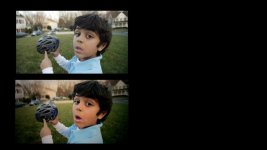
Posted this elsewhere, but seems suitable here... I've been looking for a while to match my AF and GH2 as close as possible for those jobs when post fiddling time is minimal - most of my work, actually.
Obviously, it made sense to find what I thought worked best for the GH and then adjust the AF to match it. Anyway, this recipe seems to work a smidge better than others I've tried. It's still not "perfect," but it's OK.
GH2 (TerraQuake)
Nostalgic, -2x4
+5 magenta in white balance
AF100
DTL -4
VDTL -4
CORE -2
CHLV -7
CHPH +7
MPED -2
DRS 1
GAMM B-PRESS
KNEE LOW
MATRIX NORM1
...and for what it's worth:
HVX200P
DTL 0
VDTL 0
CORE -2
CHLV -2
CHPH +7
MPED -2
GAMMA B-PRESS
KNEE LOW
MATRIX NORM
GH2 is still far more saturated than the other 2, but that's an easy dial-down on the GH or dial-up on the AF/HVX.
Obviously, it made sense to find what I thought worked best for the GH and then adjust the AF to match it. Anyway, this recipe seems to work a smidge better than others I've tried. It's still not "perfect," but it's OK.
GH2 (TerraQuake)
Nostalgic, -2x4
+5 magenta in white balance
AF100
DTL -4
VDTL -4
CORE -2
CHLV -7
CHPH +7
MPED -2
DRS 1
GAMM B-PRESS
KNEE LOW
MATRIX NORM1
...and for what it's worth:
HVX200P
DTL 0
VDTL 0
CORE -2
CHLV -2
CHPH +7
MPED -2
GAMMA B-PRESS
KNEE LOW
MATRIX NORM
GH2 is still far more saturated than the other 2, but that's an easy dial-down on the GH or dial-up on the AF/HVX.