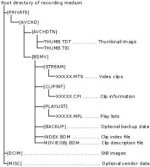
This AVCHD thing has got me beat. I thought I remembered reading in a post several years ago that you had to import the entire PRIVATE folder to get things to work. However, if I plug my SD card into the side of my iMac, go to PRIVATE > AVCHD > BDMV > STREAM, copy the 00000.MTS file to the Desktop and remove the SD card, 00000.MTS (44.5 MB) appears to play perfectly in VLC.
If I then use ClipWrap to rewrap the .MTS to .MOV format for playing in Quicktime, it also seems to play perfectly (with a slight increase in size to 46.5 MB).
Now, the PRIVATE folder which contains the clips has a size of 5,464,674,734 bytes. The size of all the clips inside the STREAM folder is 5,460,510,724 bytes. Thus there are only 4,164,010 bytes of overhead, i.e. 99.92 percent of the data is held in the MTS files.
At the moment the PRIVATE folder contains 338 files, 116 of which are, to me, useful MTS files, and they seem to work okay all by themselves without need of the remaining 222 files. I don't understand why the extra 222 files are there. I don't need to know the complete ins and outs, but for archive purposes why can't I just ditch everything but the MTS files?
SUMMARY
Below is a summary of responses, mostly for my own benefit. I also treat these things as a learning exercise, so I've researched all the obscure terms I didn't know much about (such as MTS) and explained them here as well, again mostly as a summary for me. Maybe someone else will find it useful.
Note, ClipWrap ($50) is mentioned here a few times. There is an alternative free converter: http://media-converter.sourceforge.net. For comments about the two, see https://discussions.apple.com/thread/3131540?start=135&tstart=0
1. When recording in AVCHD mode on a GH1 and GH2, the video and audio content is stored inside the PRIVATE > AVCHD > BDMV > STREAM folder with the suffix .MTS.
2. MTS is a variation of M2TS (MPEG-2 Transport Stream), the container file format used for multiplexing audio, video and other streams on Blu-ray disks.
3. In addition to being a Blu-ray standard, MTS is used in the AVCHD format but with restrictions. Only one video compression format (H.264/MPEG-4) and two audio formats (Dolby Digital: AC-3, and LPCM) are provided. For the GH1/GH2 cameras, audio is encoded only in the AC-3 format at 192kbps (48kHz sample rate, 16-bit depth, compressed).
4. As well as generating an MTS file of the recorded video and audio, the camera generates other files inside the PRIVATE folder associated with the movie clip. None of these extra files are required to play or archive the video and audio content of a clip, except in one case: where a clip exceeds 4GB (a limit imposed by the FAT32 file structure used for the SD cards). If a clip exceeds 4GB, the camera creates a second MTS file that is linked to the first file. The two (or more) linked MTS files are said to be "spanned".
5. Although the additional files are not necessary to play or archive a movie clip (unless spanned), they may contain useful information such as timecodes. The GH1/GH2 do not offer timecodes. Gary Huff explains it this way (http://www.dvxuser.com/V6/showthread...post1986246980). I have slightly edited the following, and other quotes herein:
6. MTS clips (unless spanned) can be renamed and exist as playable, archivable, standalone movie files.
7. MTS clips can be made more widely playable by rewrapping them with ClipWrap to the MOV format. The video is unaltered; the audio is converted from 16-bit to 24-bit, thus the file size will increase slightly.
8. For spanned MTS clips, ClipWrap can seamlessly join them as part of the rewrapping process.
9. Standalone MTS clips can be imported into Premiere CS6 and Final Cut Pro X (but not earlier versions of FCP).
10. Standalone MTS clips can be imported by Pinnacle Studio, PowerDirector, Edius Neo 3 and Vegas.
11. From Pete (http://www.dvxuser.com/V6/showthread...st1986247273):
If I then use ClipWrap to rewrap the .MTS to .MOV format for playing in Quicktime, it also seems to play perfectly (with a slight increase in size to 46.5 MB).
Now, the PRIVATE folder which contains the clips has a size of 5,464,674,734 bytes. The size of all the clips inside the STREAM folder is 5,460,510,724 bytes. Thus there are only 4,164,010 bytes of overhead, i.e. 99.92 percent of the data is held in the MTS files.
At the moment the PRIVATE folder contains 338 files, 116 of which are, to me, useful MTS files, and they seem to work okay all by themselves without need of the remaining 222 files. I don't understand why the extra 222 files are there. I don't need to know the complete ins and outs, but for archive purposes why can't I just ditch everything but the MTS files?
SUMMARY
Below is a summary of responses, mostly for my own benefit. I also treat these things as a learning exercise, so I've researched all the obscure terms I didn't know much about (such as MTS) and explained them here as well, again mostly as a summary for me. Maybe someone else will find it useful.
Note, ClipWrap ($50) is mentioned here a few times. There is an alternative free converter: http://media-converter.sourceforge.net. For comments about the two, see https://discussions.apple.com/thread/3131540?start=135&tstart=0
1. When recording in AVCHD mode on a GH1 and GH2, the video and audio content is stored inside the PRIVATE > AVCHD > BDMV > STREAM folder with the suffix .MTS.
2. MTS is a variation of M2TS (MPEG-2 Transport Stream), the container file format used for multiplexing audio, video and other streams on Blu-ray disks.
3. In addition to being a Blu-ray standard, MTS is used in the AVCHD format but with restrictions. Only one video compression format (H.264/MPEG-4) and two audio formats (Dolby Digital: AC-3, and LPCM) are provided. For the GH1/GH2 cameras, audio is encoded only in the AC-3 format at 192kbps (48kHz sample rate, 16-bit depth, compressed).
4. As well as generating an MTS file of the recorded video and audio, the camera generates other files inside the PRIVATE folder associated with the movie clip. None of these extra files are required to play or archive the video and audio content of a clip, except in one case: where a clip exceeds 4GB (a limit imposed by the FAT32 file structure used for the SD cards). If a clip exceeds 4GB, the camera creates a second MTS file that is linked to the first file. The two (or more) linked MTS files are said to be "spanned".
5. Although the additional files are not necessary to play or archive a movie clip (unless spanned), they may contain useful information such as timecodes. The GH1/GH2 do not offer timecodes. Gary Huff explains it this way (http://www.dvxuser.com/V6/showthread...post1986246980). I have slightly edited the following, and other quotes herein:
The general desire to keep the PRIVATE folder intact is because certain higher-end cameras will record miscellaneous data in the structure. Your GH2 will not (the GH3, on the other hand, with its timecode abilities is a different story). There's no metadata or anything to worry about losing, so feel free to move the files around to your heart's content… With GH2 footage, nothing bad (outside of spanned clips, and even then you lose a frame or two) will happen if you do that.
6. MTS clips (unless spanned) can be renamed and exist as playable, archivable, standalone movie files.
7. MTS clips can be made more widely playable by rewrapping them with ClipWrap to the MOV format. The video is unaltered; the audio is converted from 16-bit to 24-bit, thus the file size will increase slightly.
8. For spanned MTS clips, ClipWrap can seamlessly join them as part of the rewrapping process.
9. Standalone MTS clips can be imported into Premiere CS6 and Final Cut Pro X (but not earlier versions of FCP).
10. Standalone MTS clips can be imported by Pinnacle Studio, PowerDirector, Edius Neo 3 and Vegas.
From Bruce Foreman (http://www.dvxuser.com/V6/showthread...st1986246981):
Pinnacle Studio, PowerDirector, and Edius Neo 3 work just fine with just the MTS files. If your computer has enough CPU horsepower and you're using an NLE that does not need all that extra stuff, like the three I've listed above, the MTS files can be dropped right on the timeline with no transcoding and be edited straightaway… I've been editing AVCHD ever since Canon put the HF100 on the market and I've never had to diddle with anything but the MTS files. You can keep it simple.
From Shenan (http://www.dvxuser.com/V6/showthread...st1986247281):
Vegas handles pure MTS files without the folder structure beautifully. The only limitation that I've run into so far was on interviews where the clip went over the 4GB file limit…
Pinnacle Studio, PowerDirector, and Edius Neo 3 work just fine with just the MTS files. If your computer has enough CPU horsepower and you're using an NLE that does not need all that extra stuff, like the three I've listed above, the MTS files can be dropped right on the timeline with no transcoding and be edited straightaway… I've been editing AVCHD ever since Canon put the HF100 on the market and I've never had to diddle with anything but the MTS files. You can keep it simple.
From Shenan (http://www.dvxuser.com/V6/showthread...st1986247281):
Vegas handles pure MTS files without the folder structure beautifully. The only limitation that I've run into so far was on interviews where the clip went over the 4GB file limit…
11. From Pete (http://www.dvxuser.com/V6/showthread...st1986247273):
You have to be careful when deleting or cutting MTS files. Once the MTS file is gone it is impossible to delete the other directories and files from within the recording device. If you reformat your cards on a regular basis you won't have to worry about those files building up and robbing card space.
Last edited: