AVCHD files

dvxbye

New member
I know how to download the MTS files to Final cut pro via Pro res..and edit it as such.My questions are:
1. Should I store the original MTS files as a back up from the private file under stream folder?
2.When I have finished editing the pro res converted to quick time in final cut.What is my best output if I wanted to use 1080 full HD.

Thanks for your help and infos!
 
you should back up the entire private folder not just the MTS files.

best QT output would be a high bit rate H.264 file but this is also dependant on what your delivery will be. BluRay or web etc.
 
thanks and one last question regarding mts files

if I do back everyyhing up how do you name it as the mts files repeats itself from number 1.Do you name it the same as you name the the pro res converted QT in your timeline so if you called the mts files again it will reconnect to your finalcut project files?
 
Dont rename files in the private folder...

Just make separate new folders for each time you dump the card...
 
thanks and one last question regarding mts files

if I do back everyyhing up how do you name it as the mts files repeats itself from number 1.Do you name it the same as you name the the pro res converted QT in your timeline so if you called the mts files again it will reconnect to your finalcut project files?

If you rename the MTS files you won't be able to do log&transfer again... just do like MadHMC150 said, organize the "private folders" inside a different folder, like card1 card2 card3 (and inside each put the "private" folder for each)

Once you do that, you can transcode the cards in order! the resulting ProRes/AIC file will be in consecutive order, in other words you won't have a problem if they have the same mts name (the number will increase from the last file transcoded)
 
Is anybody but me having problems log and transferring from copied card folders (private folder and all contents) into FCP, but not having problems L&T from the card itself? I have no idea why but I cannot get it to L&T from copied folders, (copied into my external hard disk) from my card. It's very frustrating... could it possibly be because I have set my external Hard disk to be the scratch disk, etc. for all my files? It doesn't seem likely but I'm at a loss about this...Like I said, no problem at all L&T'ing from my SD card.
 
Is anybody but me having problems log and transferring from copied card folders (private folder and all contents) into FCP, but not having problems L&T from the card itself? I have no idea why but I cannot get it to L&T from copied folders, (copied into my external hard disk) from my card. It's very frustrating... could it possibly be because I have set my external Hard disk to be the scratch disk, etc. for all my files? It doesn't seem likely but I'm at a loss about this...Like I said, no problem at all L&T'ing from my SD card.

Once in a while I will get a card that will no longer read in the cameras & FCP. I think MAC's do something to the directory structure (once in while). I recently witnessed my mac switching the 'PRIVATE' folder name to 'private' which may break the link. Macs also add a few hidden files, so that may be the problem some of us are facing. Best way to keep everything the same is to LOCK the card when ingesting. Its kinda retarded but the whole directory structure has to be EXACTLY the same.

I have used Fat32 and MACOS for HD formats, both worked in FCP.
 
I have never experience any directory structure problems, and i never lock the cards (i feels it messes up the switch after so many times)... but I'm not saying it's not possible either!

What OS, QT, FCS version are you using? any plugins? perian codecs?
 
AVCHD reading problem by FCP

AVCHD reading problem by FCP

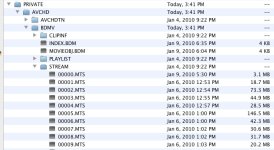
Yes, the external drive is Mac OS Extended Journaled. I've got almost an empty drive, and it all looks 'normal'. Here's a screen shot of my external drive's file structure, including the clips that FCP 7.0.1 can't see. However, all these imported just fine from my SD card.

AVCHD file structure on drive.jpg
 
Yes, the external drive is Mac OS Extended Journaled. I've got almost an empty drive, and it all looks 'normal'. Here's a screen shot of my external drive's file structure, including the clips that FCP 7.0.1 can't see. However, all these imported just fine from my SD card.

View attachment 15006

So when you open FCP, and go to log&transfer and then do what? do you click in the folder icon with the plus sign? and then you browse for the "private" folder and click open? (you Don't have to go to the folder with the mts files)

I'm just checking you're opening the "private" folder and N0T the avchd, bdmv, stream or any other folder!

Sorry if am asking something so simple but have to make sure!
 
*edit* i just checked and AVCHD and also BDMV folders could be added by hitting "open" just Not the stream folder...

I always select the PRIVATE and hit open!
 
Ok. Now I'm the fool. Thanks to Superfresa66. I tried simply opening the PRIVATE folder and this time it worked. I had been diving into the subfolder trying to read the clips themselves... sigh..the odd thing is that it seems to work diving into the folders when I L&T from the SD card...hmmm. Will have to validate that...

You rock. Thanks!
 
Last edited:
Back
Top