Hey all, has anyone had this audio bug in Premiere where channel 2 doesn’t work? If I view the file in P2 viewer everything is fine, but the moment I bring it into premiere it’s mute. I tried transcoding but nothing. I have read that this was a Premiere 2017 bug, and unfortunately that’s what I’m working with currently. Is there a workaround for this? Thank you.

Navigation
Install the app
How to install the app on iOS
Follow along with the video below to see how to install our site as a web app on your home screen.
Note: This feature may not be available in some browsers.
More options
You are using an out of date browser. It may not display this or other websites correctly.
You should upgrade or use an alternative browser.
You should upgrade or use an alternative browser.
AVC Intra 422 and premiere
- Thread starter Newsguy
- Start date
I'm not aware of such a bug, but...
The first thing I would do is check to make sure the channel assignments aren't set in a way that is preventing ch.2 from playing. In the Project panel, right-click on any of the affected clips, select "Modify", then "Audio Channels." If you are working with discrete mono, I would recommend "Clip Channel Format" = "Mono" and then map "Media Source Channels" (on the horizontal axis) to their respective "Clip" (aka audio track) numbers (on the vertical axis)... e.g. For "Clip 1", check "Media Source Channel 1"; For "Clip 2", check "Media Source Channel 2", etc. You just have to remember to modify the audio for clips BEFORE you drop them into a timeline, or they will not be affected in that timeline (if you already have something laid down, just match frame and re-overwrite each clip). One thing that really sucks about new Adobe CC apps is that previous settings, presets, workspaces, etc. often get fungled up.
Good luck!
The first thing I would do is check to make sure the channel assignments aren't set in a way that is preventing ch.2 from playing. In the Project panel, right-click on any of the affected clips, select "Modify", then "Audio Channels." If you are working with discrete mono, I would recommend "Clip Channel Format" = "Mono" and then map "Media Source Channels" (on the horizontal axis) to their respective "Clip" (aka audio track) numbers (on the vertical axis)... e.g. For "Clip 1", check "Media Source Channel 1"; For "Clip 2", check "Media Source Channel 2", etc. You just have to remember to modify the audio for clips BEFORE you drop them into a timeline, or they will not be affected in that timeline (if you already have something laid down, just match frame and re-overwrite each clip). One thing that really sucks about new Adobe CC apps is that previous settings, presets, workspaces, etc. often get fungled up.
Good luck!
Last edited:
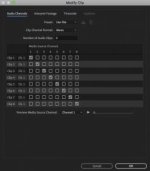
This might help also (see the embedded video in the green box marked "correct answer"):
https://forums.adobe.com/thread/2478268
Just click any solo button, then un-solo... seems to let it playback.
https://forums.adobe.com/thread/2478268
Just click any solo button, then un-solo... seems to let it playback.

To be clear though, anything else that goes in the timeline is fine with audio in every channel. Prores from the LT and anything from other cameras. This is specific to AVC intra and is something that Adobe said was a bug in the 2017 version.
Last edited: