Audio to L/R?

New_Zealand

Veteran
On Vegas Pro 14. we shot some footage and noticed that the audio was only recorded on left channel. Is there a way to turn the audio on the timeline to both L/R? Thanks
 
Asuming it's being displayed on a stereo track, you should be able to right-click the audio on the timeline, select CHANNELS then select LEFT ONLY. That should then only play the audio recorded on the left channel and centre it in the stereo field. I believe when you render it you should get a stereo audio file (but no panning).
 
"I believe when you render it you should get a stereo audio file" - Selecting the left (or right) channel only will place it dead center in the stereo field and will play out of the left and right channels equally..
 
On Vegas Pro 14. we shot some footage and noticed that the audio was only recorded on left channel. Is there a way to turn the audio on the timeline to both L/R? Thanks
Duplicate the audio onto a track below. Then if you want you can use the Pan envelopes to push one left and one right. Not that will make any difference though as all you will be doing is panning a mono recording to L & R. Same effect as Rick R. outlines.

If you want to try to create a fake stereo sound from a mono track and do it at no cost you could use the free Ozone Imager VST plugin. Download from here:
https://freevsts.com/free-izotope-ozone-imager-pc-mac/

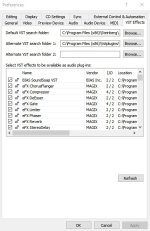
You would need to drop that VST plugin into:C:\Program Files (x86)\Vstplugins\. Then you would need to go into Vegas/Options/Preferences. Then select the VST tab and go to the "Alternate VST Search Folder 1:" option and under the browse button navigate to and select the: C:\Program Files (x86)\Vstplugins\ folder. Finally hit the "Refresh" button and close out of the Prefs window..

Now you should be able to select your mono audio track and then using the plugin button on the track open the plugin window and select the Ozone Imager VST plugin which should now be listed in your VST plugins. On the GUI for that plugin, you will see a vertical slider called "Stereoize". This can create a pseudo-stereo sound field. Experiment and see what you can dial in.

Chris Young

Ozone Imager.jpg
 

Attachments

  • Ozone Imager.jpg
    Ozone Imager.jpg
    49.2 KB · Views: 0
Back
Top