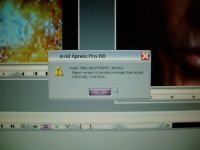
Audio::PMM_INSUFFICIENT_MEDIA

c3kings

Well-known member
Dear all,
I have a bad clip. I can put the cursor on it and see the frame. However, as long as I hit the space to play this clip, it doesn't work and shows the following message:
Audio::PMM_INSUFFICIENT_MEDIA
Player version of duration is longer than actual[4636320](4919040)
Please help!
Thanks.
King
 
Just a guess, but is this an HD clip from an FS-100 with the v3 firmware upgrade? If so, it's a noted problem with the new firmware and Avid software. The FS-100 breaks the files, but Avid seems to be the only NLE that has problems playing them. Focus is aware of the issue, and is apparently working to resolve it. In the meantime, mark an in at the head of the clip, mark an out one frame in from the tail of the clip, and edit into a timeline--or use "6" on your keyboard which should be mapped to "Play In to Out". The clip will play properly then, and you can even consolidate it to make workable media. A crummy workaround, but until a new version of the firmware comes out, that's what's got to happen.
 
cbrougham said:
Just a guess, but is this an HD clip from an FS-100 with the v3 firmware upgrade? If so, it's a noted problem with the new firmware and Avid software. The FS-100 breaks the files, but Avid seems to be the only NLE that has problems playing them. Focus is aware of the issue, and is apparently working to resolve it. In the meantime, mark an in at the head of the clip, mark an out one frame in from the tail of the clip, and edit into a timeline--or use "6" on your keyboard which should be mapped to "Play In to Out". The clip will play properly then, and you can even consolidate it to make workable media. A crummy workaround, but until a new version of the firmware comes out, that's what's got to happen.

Thanks, cbrougham. I am not using Focus, and I apologize that I didn't mention clearly in my first post.

I am just using two 8G P2 cards by hot swapping and immediately offloading the files to a laptop in order to have continuos recording.

By the way, the clip before this bad clip has problem as well. The beginning of this clip is said "Media Offline," but for the rest of the clip, it works perfectly OK.

Yes, both bad clips are the combination of few MXF video files.

Thanks.

King
 
i have the same problem. i also have a similar thread going,
audio problem with fs100. check for what i had to do.
 

Attachments

  • P1010025resize.JPG
    P1010025resize.JPG
    23.5 KB · Views: 0
Letter_Boxed said:
i have the same problem. i also have a similar thread going,
audio problem with fs100. check for what i had to do.
Yes, I have the same error message except the numbers are different. Also, I use P2 cards instead of fs100. Can you solve the problem now?
Thanks.
King
 
c3kings:

Kind of sounds like it has something to do with clip spanning in Avid--or, rather, the apparent lack thereof. Avid (at least Xpress Pro) doesn't seem to make the connection between a master clip and multiple media files when dealing with MXF media, from either a P2 card or something like the Firestore. Ordinarily, if you were capturing a lengthy clip into Avid using the Capture tool, one master clip would be generated, but multiple media files would be created because of the file size limitation (2GB for OMF media--not sure if this exists for MXF or not). The way that Avid looks at P2 media, is that each 2GB media file (due to the FAT32 file size limitation) is it's own master clip. I think that some other NLEs can use the metadata in order to link multiple media files to their parent master clip, but Avid doesn't use the metadata at this time.

Anyway... that's kind of a roundabout way of saying that I think this is the reason you're seeing the "Media Offline" message. Is it on these spanned clips that you're seeing the error message about the audio duration?
 
Back
Top