audio from Mixpre-3 seems echoy

deleuze3

Well-known member
Yeah, I would record directly into the MixPre-3 as part of the troubleshooting process...hear how it sounds.

Here, it sounds like you have duplicate channels over each other. Maybe even 1 frame out-of-sync.

Any post work done to this?

(If you listen to only one side of your headphones, it actually sounds normal.)
 
thanks for your message.
i recorded it in OBS studio in only 1 channel (left or right). Then when i imported it in adobe premiere it was only 1 channel.
So i used adobe audition to split it in 2 channels (i just used the regular copy paste fonction to record the left into the right or the other way around).
Then i import the video and audio in Adobe premiere and i export it to youtube.
 
I don't know Premiere, but I would guess that's 100% the issue. Something is being duplicated incorrectly. Hopefully you'll get it solved ASAP.

P.S. Instead of copying and pasting a second track, try changing some mono/stereo settings on the single/original one you have. If available, the correct setting will send audio to the L/R channels from the one track without having to make a second one.
 
If you don't figure it out, I would record the next one into the recorder. It's so straightforward and sounds amazing. (You have a great one!)

And for a simple video like that, it's just one clap in the beginning to sync it.
 
Thanks for your comments i appreciate
yes i might try to use plural eyes if i need to cut many times or maybe do it manually in premiere.
Do you use plural eyes ? Thanks in advance,
 
I don't, but I think people love it.

I just never stop rolling - but I also rarely record anything over 30 minutes - and then I like to sync the files in post manually and chop it all up as I go.

It can be mentally exhausting and tedious sometimes, but it's also a great brain exercise.
 
By the way, I downloaded a short snippet of your YouTube video and so this is interesting...

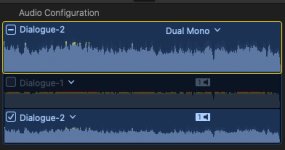
- Your first channel is super echo-ey.
- Your second channel is perfect.

I removed the first one and your audio is much better...both the left and right sides.

You duplicated it incorrectly and that's what is causing the problem.

There is no echo with the first one removed. (In my initial reply, I actually mentioned two different sounding channels over each other.)
 
Yea, maybe that's what you see?

But they are channels. Each one has L/R audio.

You can clearly hear the difference between the two. Toggle back and forth...can you hear it?

___

This is FCP X...I muted the top one. You could even see they are different by the strength of the waveforms.

Audio_Help.jpg
 
Last edited:
BTW, not that you'll need it now, Premiere, unless you're using a pretty old version, has audio sync built in, you don't need PluralEyes.
 
You do really see though, right? (Just want to make sure you get this done.)

Because this fix is so easy...I would have already exported and uploaded the new file on YouTube!
 
BTW, not that you'll need it now, Premiere, unless you're using a pretty old version, has audio sync built in, you don't need PluralEyes.


Likewise FCPX. I gave up on Plural Eyes a few years ago for synching. I have yet to have a problem synching multi cams including multiple 20 minute clips from DSLRS.
 
yes, i'll try to fix it, and i'll post the link too.

I'll try to fix the setup for future video: i'll try for other videos to be almost the whole body on the left of the image over a green screen and i would put the powerpoint in the background. Maybe it will be better.

(What do you mean patrickbaldwin? You have no problem and you don't even use pluraleyes with multicams?)
 
thanks for your message.
i recorded it in OBS studio in only 1 channel (left or right). Then when i imported it in adobe premiere it was only 1 channel.
So i used adobe audition to split it in 2 channels (i just used the regular copy paste fonction to record the left into the right or the other way around).
Then i import the video and audio in Adobe premiere and i export it to youtube.

There is absolutely no need to do this in Audition. As you’ve discovered, copy and paste in order to duplicate audio opens up the risk that you accidentally slide some of the audio out of sync.

Adobe Premiere has a “fill left with right” effect for audio (also a “fill right with left”) if you find you have a single audio channel that’s only playing out of one side of your stereo image. This fixes the issue without the risk of shifting the sound out of sync.
 
Thanks Rick.
I also thought of putting a multiband compression since the audio seems too high and sometimes too low. Would you guys use this for my course?
Thanks in advance,
 
Back
Top