Audio Delay with DVX100a in 24p?

custerc

Well-known member
Sorry for the noob question, it's probably been answered before, but every time I try to search the forum I get an error message.

Anyway, I find there's a weird delay between the sound and the audio when I import footage from my DVX100a to Final Cut. I hear it in the headphones when I'm recording, too, which I understand is normal, but is there some camera setting I have wrong? Why is it still out of sync when imported into final cut? Do I, god forbid, just always have to cut and resync the audio a little (not the end of the world, but a little annoying for such an expensive camera given that I could buy a freakin' Flip and the audio sync wouldn't have issues.
 
Are you sending Firewire video out and using the computer jack? That would cause a sync delay. If you are monitoring video footage on the camera- connect speakers to the camera. Also- please describe more about your system- FCP version, Mac model, etc.

Noah
 
im not sure if this is your problem but...

i remember when i had my DVX100a that in "log and capture"...when i started to play the tape from the beginning...if i clicked "now" right away i would often get an out of sync audio/video import.

if i waited 2-3 seconds after it started playing and then clicked "NOW" then it was fine. as i recall this only was problematic when startiing to import from the very beginning of the tape.

david
www.davidprobst.com
 
The DVX100A actually has no delay in its footage. The DVX100 (the original model) did. The DVX100 records the audio two frames earlier than the video, but that was fixed in the DVX100A. So if you're using a DVX100A, any sync issues should be due to the software you're using, not the camera.
 
Are you sending Firewire video out and using the computer jack? That would cause a sync delay. If you are monitoring video footage on the camera- connect speakers to the camera. Also- please describe more about your system- FCP version, Mac model, etc.

Noah

Sure. It's FCE, actually, version 4.0.1, on a MacBook Pro (10.5.8, 2.5 GHz, 2 GB RAM). I'm using some Panasonic AYDVM63PQ mini DV tapes that people on here recommended. I am sending firewire video out and using the computer jack. So that always causes a delay? Does it degrade the quality of the footage in other ways (it looks interlaced in FC but it shouldn't be if I'm shooting in 24p, right?) What other options are there for getting it onto the computer?

Might as well add: I've also been experiencing this weird issue where sometimes when I try to log and capture it says its capturing, but then stops halfway through and displays the imported clip as 0:00:000, then it won't let me edit it or drag it into the timeline. But then when I rewound and tried capturing again, it worked....

(Also, FYI Noah and Barry, I'm planning to buy your DVD and book/DVD on the DVX100 and FCP once I save up enough, but I have about $12 in my checking account right now after buying the camera, audio gear, headpones, tapes, tripod, etc. etc. etc...)
 
Last edited:
You cannot view video from the camera in sync with the computer head phone jack. If you want to monitor video from the camera, plug headphone or better speakers into the camera and it will be in sync. Has nothing to do with the camera or FCE but simply that the video is playing back through Firewire in the camera which takes a couple of frames to process but you're listening to direct audio from the computer.

Noah
 
You cannot view video from the camera in sync with the computer head phone jack. If you want to monitor video from the camera, plug headphone or better speakers into the camera and it will be in sync. Has nothing to do with the camera or FCE but simply that the video is playing back through Firewire in the camera which takes a couple of frames to process but you're listening to direct audio from the computer.

Noah

No, I'm not trying to monitor it, I'm talking about after I capture it, when it's already in FCE and on the hard drive, and the camera is disconnected....
 
So you're saying video viewed directly on your desktop in FCE with the audio from the computer is out of sync? And this is a DVX100 or A or B? Also FCE doesn't support 24p at all so that could also be your issue.

Noah

Noah
 
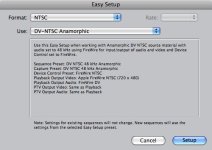
then it's not the camera. Please screen capture your sequence and capture settings- Shift Apple 3. So we can help you.

Noah
 
attached, i think. Far as I can tell this screen is all FCE has got...
 

Attachments

  • screen.jpg
    screen.jpg
    38.8 KB · Views: 0
Back
Top