okay, I'm new here and don't know if there's a problem like this on previous threads. Apologies for possible redundancy! 
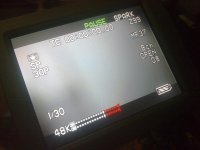
Here it is anyway. I sometimes encounter an audio problem when I start up my DVX100B. The audio levels totally peak and when I check on the headphones, I hear a lot of static. It's totally not advisable to shoot with that audio. The only way to fix it is to hit the reset button or hit the camera/vcr button for preview, then get back to Camera mode. The audio returns to normal, without static and peaking, ready to shoot. I'm using the INT microphone and there's no problem with it. I just don't know how this BUG started and how I could end it. My "fixing" process could slow me down especially when I turn on my camera and need to shoot right away. Thanks for anyone's help.
Here it is anyway. I sometimes encounter an audio problem when I start up my DVX100B. The audio levels totally peak and when I check on the headphones, I hear a lot of static. It's totally not advisable to shoot with that audio. The only way to fix it is to hit the reset button or hit the camera/vcr button for preview, then get back to Camera mode. The audio returns to normal, without static and peaking, ready to shoot. I'm using the INT microphone and there's no problem with it. I just don't know how this BUG started and how I could end it. My "fixing" process could slow me down especially when I turn on my camera and need to shoot right away. Thanks for anyone's help.